What type of hardware are you using: Raspberry Pi 3, 4+ What YunoHost version are you running: 12.0.16 How are you able to access your server: The webadmin Are you in a special context or did you perform specific tweaking on your YunoHost instance ?: No
Describe your issue
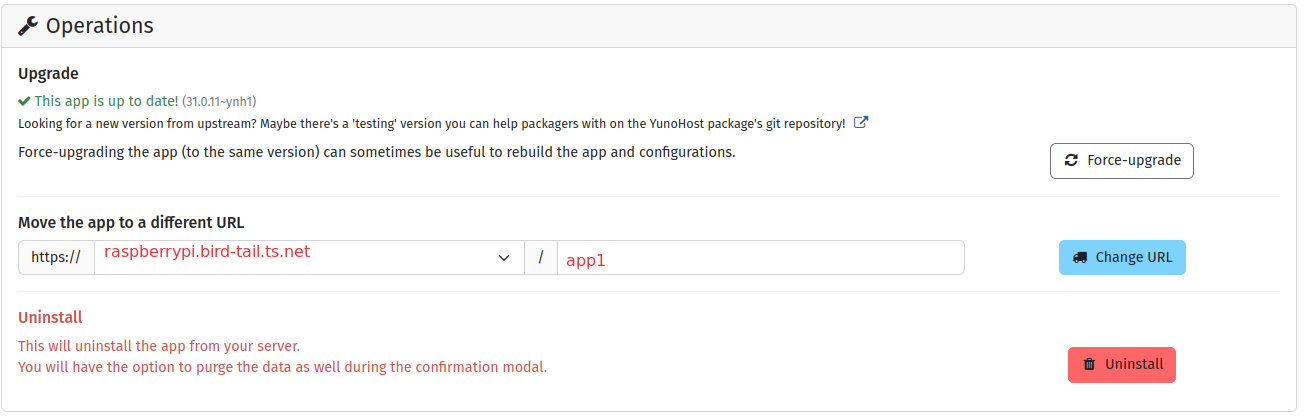
I am connecting to my Yunohost instalation in a home Rasperberry Pi using Tailstcale magicDNS (eg. “raspberrypI[DOT]bird-tail[DOT]ts[DOT]net”). I currenty have 2 apps installed in Yunohost (eg. “app1” and “app2”).
I have added the “raspberrypi[DOT]bird-tail[DOT]ts[DOT]net” domain in Yunohost admin and I can reach it via this tailscale address but I need a way to access directly each of the apps.
I have tried adding a prefix to the subdomain (“app1[DOT]raspberrypi[DOT]bird-tail[DOT]ts[DOT]net” and “app2[DOT]raspberrypi[DOT]bird-tail[DOT]ts[DOT]net”) but I don’t know how to make yunohost redirect these requests to the corresponding apps.
Thanks for reaching out. I have already tried both: #1 is not possible because the apps require to be installed in the domain root (grist and n8n) and I tried #2: the app is apparently moved to that sub-sub-domain but the app is not found afterwards. I am not sure if I need to change something in Yunohost or Tailscale but Tailscale finds Yunohost admin. And if I install one app to the same Tailscale domain (without “app1”) the app does work. But that means I can only have one app running. Bottomline: I think it is a redirecting issue that I need to address in Yunohost.
It seems that ‘‘domain name’’ means ‘‘hostname+tailsdomain.tld’’. So you can reach main domain but no others. Can you set a ‘‘custom’’ DNS in tailscale?
Thanks for the suggestion. Will check it out asap, meawhile, got it working with PiHole (I’ll post the how-to) because I have it already installed and been using it for a few years.
Basically I’ve added a custom nameserver in Tailscale admin pointing to the machine where I had PiHole running (100.x.x.x). Then, in PiHole admin I added Local DNS records (app1.local, app2.local) and pointed them to the IP of the other machine hosting Yunohost (100.x.x.x).
Then, in Yunohost admin / Apps, I’ve chosen to serve each app from the respective local domain (app1.local, app2.local).
Now, using Tailscale, I can reach each Yunohost app and get ad blocking. Each DNS query goes to PiHole, gets blocked for ads, and then checked if it should resolve to a local machine (i.e. the apps installed in Yunohost) or the broader internet.
Great that you could solve it! just be aware that PiHole won’t have updates in Yunohost, and also I don’t know if you managed to use self-signed certs in case you need https, in that case it’s always a good idea to use “.internal” instead of “.local”