I think the command is missing, what exactly do I need to write?
input : php artisan passport:keys 2fauth
output : Could not open input file: artisan
I think the command is missing, what exactly do I need to write?
input : php artisan passport:keys 2fauth
output : Could not open input file: artisan
My default PHP version is older, so I needed to run the php8.3 variant to call the correct PHP version.
This command needs to be run in the 2fauth-directory, ie, in /var/www/2fauth, and I found I needed to run it as 2fauth to prevent the keys from being owned by root (or, of course, chowm them once more):
root@online:/var/www/2fauth# rm storage/oauth-p*
root@online:/var/www/2fauth# php8.3 artisan passport:keys

   INFO  Encryption keys generated successfully.

root@online:/var/www/2fauth# ls -hals storage/oauth-p*
4.0K -rw------- 1 root root 3.3K Jul 12 06:55 storage/oauth-private.key
4.0K -rw-rw---- 1 root root  812 Jul 12 06:55 storage/oauth-public.key
root@online:/var/www/2fauth# rm storage/oauth-p*
root@online:/var/www/2fauth# sudo -u 2fauth php8.3 artisan passport:keys

   INFO  Encryption keys generated successfully.

root@online:/var/www/2fauth# ls -hals storage/oauth-p*
4.0K -rw------- 1 2fauth 2fauth 3.3K Jul 12 06:56 storage/oauth-private.key
4.0K -rw-rw---- 1 2fauth 2fauth  812 Jul 12 06:56 storage/oauth-public.key
This action may resolve mystipsy’s problem with file permissions, though for me it does not resolve the “No account found using this email” error while logging in.
Yes, it got better when the incredible owner changed, thank you very much
Great!
@wbk
I compared your Yunopaste and Mystispy.
They are pretty the sames. This is strange
Is your mail account visible in the 2FAuth database (for example with PhpMyAdmin )?
Good thing to check!
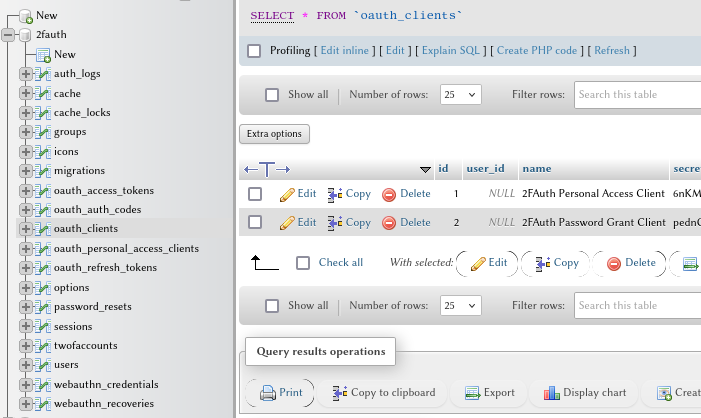
Curiously enough, most of the application tables are empty. The tables that have any records in them are:
From the set on the left (in the picture below), all tables I did not mention are empty. Something peculiar struck me in the result set of the oauth_clients:
user_id is null.
On second try I was able to create a valid user through the insert form:
INSERT INTO `users` (
  `id`
, `oauth_id`
, `oauth_provider`
, `name`
, `email`
, `email_verified_at`
, `password`
, `is_admin`
, `remember_token`
, `created_at`
, `updated_at`
, `last_seen_at`
, `preferences`)
VALUES (
  NULL
, '1'
, '1'
, 'Boudewijn'
, 'wbk@mydomain.tld'
, NULL
, '$2y$10$r45mZlCgEbQ69DMGTpT1Q.xCMjyp5P53kgtkVL/ThOMV7v8KngvXm' --> use a bcrypt hash generator
, '1'
, NULL
, NULL
, '2025-07-12 20:54:44'
, '2025-07-12 20:54:44'
, NULL)
(On first try I inserted a plain text password; 2fauth complained that this user did not have a bcrypt2-encrypted password. I tried updating my password through 2fauth, but domain.tld <> localhost preventing mail from working. I did not look into that but updated the password via the database by pasting the hashed string. After updating the record, I could log in.
@mystispy , after having solved your problem and knowing how to do it, you may, in this special case, want to re-install the application.
I have without hesitating uploaded the installation log, because all identifiable information in these logs is scrambled or replaced. In this case though, I recognize client secrets from the database in the installation log. I am not familiar enough with Laravel to say whether it is a security problem (it does look like an encrypted value, but any non-encrypted string of random values can look encrypted  )
)
The bit that concerns me is at the bottom of the log:
2025-07-11 21:57:16,702: DEBUG -    INFO  Personal access client created successfully.
2025-07-11 21:57:16,702: DEBUG -
2025-07-11 21:57:16,703: DEBUG -   Client ID ................................................................ 1
2025-07-11 21:57:16,703: DEBUG -   Client secret ..................... 6nKM540kGwkmLQngzjGNTTwZrSrc4hHUoaekFqhy
2025-07-11 21:57:16,792: DEBUG -
2025-07-11 21:57:16,792: DEBUG -    INFO  Password grant client created successfully.
2025-07-11 21:57:16,793: DEBUG -
2025-07-11 21:57:16,793: DEBUG -   Client ID ................................................................ 2
2025-07-11 21:57:16,794: DEBUG -   Client secret ..................... pednCjjep7XE6HIb7mz93LC0WFH9lXvhLoParhst
2025-07-11 21:57:16,814: DEBUG - + php8.3 artisan storage:link -n
2025-07-11 21:57:17,175: DEBUG -
2025-07-11 21:57:17,176: DEBUG -    INFO  The [public/storage] link has been connected to [storage/app/public].
2025-07-11 21:57:17,176: DEBUG -
Hi,
it would be fine to update the Yunohost installer , if you encountered problems.
According to this page , you should find logs of installation in storage.log..
Please can you share them in order to understand what went wrong during creation of user?
That’s the thing, the storage/log directory was empty.
It has been populated after manually inserting the user record and trying to log in, which precludes a permission issue.
One thing that comes to mind, is that the users I tested while installing 2fauth have their (sub)domain in another (sub)domain than 2fauth is installed to. With 2fauth claiming its own (sub)domain, there is not really a way around that though.
This topic was automatically closed 15 days after the last reply. New replies are no longer allowed.