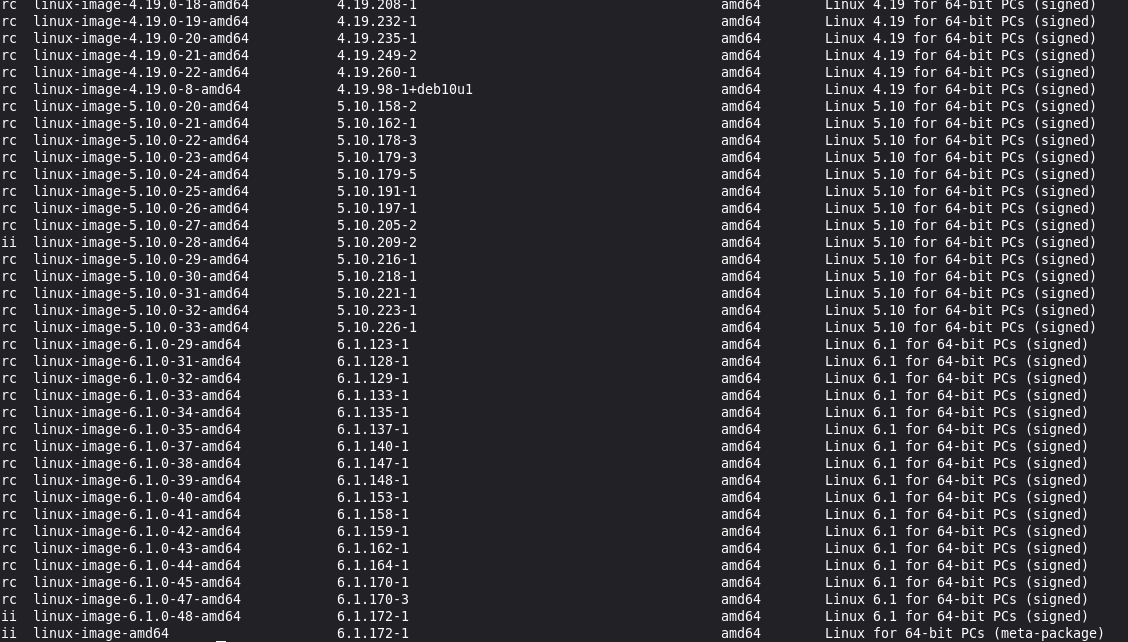
This is the output I am getting for dpkg -l | grep linux-image
This doesn’t show anything at all. It just takes me to the next command prompt.
Could it be related with the host/hypervisor of your VPS ? Are your other ynh servers hosted by the same provider?
My other servers are hosted by a different provider.
I’ve been running the server in question for several years, since Yunohost 11.x. I doubt there is an issue at the VPS provider’s end. How may I check if there is an issue with it?
so there are two kernel actualy installed.
Which one is selected by default at boot ?
this is a grub configuration issue
sudo cat /boot/grub/grub.cfg
this is configured in /etc/grub.d
ls -la /etc/grub.d/
what kernel are set in /boot ?
ls /boot/vmlinuz-* /boot/kernel-*
Maybe in the dashboard or config panel…
to make it simple : there are two kernel installed and provided to grub.
so at boot time a selection is done, either you have an interactive access to your boot and can select the linux kernel or you can’t and it will use the first or defaut one.
the quickest way is to uninstall the 5.x kernel, but this assume there will be no problem with kernel 6.x. I think this is safe.
sudo apt remove linux-image-5.10.0-28-amd64
cross your fingers and reboot …
1 Like
Hmmm, that is a tricky one. I am getting the following warning :
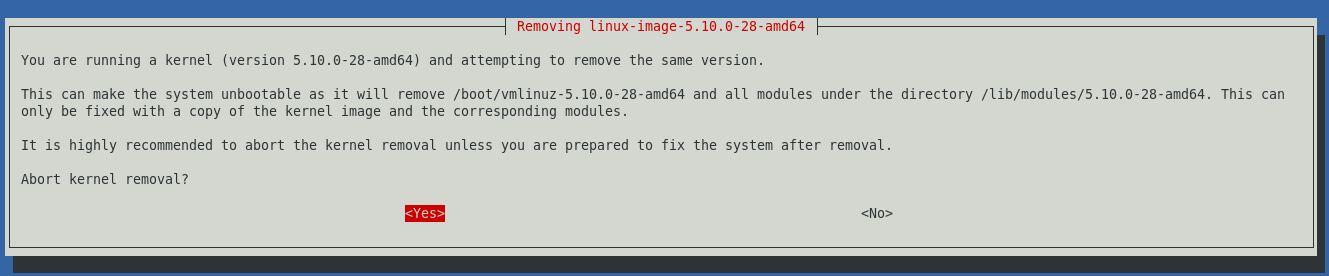
Will it automatically use the next available version of the kernel, or will I need fixing further things manually? I am going to make backups and prepare for the worst before doing this. Thank you very much for guiding me to the root of the issue! 
the other way -better- way to proceed is to edit grub configuration to boot on right system, then once booted remove this unused kernel
i need your grub configuration /boot/grub/grub.cfg if you want me to help ..
topic about kernel selection in grub debian is on Stackexchange :
1 Like
I don’t have a grub.cfg file in that location.
Thanks very much! I’ll take a close look at this and read more on the topic. Will get back soon!
Meanwhile, I got a new kernel update. This is the log : https://paste.yunohost.org/raw/emugezofas
So, I have two different kernel versions, and I am using the outdated one while I continue to get updates to the newer version. I hope I understood this right.
have you tried this command :
run update-grub (or grub-mkconfig > /boot/grub/grub.cfg) as root.
Since you do not have a /boot/grub/grub.cfg I think that create the config for the boot is a good option, no ?
(and guess what : with all the linux images listed, you’ve got many more than 2 different kernel on your server… keeping version 4 seems to be useless, imo)
If grub.cfg is not there then your vm is using some other bootloader. Find out what that is and take it from there I guess?
1 Like
Like LiLo ? Is there a file /etc/lilo.conf
Would you mind telling which provider this VM is hosted on?
Maybe you can find helpful information in their documentation about bootloader and boot process.
1 Like
None of these commands are available in this system. And the configuration files are not there in the locations given in many and various guides and discussions.
There is no grub.cfg file to be found in this system. Right now I cannot afford to do a clean install of Yunohost. I cannot risk uninstalling the old kernel either.
There is no lilo.conf file.
It is 1984hosting.com and I don’t see any helpful pointers in their docs. I am not knowledgeable enough to write the question I need to ask them. Should I ask if they have customized the disk images / iso files they provide for installation in a way that changes the location of grub, bootloader or related components?