[solved] Listmonk: AxiosError: Network Error when login as admin

What app is this about, and its version: listmonk, 6.0.0~ynh1
What YunoHost version are you running: YunoHost 12.1.39 (stable)
What type of hardware are you using: Other ARM board

Describe your issue

After a fresh install, I create the admin user (a user from group admin in yunohost) succesfully.
Then I tried to create a new superadmin in listmonk webui, not in the yunohost admin group.
When I try to login as the newly created superadmin, blank screen with this error: AxiosError: Network Error

I would like to provide some logs, but I wasn’t unable to find something useful.
Share relevant logs or error messages

In Mozilla Dev Tools - Network I see “CORS Missing Allow Origen” error, I add

[server]

cors_allowed_origins = [“*”]

to config.toml, restart the app and same results.

Any hint?

Seems that the proble is single sign on:

x-sso-wat: You’ve just been SSOed

How to disable SSO for Listmonk?

I followed this 3d to create a specific hook and this one to activate it, but still no luck

Finally I solved the problem commenting

access_by_lua_file /usr/share/sowat/access.lua;

in /etc/nginx/conf.d/mydomain.com.conf

But I’m not sure if it is safe…

Hi @makhno
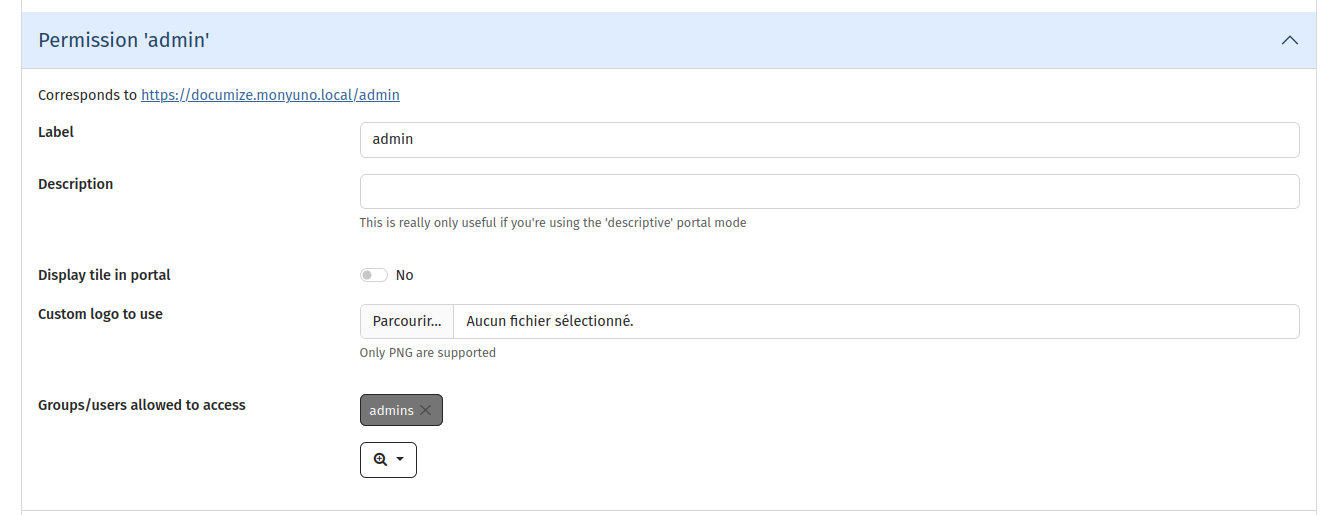
You have to add your superadmin user to yunohost admins group : only them can access the /admin path.

You may have to reinstall listmonk and choose a superadmin that belongs to admins group.

Hello otm33, that’s done, the superadmin is in the admins group in yunohost

Does it work ?
I don’t think it will work afterward. Better reinstall.

You were perfectly right, problem solved with reinstall with correct super admin, thank you.

@admin1 topic can be closed

1 Like