What type of hardware are you using: Raspberry Pi 3, 4+ What YunoHost version are you running: 13.0.5 How are you able to access your server: Direct access via physical keyboard/screen
Describe your issue
Hello and thanks for your time.
My last attempt to update Yunohost succeeds 4 days ago, services are running (faircamp, gotosocial, monitorix, …) but since then I can’t access the server anymore, I’m trapped outside. I’m the only user account, admin.
I did not change any password or anything but the webadmin says the credentials are wrong, even when change IP location (so it does not seems to be related to Fail2Ban)
SSH root attempts says “Permission denied. Please try again later.”
SSO refuses all credentials too
Share relevant logs or error messages
No logs coz i can’t access anything.
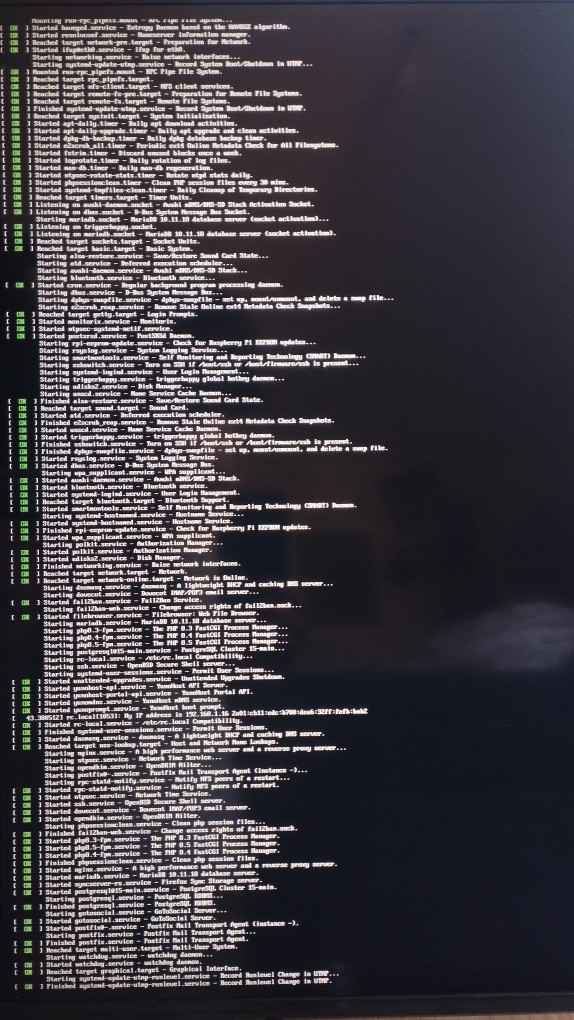
When plugin a screen on the rpi the loading process is all green, no errors:
I don’t know how to perform yunohost diagnosis run as i don’t have access to the server. Also, with screen and keyboard connected to rpi I can do nothing except watching the loading process. I tried F10 and all (ctrl+alt+f2) before loading strats but nothing happens.
Finished systemd-update-utmp-runlevel.service - Record Runlevel Change in UTMP.
I quickly checked the web and didn’t find really helping stuff…
To add another layer of fun I have issues to display the screen right after turning on due to the fact that the only hdmi device I have is a Tizen os tv that goes black screen and loading while searching for signal… Keyboard is responding: typing works while boot session starts and led blinks. But so far I couldn’t prevent booting with keyboard keys…even by pressing all of them at once (ಠ_ಠ)
I’ll get back after I’ve found a proper computer screen to make tests.
EDIT: i can display Yunohost CLI. I’m invited to log-in, which I try (but first had to consider typing password on an azerty responding like a qwerty).
Same problem as the beginning: login incorrect.
I tried all “user” or “root” credentials, I know they are the good ones, well typed and still no, i can’t enter. I feel stupid coz it makes me paranoid: the good password isn’t recognized anymore wtf :’( as if the last update changed it…
MAYBE?: I could have a direct look into the folders by plugin the hard drive on another computer if it can help, but I honestly wouldn’t know where to look \o/
The LDAP service is down, attempt to restart it…
Failed to restart slapd.service: Unit slapd.service not found.
Info: The operation 'Regenerate system configurations 'slapd'' could not be completed.
Full log:
args:
  dry_run: false
  force: false
  list_pending: false
  names:
  - slapd
  with_diff: false
ended_at: 2026-08-13 13:38:38.286419
error: Service slapd is not running but is required to perform this action ... You
  can try to investigate what's happening with 'systemctl status slapd'
interface: cli
operation: regen_conf
parent: null
related_to:
- - configuration
  - slapd
started_at: 2026-08-13 13:37:51.071450
started_by: root
success: false
yunohost_version: 12.1.40.1

============

2026-08-13 14:37:52,251: DEBUG - initializing root ldap interface
2026-08-13 14:38:10,262: WARNING - The LDAP service is down, attempt to restart it…


REDACTED
That sounds like a difficult recovery situation, especially when the services still appear to be running normally. Since the local boot process is clean but webadmin, SSH, and SSO all reject the account, the diagnosis output and authentication logs should help distinguish a password issue from a broader account or configuration problem. Can you share the output of yunohost diagnosis run from the local console, and check whether the admin account is still present?
 ‿
‿
