Roundcube update Version 1.6.15~ynh1 → 1.7.2~ynh1 lost all my e-mails

What app is this about, and its version: Roundcube update Version 1.6.15~ynh1 → 1.7.2~ynh1
What YunoHost version are you running: 12.1.40.1
What type of hardware are you using: Raspberry Pi 0, 1 or 2

Describe your issue

:uk: Hello everybody,

Two days ago, I updated Roundcube from Version 1.6.15~ynh1 to 1.7.2~ynh1.
I was warned that my address book would be lost, but my e-mails should have been saved.
But there are no e-mails in any of the folders (my folders have been kept but emptied).
There are no received mails during the last two days either.
Can you please help me fix that ?

:fr: Bonjour à tous,

Voilà deux jours, j’ai mis à jour Roundcube de la Version 1.6.15~ynh1 à la 1.7.2~ynh1.
J’ai eu une mise en garde disant que j’allais perdre les adresses précédemment collectées, mais mes courriels auraient dû être conservés.
Mais il n’y a plus aucun courriel dans mes dossiers (l’arborescence des dossiers a été conservée, mais tous les dossiers sont vides).
Je n’au aucun courriel dans ma boîte de réception durant ces deux derniers jours non plus.
Pouvez-vous m’aider à réparer tout ça, SVP ?

Share relevant logs or error messages

No error message displayed.

Could you try running

sudo yunohost app shell roundcube
php8.5 ./bin/install-jsdeps.sh -v

as suggested here: Upgrade to 1.7.2 - Missing jquery.min.js · Issue #278 · YunoHost-Apps/roundcube_ynh · GitHub

I don’t think roundcube deleted anything, I think it’s not loading properly.

Thank you @orhtej2 !

Is there a terminal included in the SSO interface, or should I use SSH ?

You need to use SSH, such option is not (yet) in the web admin

OK. Thanks ! :grinning_face:

In a terminal, I connected to my server as admin via SSH. I copy-pasted, what you advised.
There was no error message displayed, but I didn’t recover my e-mails. I restarted my server. Same deal. No e-mails.

Thank you nonetheless @orhtej2 !

If you inspect network log in developer tools in your browser - are there any errors?

What if you try a different webmail like YunoHost app store | SnappyMail ?

1 Like

You mean MySite.tld/yunohost/admin/#/tools/logs ?
I searched for “Network” and “Réseau” (my Yunohost is in french), to no avail.

Will Snappymail use the same e-mail database as Roundcube ?

Yes, Snappymail queries the central e-mail stack, just as Roundcube

No, in the web browser right click on page and select ‘Inspect’, navigate to Network tab and refresh the page.

OK. I think I get it.
In my Roundcube webmail interface, I right-clicked on page and selected ‘Inspect’, navigated to Network tab and refreshed the page.
I had one error with jquerry.min.js : NS_ERROR_CORRUPTED_CONTENT

This reminds me of the issue related to the php version used when running part of an update script called during the upgrade process. I made a PR but right now, reaching GH is just a nightmare because of my connection.

If I try SnappyMail, will I be able to delete SnappyMail or Roundcube without deleting my “central e-mail stack” ?

The e-mail stack is independent of any apps installed from the catalogue.

In fact you can even check your mail with desktop client (like Thunderbird) without any additional tweaking to the default configuration.

I installed SnappyMail. It just works. All e-mails are here.
If my other users like it, I will unsinstall Roundcube.

Meanwhile, solutions about the empty Rouncube may be of interest.

Thanks @orhtej2 !

You can uninstall and reinstall roundcube (make backup first), no dataloss should occur

Good idea ! I’ll try that when I am back on the server LAN.

Salut,

Pensez aussi à faire une sauvegarde de vos mails, avant la mise à jour de Roundcube.

Via l’interface admin.
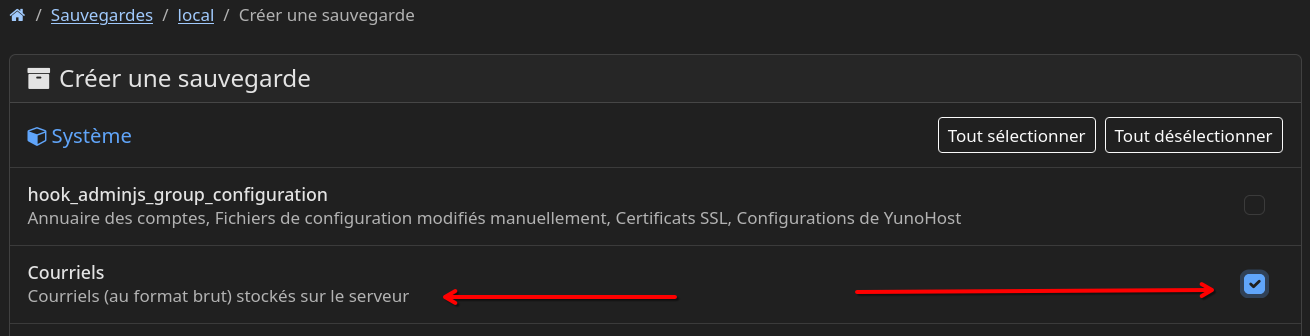
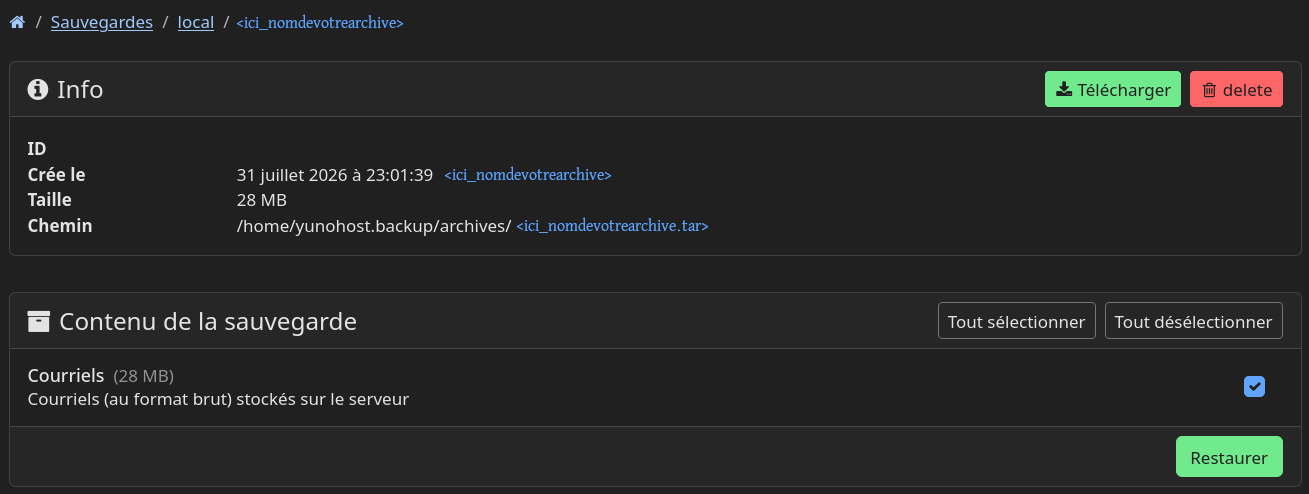
Voici un exemple que j’ai fait pour vous montrer.

Sauvegarde :

Restauration :

Sinon, via SSH :
Sauvegarde des mails.

yunohost backup create --system data_mail

Restauration des mails.

yunohost backup restore <ici_nomdevotrearchive>

Après la mise à jour de Roundcube, faites une restauration de vos mails, ça devrait résoudre le problème. Cette solution m’a permis de résoudre le même souci que le vôtre.

Bonjour @JfmbLinux ,

:fr: J’ai suivi vos conseils (sauvegarde puis restauration des courriels au format brut) sans succès : aucun courriel n’est réapparu.

Merci pour votre conseil et le temps que vous y avez passé !

Bonne journée !

:uk: I followed your advice (backup and restoration of the e-mails in a raw format) but failed : no e-mail reappeared.

Thank you for your advice and the time you spent on it !

Have a nice day !