Bonjour,
Je viens de faire l’installation de “smartmontools”.
Sachant que j’ai 2 DD (1 pour le système et le applis et l’autre pour les données), voici les résultats :
SDA : (Je pense qu’il va falloir que je change de disque)
SMART Attributes Data Structure revision number: 1
Vendor Specific SMART Attributes with Thresholds:
ID# ATTRIBUTE_NAME FLAG VALUE WORST THRESH TYPE UPDATED WHEN_FAILED RAW_VALUE
5 Reallocated_Sector_Ct 0x0033 087 087 010 Pre-fail Always - 66
9 Power_On_Hours 0x0032 092 092 000 Old_age Always - 36135
12 Power_Cycle_Count 0x0032 099 099 000 Old_age Always - 184
177 Wear_Leveling_Count 0x0013 098 098 000 Pre-fail Always - 30
179 Used_Rsvd_Blk_Cnt_Tot 0x0013 087 087 010 Pre-fail Always - 66
181 Program_Fail_Cnt_Total 0x0032 100 100 010 Old_age Always - 0
182 Erase_Fail_Count_Total 0x0032 100 100 010 Old_age Always - 0
183 Runtime_Bad_Block 0x0013 087 087 010 Pre-fail Always - 66
187 Uncorrectable_Error_Cnt 0x0032 099 099 000 Old_age Always - 61
190 Airflow_Temperature_Cel 0x0032 056 038 000 Old_age Always - 44
195 ECC_Error_Rate 0x001a 199 199 000 Old_age Always - 61
199 CRC_Error_Count 0x003e 100 100 000 Old_age Always - 0
235 POR_Recovery_Count 0x0012 099 099 000 Old_age Always - 60
241 Total_LBAs_Written 0x0032 099 099 000 Old_age Always - 14348600712
Error 61 occurred at disk power-on lifetime: 24495 hours (1020 days + 15 hours)
When the command that caused the error occurred, the device was active or idle.
After command completion occurred, registers were:
ER ST SC SN CL CH DH
40 51 60 48 cc 1d 40 Error: UNC at LBA = 0x001dcc48 = 1952840
Commands leading to the command that caused the error were:
CR FR SC SN CL CH DH DC Powered_Up_Time Command/Feature_Name
60 08 60 48 cc 1d 40 0c 04:11:09.748 READ FPDMA QUEUED
ef 10 03 00 00 00 40 0d 04:11:09.748 SET FEATURES [Enable SATA feature]
47 00 01 30 03 00 40 0d 04:11:09.748 READ LOG DMA EXT
47 00 01 30 00 00 40 0d 04:11:09.748 READ LOG DMA EXT
47 00 01 00 00 00 40 0d 04:11:09.748 READ LOG DMA EXT
Error 60 occurred at disk power-on lifetime: 24495 hours (1020 days + 15 hours)
When the command that caused the error occurred, the device was active or idle.
After command completion occurred, registers were:
ER ST SC SN CL CH DH
40 51 68 48 cc 1d 40 Error: UNC at LBA = 0x001dcc48 = 1952840
Commands leading to the command that caused the error were:
CR FR SC SN CL CH DH DC Powered_Up_Time Command/Feature_Name
60 08 68 48 cc 1d 40 0d 04:11:09.510 READ FPDMA QUEUED
ef 10 03 00 00 00 40 0b 04:11:09.510 SET FEATURES [Enable SATA feature]
47 00 01 30 03 00 40 0b 04:11:09.510 READ LOG DMA EXT
47 00 01 30 00 00 40 0b 04:11:09.510 READ LOG DMA EXT
47 00 01 00 00 00 40 0b 04:11:09.510 READ LOG DMA EXT
Error 59 occurred at disk power-on lifetime: 24495 hours (1020 days + 15 hours)
When the command that caused the error occurred, the device was active or idle.
After command completion occurred, registers were:
ER ST SC SN CL CH DH
40 51 58 48 cc 1d 40 Error: UNC at LBA = 0x001dcc48 = 1952840
Commands leading to the command that caused the error were:
CR FR SC SN CL CH DH DC Powered_Up_Time Command/Feature_Name
60 08 58 48 cc 1d 40 0b 04:11:09.276 READ FPDMA QUEUED
60 08 50 40 cc 1d 40 0a 04:11:09.276 READ FPDMA QUEUED
60 08 48 38 cc 1d 40 09 04:11:09.276 READ FPDMA QUEUED
60 08 40 30 cc 1d 40 08 04:11:09.276 READ FPDMA QUEUED
60 08 38 28 cc 1d 40 07 04:11:09.276 READ FPDMA QUEUED
Error 58 occurred at disk power-on lifetime: 24494 hours (1020 days + 14 hours)
When the command that caused the error occurred, the device was active or idle.
After command completion occurred, registers were:
ER ST SC SN CL CH DH
40 51 48 88 d2 1d 40 Error: UNC at LBA = 0x001dd288 = 1954440
Commands leading to the command that caused the error were:
CR FR SC SN CL CH DH DC Powered_Up_Time Command/Feature_Name
60 08 48 88 d2 1d 40 09 03:51:49.995 READ FPDMA QUEUED
ef 10 03 00 00 00 40 12 03:51:49.995 SET FEATURES [Enable SATA feature]
47 00 01 30 03 00 40 12 03:51:49.995 READ LOG DMA EXT
47 00 01 30 00 00 40 12 03:51:49.995 READ LOG DMA EXT
47 00 01 00 00 00 40 12 03:51:49.995 READ LOG DMA EXT
Error 57 occurred at disk power-on lifetime: 24494 hours (1020 days + 14 hours)
When the command that caused the error occurred, the device was active or idle.
After command completion occurred, registers were:
ER ST SC SN CL CH DH
40 51 90 88 d2 1d 40 Error: UNC at LBA = 0x001dd288 = 1954440
Commands leading to the command that caused the error were:
CR FR SC SN CL CH DH DC Powered_Up_Time Command/Feature_Name
60 08 90 88 d2 1d 40 12 03:51:49.768 READ FPDMA QUEUED
ef 10 03 00 00 00 40 0f 03:51:49.768 SET FEATURES [Enable SATA feature]
47 00 01 30 03 00 40 0f 03:51:49.768 READ LOG DMA EXT
47 00 01 30 00 00 40 0f 03:51:49.768 READ LOG DMA EXT
47 00 01 00 00 00 40 0f 03:51:49.768 READ LOG DMA EXT
SMART Self-test log structure revision number 1
No self-tests have been logged. [To run self-tests, use: smartctl -t]
SMART Selective self-test log data structure revision number 1
SPAN MIN_LBA MAX_LBA CURRENT_TEST_STATUS
1 0 0 Not_testing
2 0 0 Not_testing
3 0 0 Not_testing
4 0 0 Not_testing
5 0 0 Not_testing
256 0 65535 Read_scanning was never started
Selective self-test flags (0x0):
After scanning selected spans, do NOT read-scan remainder of disk.
If Selective self-test is pending on power-up, resume after 0 minute delay.
SDB : (Ok pour moi)
SMART Attributes Data Structure revision number: 1
Vendor Specific SMART Attributes with Thresholds:
ID# ATTRIBUTE_NAME FLAG VALUE WORST THRESH TYPE UPDATED WHEN_FAILED RAW_VALUE
5 Reallocated_Sector_Ct 0x0033 100 100 010 Pre-fail Always - 0
9 Power_On_Hours 0x0032 094 094 000 Old_age Always - 25952
12 Power_Cycle_Count 0x0032 099 099 000 Old_age Always - 106
177 Wear_Leveling_Count 0x0013 098 098 000 Pre-fail Always - 11
179 Used_Rsvd_Blk_Cnt_Tot 0x0013 100 100 010 Pre-fail Always - 0
181 Program_Fail_Cnt_Total 0x0032 100 100 010 Old_age Always - 0
182 Erase_Fail_Count_Total 0x0032 100 100 010 Old_age Always - 0
183 Runtime_Bad_Block 0x0013 100 100 010 Pre-fail Always - 0
187 Uncorrectable_Error_Cnt 0x0032 100 100 000 Old_age Always - 0
190 Airflow_Temperature_Cel 0x0032 061 032 000 Old_age Always - 39
195 ECC_Error_Rate 0x001a 200 200 000 Old_age Always - 0
199 CRC_Error_Count 0x003e 013 013 000 Old_age Always - 87227
235 POR_Recovery_Count 0x0012 099 099 000 Old_age Always - 80
241 Total_LBAs_Written 0x0032 099 099 000 Old_age Always - 27449506872
SMART Error Log Version: 1
No Errors Logged
SMART Self-test log structure revision number 1
No self-tests have been logged. [To run self-tests, use: smartctl -t]
SMART Selective self-test log data structure revision number 1
SPAN MIN_LBA MAX_LBA CURRENT_TEST_STATUS
1 0 0 Not_testing
2 0 0 Not_testing
3 0 0 Not_testing
4 0 0 Not_testing
5 0 0 Not_testing
256 0 65535 Read_scanning was never started
Selective self-test flags (0x0):
After scanning selected spans, do NOT read-scan remainder of disk.
If Selective self-test is pending on power-up, resume after 0 minute delay.
Qu’en pensez-vous ?
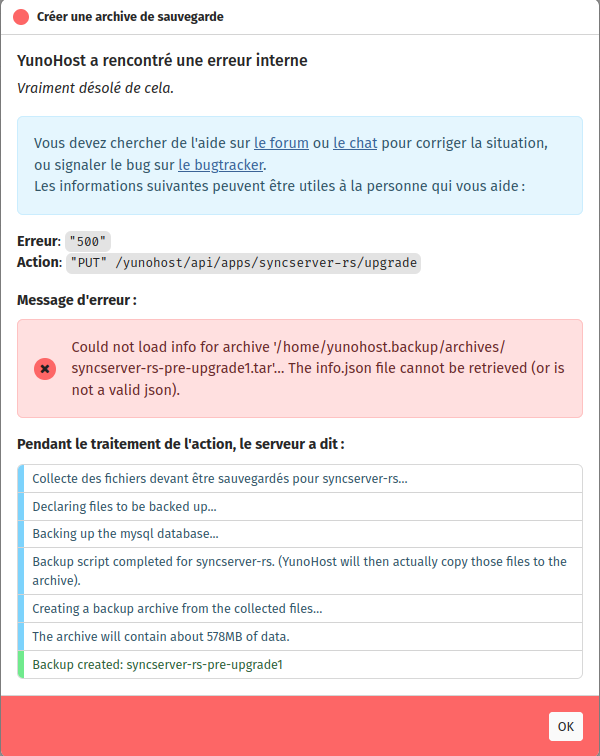
Si je dois changer le disque système, vaut-il mieux que je refasse une installation de yunohost, tout en sachant que je ne vais pas pouvoir récupérer les données de l’ancien disque car la sauvegarde n’est pas bonne ?
Est-ce que je peux faire un clone du disque à changer sur un DD neuf, pour recupérer toutes mes données et essayer de réinstaller les applications qui ne veulent pas se réinstaller ?