What type of hardware are you using: Old laptop or computer What YunoHost version are you running: 12.1.14 stable How are you able to access your server: The webadmin Are you in a special context or did you perform specific tweaking on your YunoHost instance ?: No
Describe your issue
I believe this is an issue with YNH rather than Immich but I may be wrong so apols if I raised it in the wrong location. Many thanks for the product and all the excellent support I have received, it is appreciated.
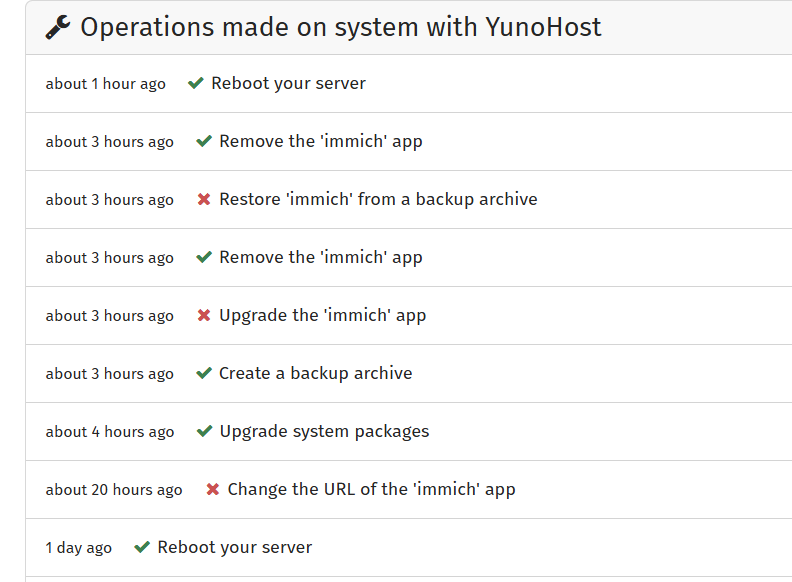
I have a new URL to host my Immich app, so I tried to simply move the URL through the YNH admin interface. I have done this before with no problems but this time it failed. Please see attached log. I can’t see the problem. Any advice would be welcomed. Thanks, Neil.
Can you try to add a higher timeout value with the following command sudo sed -i "/ynh_systemctl/s/\"$/ \--timeout=900/" /etc/yunohost/apps/immich/scripts/change_url and retry ?
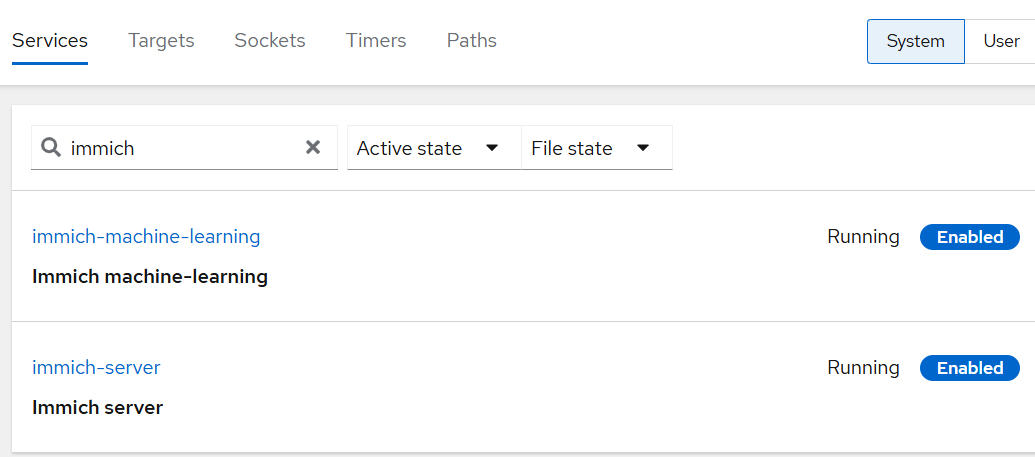
What’s the current status of the two services (before changing path/domain)?
Ps: in your second attemp the both services failed and not in the first one
Apols if I am missing the point. When you say service I presume you mean the Immich service on theold URL and accessing the new URL. Both seem to be working fine. The old URL Immich service is OK from both my desktop and my Android phone. The new URL is accessible and displays the other three apps I have ported to the dynu.com service. If I am missing the point please advise. Cheers.
I just thought, there is one difference, the old domain is a normal URL in it’s own right, the new one is just a sub-domain of a sungle URL with three other apps on a further three sub-domains. Not sure if that makes a difference.
Ahhh. I think you may mean the Immich services (thumbnail generation etc.). These used to work OK but I have checked and just tried to run the jobs and these still seem OK.
And here is the output from the command you suggested:-
immich-server.service - Immich server
Loaded: loaded (/etc/systemd/system/immich-server.service; enabled; preset: enabled)
Active: active (running) since Fri 2025-08-22 11:54:11 BST; 4h 32min ago
Docs: GitHub - immich-app/immich: High performance self-hosted photo and video management solution.
Main PID: 739 (immich)
Tasks: 23 (limit: 8185)
Memory: 2.3G
CPU: 19min 8.864s
CGroup: /system.slice/immich-server.service
├─ 739 immich
└─1855 immich-api
Aug 22 11:54:11 yunohost systemd[1]: Started immich-server.service - I
immich-machine-learning.service - Immich machine-learning
Loaded: loaded (/etc/systemd/system/immich-machine-learning.service; enabled; preset: enabled)
Active: active (running) since Fri 2025-08-22 11:54:11 BST; 4h 34min ago
Docs: GitHub - immich-app/immich: High performance self-hosted photo and video management solution.
Main PID: 736 (gunicorn)
Tasks: 9 (limit: 8185)
Memory: 968.6M
CPU: 21min 4.209s
CGroup: /system.slice/immich-machine-learning.service
├─ 736 /var/www/immich/app/machine-learning/venv/bin/python3 /var/www/immich/app/machine-learning/venv/bin/gunicorn immi>
└─4264 /var/www/immich/app/machine-learning/venv/bin/python3 /var/www/immich/app/machine-learning/venv/bin/gunicorn immi>
Aug 22 11:54:11 yunohost systemd[1]: Started immich-machine-learning.service - Immich machine-learning.
OOh nooo. It just got a lot worse… I was running an older server version of ImmichV1.132.3, so I thought perhaps if I upgraded it that would help the URl port. Unfortunately it failed to upgrade it and then failed to restore Immich from its new backup. Now I have no Immich server app installed. The logs seem to be pretty empty too. See below. What did I do wrong? Is my issue more endemic that the URL change issue. Should I do a full clean install of Immich on the new URL? Are there any leftover files or directories to clear out first or any you would like to see?
Thanks, Neil
The problem seems to be that the expected Immich Server is listening is never reported / logged in immich-server.log hence the timeout seems to always trigger. I don’t know what changed. Might be a side effect of Yunohost v12.1 as this is the only major difference I can think of.
@ tzb6js
I am sorry you have the problem (as well) but at least this shows that the error seems to be not isolated to my machine.
You can work with the backup - although it is something of a hassle. Steps to proceed
Copy the immich backup to e.g. ~/ using sudo cp /home/yunohost.backup/archives/immich-backup1.tar.gz ~/immich-backup1.tar.gz
Rename the original backup e.g. immich-backup1.tar.gz to immich-backup1_orig.tar.gz
Go to ~/immichbackup using cd ~/immichbackup
Extract the ~/immich-backup1.tar.gz to the current subfolder e.g. ~/immichbackup: tar -xzf ~/immich-backup1.tar.gz
Modify ~/immichbackup/app/immich/settings/scripts/restore and remove the --wait_until="Immich Server is listening" and possibly the timeout=900 parameters in line ~98 using sudo nano apps/immich/settings/scripts/restore
Re-tar the file, ensure that root owns all the files in the tar into the file ~/immich-upgrade2.tar.gz sudo tar --format=gnu --numeric-owner --owner=0 --group=0 -czf ~/immich-upgrade2.tar.gz .
move the new tar.gz file to the original location (and name) using sudo mv ~/immich-upgrade2.tar.gz /home/yunohost.backup/archives/immich-upgrade1.tar.gz
Please note that immich-backup1.tar.gz is the name of your backup file located in yunohost.backup. Also note that I typed those example commands, they may contain typos for the exact file locations. Please check beforehand.
Andy, many,many thanks for this update! It’s good to know it’s not just me being dumb again. Also thanks for the recovery instructions but sadly … being impatient … I already took the nuclear option and installed the latest version of Immich on my new URL. It seems to have worked OK and is now chunderring through all the indexing again !
At least I now know that the only fix to this problem is a bug fix (or two) for Yunohost itself.
Did you change the verbosity of the log either in the logging settings from the app (/admin/system-settings?isOpen=logging) or in the env file ? (It should be configured to “LOG”)