What type of hardware are you using: Old laptop or computer
What YunoHost version are you running: 12.1.40.1 (stable)
How are you able to access your server: The webadmin
SSH
Direct access via physical keyboard/screen
Are you in a special context or did you perform specific tweaking on your YunoHost instance ?: Select while setup only local network no internet or per vpn if this is relevant.
Describe your issue
The self diagnostics say I have no Internet…
I read on the documentaition thats mendory that I open the http and https port on my router did it after that my router says I have connection ping brings me results and curl say I have no connection after all… Also give them per Router the ability to portforward self so they can open and close ports itself.
Also Yuno Host say that.
I have an Pihole on an RP4 in my network and gives the urls “yunohost .org” and “app/yunohost.org” free.
Its have as dns an dnscrypt-proxy configured if somewhat relevant.
My Machine specs:
Intel Core i5-6400
32 gb ram
Graficcard: GTX 750
all on an old Lenovo Motherboard named Thinkmaschine.
How do I fix that?
That I get Apps and my System are connected to the internet but not reachable from outside my homenetwork?
Share relevant logs or error messages
From my machine Translated after that:
Alles sieht OK aus für Grundsystem!
Alles sieht OK aus für Grundsystem!
1 erhebliche(s) Problem(e) in Verbindung mit Internetkonnektivität gefunden!
Kann Diagnose für DNS-Einträge nicht ausführen während wichtige Probleme zu Internetkonnektivität noch nicht behoben sind.
Kann Diagnose für Geöffnete Ports nicht ausführen während wichtige Probleme zu Internetkonnektivität noch nicht behoben sind.
Kann Diagnose für Web nicht ausführen während wichtige Probleme zu Internetkonnektivität noch nicht behoben sind.
Kann Diagnose für E-Mail nicht ausführen während wichtige Probleme zu Internetkonnektivität noch nicht behoben sind.
Everything looks OK for Services status check!
Everything looks OK for System resources!
Everything looks OK for System configurations!
Everything looks OK for Applications!
Translated:
Everything looks OK for the base system!
Everything looks OK for the base system!
1 significant issue(s) related to Internet connectivity found!
Cannot run the DNS entries diagnostic while critical Internet connectivity issues remain unresolved.
Cannot run the Open Ports diagnostic while critical Internet connectivity issues remain unresolved.
Cannot run the Web diagnostic while critical Internet connectivity issues remain unresolved…
Also that error:
Der default App-Katalog kann nicht heruntergeladen werden: Konnte keine Verbindung zu https:// app.yunohost .org/default/v3/apps.json herstellen… vielleicht ist der Dienst ausgefallen, oder Sie sind nicht richtig mit dem Internet in IPv4/IPv6 verbunden.
Translated:
The default app catalog cannot be downloaded: Unable to connect to https:// app.yunohost .org/default/v3/apps.json… The service may be down, or you may not be properly connected to the Internet via IPv4/IPv6.
On the server - are you able to curl https://ipv4.yunohost.org? Does it show a reasonable IP (one assigned to your router?)
Are you forwarding the relevant ports - namely 80, 443 and possibly 465 and 993 on TCP/IP (not UDP) to your YunoHost box?
curl: (6) Could not resolve host: ipv4. yunohost. org
yeah that I have make free on the router like you said 80, 443
On my Router the IP4 and IP6 are not open maybe do it have to do something with that?
I cant sare the picture because I am new…
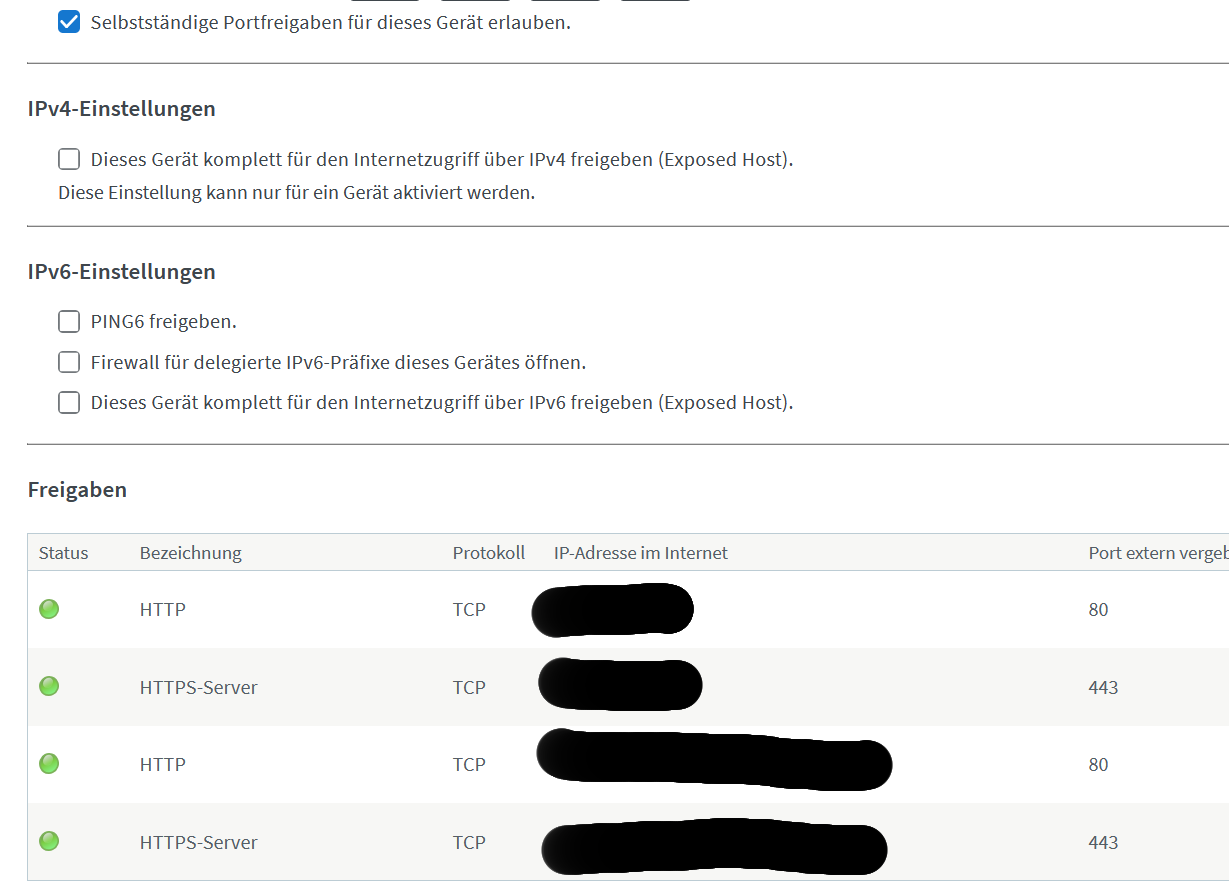
On the Picture you can see:
the ip4 settings that are disabled because If I open that I expose the ip4 to the internet.
on the IPv6 you can see:
PING6 option that are disabled.
Firewall for IPv6 Präfixes are disabled
IPv6 to the internet exposen what are disabled
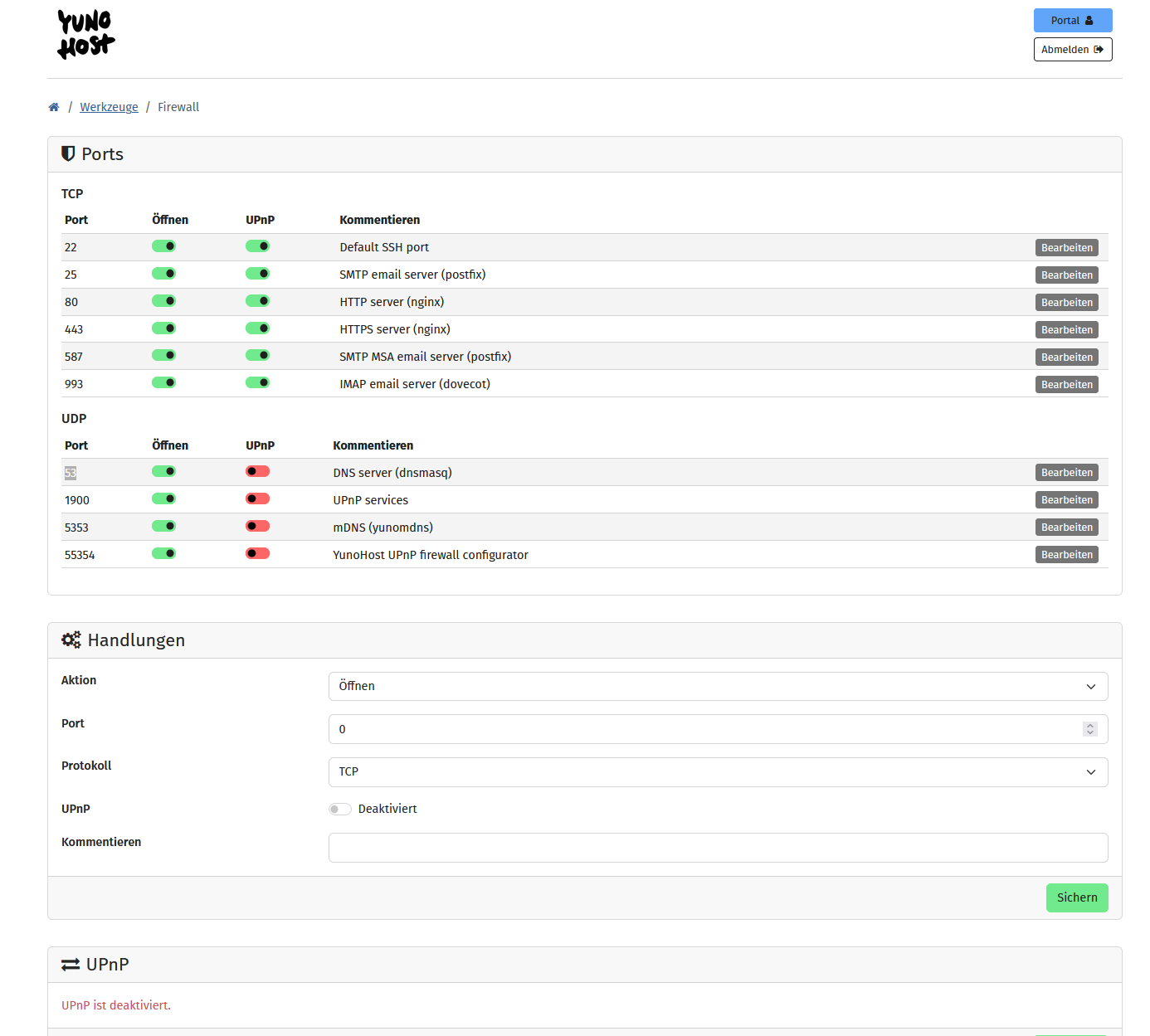
On the webpannel from yunohost all is open exepct some UDP ports and UPnP are disabled.
Thanks for helping ^^
You should be able to share images now.
So, as I understand it, you cannot reach the internet from your box. Until this is fixed the issues with connectivity reported by YunoHost naturally won’t go away.
I have no further insight as I don’t really know why your internet connectivity is broken in the first place 
My Guess was that maybe the preconfiguration I piced was fals:
The Options are:
online
online via vpn
not online homeserver / testserver ← I piced that.
my Internet workes I write you from my pc connected via router to pihole to dnscrypt-proxy to mullwad and an other dns provder and you can see it works.
And also should work for my Homeserver.
All other devices also works I dont know why it dont work.
Reinstalled 3 times yuno host maybe I must pic the vpn option instad… 
and do it the last time hoped I must dont do it again meeep.
Just readed yesterday on the wiki:
Dont reinstall yunohost everytime problems apear because its esayer…
I dont want to but If I see only that option and nothing else works I shoose that option to do so…
I got a liddel bit wider but the reinstall havnt changed anything…
I needed to restart the API per systemctl start yunohost-api
And then I needed to point in the /etc/dnsmasq.d/upstream.conf and changed there the the dns resolver to my pihole one now I get an connection.
Yaay but know I need to get the ports free for connection from outside. If i want that.
I done this with the commands:
systemctl start yunohost-api
for starting the service
sudo bash -c ‘echo -e “server=YOURDNSSERVER\nserver=YOURDNSSERVER” > /etc/dnsmasq.d/upstream.conf’
for changing the DNS Resolver to my Pihole ones
and this
sudo ln -sf /run/resolvconf/resolv.conf /etc/resolv.conf
to link them
and restarting then them with
sudo systemctl restart dnsmasq
know I get an connection yaay.
The pi-hole package is unmaintained and has many documented issues
I think you should use the adguard home package instead: YunoHost app store | AdGuard Home
Pihole is on my Rasbbery Pi and not on the YunoHost Homeserver.
But thanks.