Directory Lister is the easiest way to expose the contents of any web-accessible folder for browsing and sharing. With a zero configuration, drag-and-drop installation you’ll be up and running in less than a minute.
It seems that default configuration is not ideal, as data is located at /var/www/directorylister/ with permissions only given to the directorylister user.
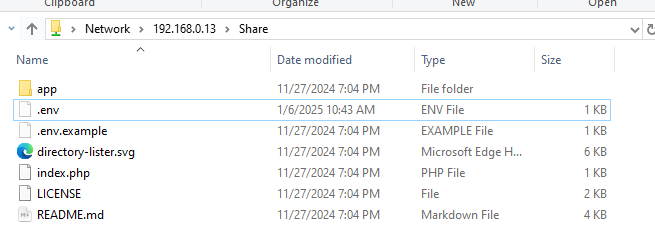
As root a ls -alh gives :
drwxr-x---   3 directorylister www-data        4.0K Jan  6 11:38 .
drwxr-xr-x+ 14 root            root            4.0K Jan  6 10:43 ..
drwxr-x---   9 directorylister www-data        4.0K Nov 27 19:04 app
-rw-r-----   1 directorylister www-data        5.9K Nov 27 19:04 directory-lister.svg
-rw-------   1 directorylister directorylister  411 Jan  6 10:43 .env
-rw-r-----   1 directorylister www-data         330 Nov 27 19:04 .env.example
-rw-r-----   1 directorylister www-data         528 Nov 27 19:04 index.php
-rw-r-----   1 directorylister www-data        1.1K Nov 27 19:04 LICENSE
-rw-r-----   1 directorylister www-data        4.0K Nov 27 19:04 README.md
I’m a bit annoyed by the Simple installation allows you to be up and running in less than a minute. as it’s clearly not the case for the YNH integration.
So here’s what you can do :
1 - not recommended : alter the permissions of your /var/www/directorylister/ so it can connect with your SFTP user
2 - Wait for this github PR to land : Add SFTP access to the app by DeMiro5001 · Pull Request #13 · YunoHost-Apps/directorylister_ynh · GitHub, I have great hopes in this one as it seems the “correct YNH way” to create a SFTP access. It comes from the demo webapp install code and seems more solid, pretty close to landing as it seems.
I’m still trying to figure out other solutions that would not induce halo effects (security, update risks, …)
If someone more at ease with YNH configuration could help us it’d be a great help.
Sadly, I haven’t been able to hack anything outside the app directory : symlinks don’t seem to work in either way. (It’s either access denied or breaking the listing)
Currently, the way to go seems to add your user to www-data group, then altering the permissions of this group on files for this app. I’m still hacking around a bit before giving up , or not. I’ll keep you posted if I find a more suitable workflow.
@ericg , I was a bit (bitterly) kidding about this one
edited /var/samba/smb.conf and added the following at the end (warning, this is a public, passwordless, share, need to ensure ports are NOT open in your NAT
[DirectoryLister]

   comment = Directory Lister
   path = /var/www/directorylister
   browseable = yes
   read only = no
   guest ok = yes
   create mask = 666
   directory mask = 777
   force user = directorylister
   force group = www-data
then a bit of reload/restart : sudo systemctl reload smbd sudo systemctl restart smbd
After that, going to firewall settings to open SMB ports (TCP : 137,138,139,445)
the app will now have a data_dir (on /home/yunohost.app/$app)
on install, you will be asked to choose an admin for the app
data_dir will be symlinked to a folder with the same name of the app located on the “Multimedia” folder of the admin you chose on app install
you can use nextcloud or any filemanager that has access to the Multimedia folder to upload your files
UPGRADE WILL NOT WORK (sorry. Until I add a config panel that allows to change the admin user and the symlink)
I still didn’t add symlink deletion in the remove script, as the data_dir can be kept on remove. So, should I keep it or not?
Those who have multiple users, can you test it with multiple instances for every user?


 , or not. I’ll keep you posted if I find a more suitable workflow.