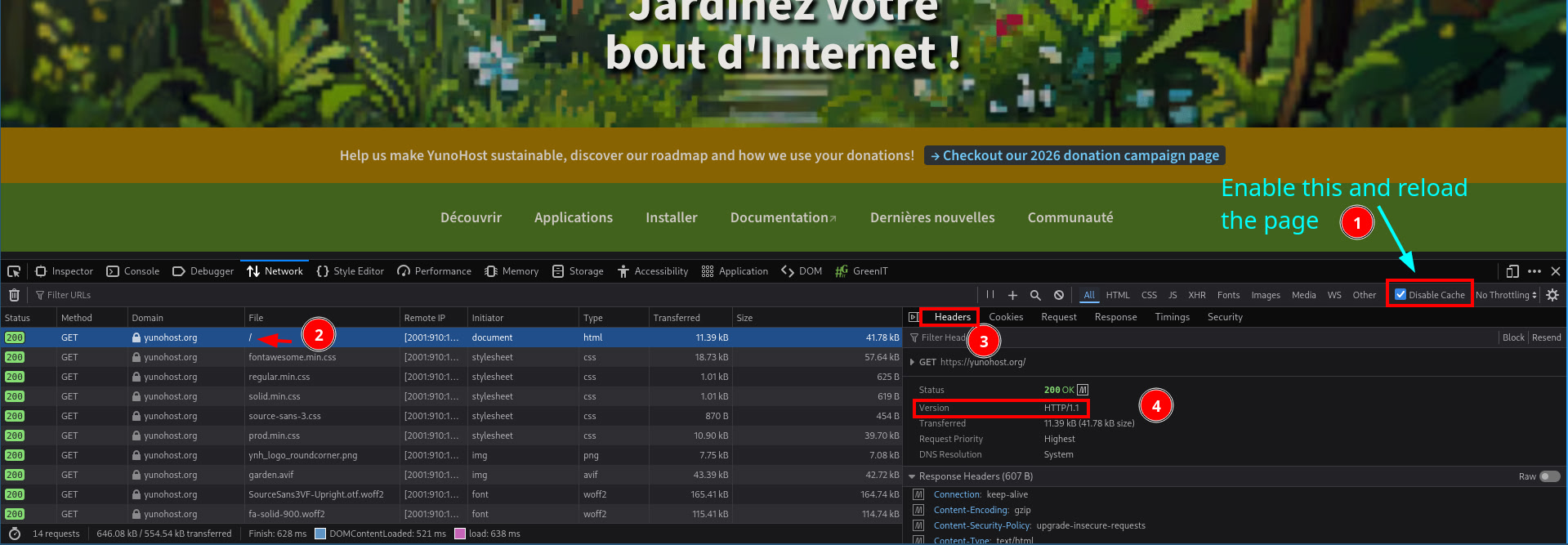
Two critical vulnerabilities (CVE-2026-123633 and CVE-2026-123007) in nginx have been announced some hours ago. We are waiting patch to be applied by debian security team BUT yunohost published a quick temporary patch disabling http2 on servers
You need to perform YunoHost system upgrade as soon as possible onto 12.1.43 YunoHost version (or 13.0.11).
via the Web UI: go at https://domain.tld/yunohost/admin/#/update, click “Retrieve available updates”, and then “Upgrade” under the “System” section
via SSH: sudo yunohost tools update && sudo yunohost tools upgrade system
If you have change your nginx configuration by hand AND you are on Yunohost 12, consider applying manually our patch.
sed -i 's/ssl http2/ssl/g' /etc/nginx/conf.d/*.conf
systemctl restart nginx
If you are on yunohost 13, the debian security has already published some long term fixes, but we think it is better to deactivate http2 for some hours or days.
Deux failles critiques (CVE-2026-123633 and CVE-2026-123007) dans nginx ont été annoncées il y a quelques heures. Nous attendons que l’équipe sécurité de debian applique les patchs MAIS yunohost a publié de son côté un patch temporaire qui désactive http2.
Vous devriez mettre à jour les paquets système de votre instance YunoHost dès que possible sur la version 12.1.43 (ou 13.0.11).
via l’interface web: allez sur https://domaine.tld/yunohost/admin/#/update, cliquez sur “Récupérer les mises à jours disponibles”, puis sur “Mettre à jour” sous la section “Système”.
via SSH: sudo yunohost tools update && sudo yunohost tools upgrade system
Si vous avez changé manuellement vos configs et que vous êtes sur yunohost 12, vous pouvez appliquer le patch vous même.
sed -i 's/ssl http2/ssl/g' /etc/nginx/conf.d/*.conf
systemctl restart nginx
Si vous êtes sous yunohost 13 l’équipe sécurité de debian 13 a publié certains correctifs, mais nous pensons qu’il reste prudent de désactiver http2 pour quelques heures ou jours.
I apllied manually the patch on my nginx configuration quickly before seeing and applying the upgrade to ynh 12.1.43.
When the patch on debian will be available, I assume you’ll provide an update of ynh to resume http2… but since i changed manually my nginx conf it won’t change anything for me ? I will have to force a regen-conf ? Something else ?
If it’s the only change you made, and you passed by 12.1.43 before 12.1.44, i guess your file will be unpatched correctly (so http2 reapplied). I am not sure of what happens if you go from 12.1.42 to 12.1.44…
Anyway, in your case, i recommand to run (or at least with the --dry-run to know the change)
If I execute yunohost tools regen-conf nginx --force --with-diff --dry-run and nothing shows up, I can be confident no nginx config has been modified by hand, right?
Thanks, lif, as far as I’ve tried --forceis only needed to actually override local modifications, not for displaying, as they are always shown (very good behavior).
But indeed, I checked, and it’s me who made a mistake in reviewing my console history. The cited (empty) --dry-run I had made before applying the manual workaround.
Unfortunately, this does not clear up the observed problem. Because the actual situation with the upgraded yunohost now actually is that it want’s to revert the workaround and re-configure http2 for that file.
Maybe people could check on their servers, if they still have http2 somewhere in configs after the upgrade:
grep -r http2 /etc/nginx/ | sed 's/.*conf/<redacted>.conf/'
Hm, the only things I can note about that still http2 by-default <topest-domain> is that the DNS currently points elsewhere, and it thus only has a self-signed cert.
 Two critical vulnerabilities (CVE-2026-123633 and CVE-2026-123007) in nginx have been announced some hours ago. We are waiting patch to be applied by debian security team BUT yunohost published a quick temporary patch disabling http2 on servers
 Deux failles critiques (CVE-2026-123633 and CVE-2026-123007) dans nginx ont été annoncées il y a quelques heures. Nous attendons que l’équipe sécurité de debian applique les patchs MAIS yunohost a publié de son côté un patch temporaire qui désactive http2.