# WireGuard Client: how to unblock webadmin access when VPN is connected?
**URL:** https://forum.yunohost.org/t/wireguard-client-how-to-unblock-webadmin-access-when-vpn-is-connected/25497
**Category:** Support apps
**Tags:** wireguard\_client, french, english
**Created:** [July 9, 2023, 9:05am UTC](https://forum.yunohost.org/t/wireguard-client-how-to-unblock-webadmin-access-when-vpn-is-connected/25497 "2023-07-09T09:05:57Z")
**Posts on this page:** 7
**Page:** 1
### Author:  [@ByteProphet](https://forum.yunohost.org/u/ByteProphet)
#### Post date: [July 9, 2023, 9:05am UTC](https://forum.yunohost.org/t/wireguard-client-how-to-unblock-webadmin-access-when-vpn-is-connected/25497/1 "2023-07-09T09:05:57Z")
## 🇬🇧 🇺🇸
**Hardware:** amd64
**YunoHost version:** 11.0.9
**I have access to my server :** direct access via keyboard / screen + webadmin
**Special context or some particular tweaking on my instance:** no
**About:** Wireguard Client (0.3~ynh1)
## Description of my issue
#
Hi,
I’m currently using a generic [noho.st](http://noho.st) sub-domain to access my webadmin. When I activate a Wireguard connection, it’s no longer possible to connect using this method (only CLI), but I want to be able to continue using the webadmin while connected to WG. WG access itself is operational, as I’ve been able to check via CLI (ip addr, ping, curl…), but only blocks webadmin access, which may be normal…
The WG profile I’m using includes a rule `AllowedIPs = 0.0.0.0/0, ::/0` and I’ve seen that there’s a warning about this on [the basic instructions for the WG app](https://forum.yunohost.org/t/wireguard-client-connect-your-server-to-vpns/23921), so maybe that’s the cause, since I suppose that this global rule doesn’t exclude webadmin and blocks it.
But how do you free up access to the webadmin while still allowing all traffic to pass through the WG tunnel (maybe apart from this app)? And don’t I need to open new ports or redirects from the router in addition to the traditional ports 80 and 443 for webadmin? And what about the Yunohost firewall?
Browser still infinite load and fails to access the webadmin after a while (timeout) with a fairly generic error like make sure the URL is correct, something like that. When I do a `wg-quick down`, if the page is still trying to load at that moment, webadmin access unblocks immediately.
There are no documentation about this. I’m no expert in networking, so a little help would be greatly welcome!
## Thanks! 🤞
## 🇫🇷
## Description du problème
#
Bonjour,
J’utilise pour l’instant un sous-domaine générique en [noho.st](http://noho.st) pour accéder à mon webadmin. Lorsque j’active une connexion Wireguard, plus possible de me connecter par ce biais (seulement CLI), hors je veux pouvoir continuer à utiliser le webadmin tout en étant connecté sur WG. L’accès WG en soit est opérationnel, j’ai pu le vérifier via CLI (ip addr, ping, curl…), mais ne bloque bien que l’accès webadmin, ce qui est peut être normal…
Le profil WG utilisé inclut une règle `AllowedIPs = 0.0.0.0/0, ::/0` et j’ai vu qu’il y a un warning là dessus sur [les instructions de base de l’appli WG](https://forum.yunohost.org/t/wireguard-client-connect-your-server-to-vpns/23921), c’est peut être la cause, puisque j’imagine que cette règle globale n’exclue pas le webadmin et le bloque.
Mais alors comment libérer l’accès au webadmin tout en continuant à faire passer tout le (reste du) trafic par tunnel WG (hors cette exception) ? Et n’y a t-il pas besoin d’une nouvelle ouverture de ports ou redirection depuis le routeur en plus des traditionnels ports 80 et 443 ? Et côté firewall de Yunohost ?
Le navigateur mouline et ne parvient pas à acceder à la page webadmin au bout d’un moment ( **timeout** ) avec une erreur assez générique du genre assurez-vous que l’URL soit correcte, quelque chose comme ça. Quand je fais un `wg-quick down` si la page est encore en train de tenter de charger à ce moment, l’accès webadmin se débloque immédiatement.
Il n’y a pas de documentation pour cette application. Je ne suis pas expert en réseaux, donc un peu d’aide serait superbement la bienvenue !
## Merci d’avance ! 🤞
---
### Author:  [@tituspijean](https://forum.yunohost.org/u/tituspijean)
#### Post date: [July 9, 2023, 9:52am UTC](https://forum.yunohost.org/t/wireguard-client-how-to-unblock-webadmin-access-when-vpn-is-connected/25497/2 "2023-07-09T09:52:55Z")
It’s definitely not normal that you cannot access the webadmin with WireGuard on. (I’ve just checked myself). Some questions:
- Does Internet access work beside the webadmin timing out?
- Does the YunoHost user portal, with the colored app tiles work?
- Can you access the webadmin with the server’s internal VPN address at [https://10.10.10.0/yunohost/admin](https://10.10.10.0/yunohost/admin) ?
- Have you enabled a whitelist access to the webadmin?
---
### Author:  [@ByteProphet](https://forum.yunohost.org/u/ByteProphet)
#### Post date: [July 9, 2023, 1:19pm UTC](https://forum.yunohost.org/t/wireguard-client-how-to-unblock-webadmin-access-when-vpn-is-connected/25497/3 "2023-07-09T13:19:28Z")
> Does Internet access work beside the webadmin timing out?
- Yes, I can ping, curl, etc from CLI
> Does the YunoHost user portal, with the colored app tiles work?
- No admin UI and no user UI
> Can you access the webadmin with the server’s internal VPN address at [https://10.10.10.0/yunohost/admin](https://10.10.10.0/yunohost/admin) ?
- No : NS\_ERROR\_CONNECTION\_REFUSED
- I used “Address” value’s field under “[Interface]” from profile file
- [https://10.10.10.0/yunohost/admin](https://10.10.10.0/yunohost/admin) not work too.
> Have you enabled a whitelist access to the webadmin?
- I don’t find whitelist interface.
Precision: after new interface “switzerland2” added, I upload profile file (same name), and process freeze and doesn’t finish, maybe because connection timeout…
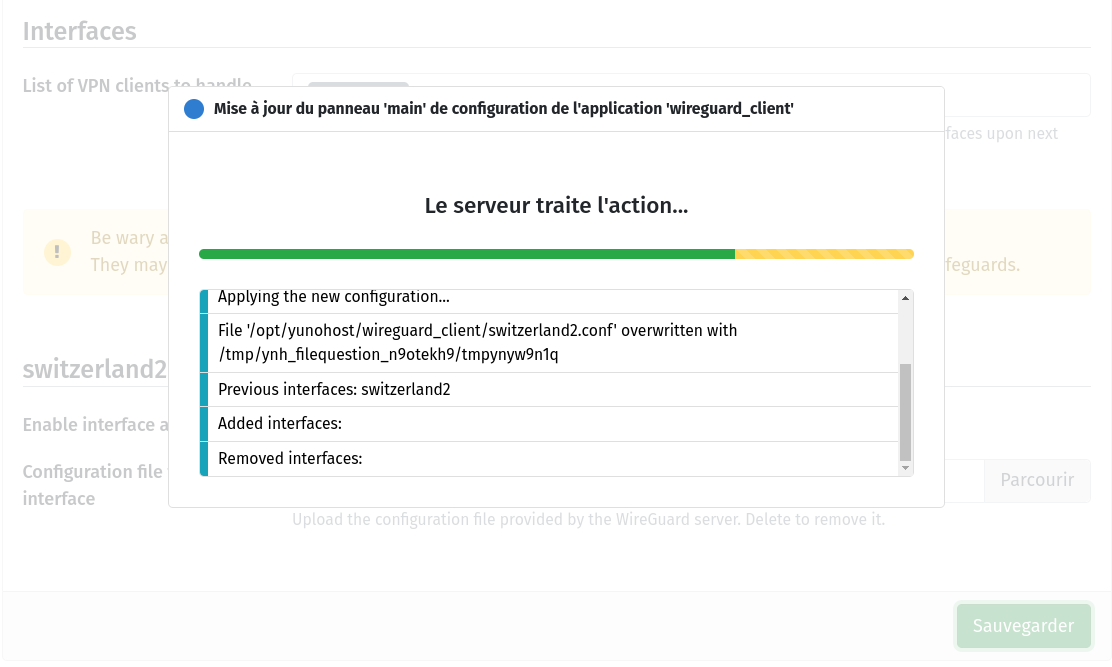
But when `wg show` from CLI, state of connection looks normal.
---
### Author:  [@tituspijean](https://forum.yunohost.org/u/tituspijean)
#### Post date: [July 9, 2023, 8:41pm UTC](https://forum.yunohost.org/t/wireguard-client-how-to-unblock-webadmin-access-when-vpn-is-connected/25497/4 "2023-07-09T20:41:19Z")
> [@ByteProphet](#):
>
> I used “Address” value’s field under “[Interface]” from profile file
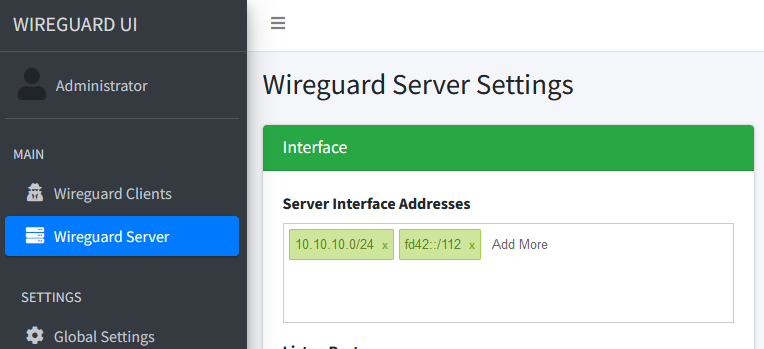
I meant this address from the server:
> [@ByteProphet](#):
>
> [https://10.10.10.0/yunohost/admin](https://10.10.10.0/yunohost/admin) not work too.
Same `NS_ERROR_CONNECTION_REFUSED` error?
> [@ByteProphet](#):
>
> I don’t find whitelist interface.
I guess it’s a no then. However, it’s still good to check. It is in Tools \> YunoHost settings, item is under Webadmin.
> [@ByteProphet](#):
>
> Precision: after new interface “switzerland2” added, I upload profile file (same name), and process freeze and doesn’t finish, maybe because connection timeout…
Can you elaborate on what you did? There was no previous interface? (the file name is not an issue, the file gets renamed anyways).
There should be a log of that in the webadmin, Tools \> Logs. Can you share it with the green “Share with YunoPaste” button?
---
### Author:  [@ByteProphet](https://forum.yunohost.org/u/ByteProphet)
#### Post date: [July 10, 2023, 6:47pm UTC](https://forum.yunohost.org/t/wireguard-client-how-to-unblock-webadmin-access-when-vpn-is-connected/25497/5 "2023-07-10T18:47:01Z")
> [@tituspijean](#):
>
> I meant this address from the server:
>
> 
I use public VPN service, so I can’t set this. 😔
> [@tituspijean](#):
>
> Same `NS_ERROR_CONNECTION_REFUSED` error?
Yes (according Network tab of my browser inspector).
> [@tituspijean](#):
>
> I guess it’s a no then. However, it’s still good to check. It is in Tools \> YunoHost settings, item is under Webadmin.
It is on OFF ; never used.
> [@tituspijean](#):
>
> Can you elaborate on what you did? There was no previous interface? (the file name is not an issue, the file gets renamed anyways).
> There should be a log of that in the webadmin, Tools \> Logs. Can you share it with the green “Share with YunoPaste” button?
Session log from wireguard\_client@switzerland2 service : [hastebin](https://paste.yunohost.org/tuyeqiyafi.makefile)
Session (previous day, today is not available) from Tools / Log / 20230709-131135-app\_config\_set-wireguard\_client : [https://paste.yunohost.org/raw/esozafirom](https://paste.yunohost.org/raw/esozafirom)
Thank you.
---
### Author:  [@tituspijean](https://forum.yunohost.org/u/tituspijean)
#### Post date: [July 11, 2023, 7:12am UTC](https://forum.yunohost.org/t/wireguard-client-how-to-unblock-webadmin-access-when-vpn-is-connected/25497/6 "2023-07-11T07:12:14Z")
> [@ByteProphet](#):
>
> Session log from wireguard\_client@switzerland2 service : [hastebin](https://paste.yunohost.org/tuyeqiyafi.makefile)
I notice a `Temporary failure in name resolution` at the beginning. Can you usually ping that server when the VPN is off?
Another thing, when the VPN is on, can you access any other app installed on the server, or is it only the SSO and webadmin that are not responding?
---
### Author:  [@system](https://forum.yunohost.org/u/system)
#### Post date: [July 26, 2023, 7:12am UTC](https://forum.yunohost.org/t/wireguard-client-how-to-unblock-webadmin-access-when-vpn-is-connected/25497/7 "2023-07-26T07:12:35Z")
This topic was automatically closed 15 days after the last reply. New replies are no longer allowed.