# VPS server down stuck in rescue mode and cannot reboot
**URL:** https://forum.yunohost.org/t/vps-server-down-stuck-in-rescue-mode-and-cannot-reboot/32300
**Category:** Support
**Tags:** yunohost, english
**Created:** [November 29, 2024, 5:27am UTC](https://forum.yunohost.org/t/vps-server-down-stuck-in-rescue-mode-and-cannot-reboot/32300 "2024-11-29T05:27:07Z")
**Posts on this page:** 6
**Page:** 1
### Author:  [@Ash3T1](https://forum.yunohost.org/u/Ash3T1)
#### Post date: [November 29, 2024, 5:27am UTC](https://forum.yunohost.org/t/vps-server-down-stuck-in-rescue-mode-and-cannot-reboot/32300/1 "2024-11-29T05:27:07Z")
**What type of hardware are you using** : VPS bought online
**What YunoHost version are you running** : 11.2.30.2 (stable)
**How are you able to access your server** : SSH
**Are you in a special context or did you perform specific tweaking on your YunoHost instance ?** : installed Piped then install Cloudflare WARP from CLI, then the server is down
### Describe your issue
I tried reboot for several time, and all the web service is down and cannot access through webadmin.
Then I tried reboot in secure mode(I used ovh vps), then mount the disk, but I cannot find the backup files for yunohost.

I was hoping to get the backups then reinstall yunohost again. but there is only ‘debian’ under the ‘home’ directory.
Hopefully, I can use SFTP to download my backups, then reinstalled yunohost again.
For Your information:
1.If I reboot, ping my server IP shows timeout, websites are down, when in secure mode ping server IP is still accessiable. This is why I say that it stuck with reboot, it cannot boot then function properly.
2.I am not sure what wrong with my server, the ram usage is high but it should still managerable. I cannot connect through the previous SSH username and password.
This server was running for two months since my last migration, but after install Piped, then Cloudflare Wrap, it went down.
1. How to get my backups download then reinstall? I don’t know how to determine the error then fix it.
I presume the best I can do is get the backkup then reinstalled Yunohost again. Then here is my question my server is with Debian 11, shall I install Debian 12, then backup the system files, will that work?
1. when I used the KVM console provide by ovh, I can still see the yunohost logo and access my ssh admin user
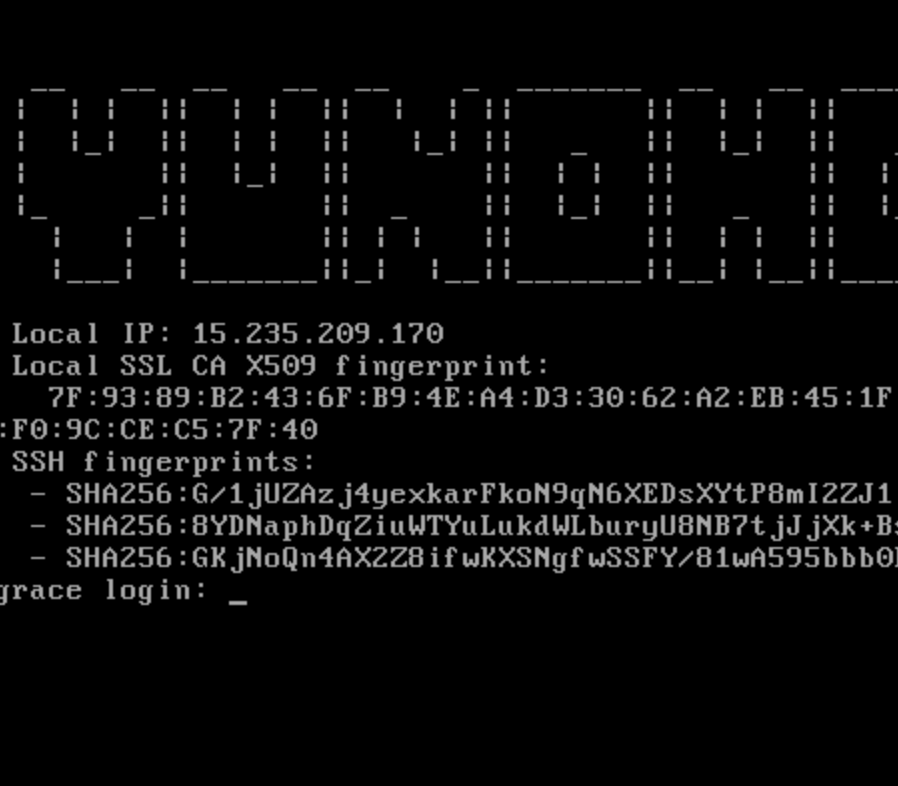
But I am not sure what to do next. 😮💨
### Share relevant logs or error messages
I am not sure where shall I look for this, since I cannot access webadmin.
---
### Author:  [@arkadi](https://forum.yunohost.org/u/arkadi)
#### Post date: [November 29, 2024, 6:02am UTC](https://forum.yunohost.org/t/vps-server-down-stuck-in-rescue-mode-and-cannot-reboot/32300/2 "2024-11-29T06:02:40Z")
> [@Ash3T1](#):
>
> 1. it.
>
> I presume the best I can do is get the backkup then reinstalled Yunohost again. Then here is my question my server is with Debian 11, shall I install Debian 12, then backup the system files,
ok let’s get more info.
1. login to your server with SSH.
2. check what is happening on your server with `htop`. what is using the most RAM and CPU?
3. run `sudo yunohost service status`. are any services stopped? especially nginx, or yunohost-api and yunohost-portal-api
---
### Author:  [@Ash3T1](https://forum.yunohost.org/u/Ash3T1)
#### Post date: [November 29, 2024, 4:28pm UTC](https://forum.yunohost.org/t/vps-server-down-stuck-in-rescue-mode-and-cannot-reboot/32300/3 "2024-11-29T16:28:49Z")
Now my server is up and running again.
This is what I got from ChatGPT.
The issue likely stems from **routing or DNS configuration changes** made when WARP was activated. When you ran `warp-cli connect`, it might have altered the default network routing table, redirecting all traffic (including internal traffic) through WARP. If the routing was not configured correctly, the server may lose network connectivity, including access to its own services.
I was hoping the get the Piped running on my server and found that : a **free Cloudflare WARP connection** and tunnel traffic through it This will help bypass YouTube’s bot detection for your Piped instance. Then I followed the suggestions on ChatGPT then get to this mess.
Can anyone please help me to open this post Now my server is up and running again.
This is what I got from ChatGPT.
The issue likely stems from **routing or DNS configuration changes** made when WARP was activated. When you ran `warp-cli connect`, it might have altered the default network routing table, redirecting all traffic (including internal traffic) through WARP. If the routing was not configured correctly, the server may lose network connectivity, including access to its own services.
I was hoping the get the Piped running on my server and found that : a **free Cloudflare WARP connection** and tunnel traffic through it This will help bypass YouTube’s bot detection for your Piped instance. Then I followed the suggestions on ChatGPT then get to this mess.
Can anyone please help me to open this post : [Piped Got error: “Sign in to confirm that you’re not a bot”](https://forum.yunohost.org/t/piped-got-error-sign-in-to-confirm-that-you-re-not-a-bot/31080) and this one is resloved.
By the way, another question the Debian 11 is depreciated, do I need to upgrade to 12?
---
### Author:  [@arkadi](https://forum.yunohost.org/u/arkadi)
#### Post date: [November 30, 2024, 1:27am UTC](https://forum.yunohost.org/t/vps-server-down-stuck-in-rescue-mode-and-cannot-reboot/32300/4 "2024-11-30T01:27:18Z")
You can still on Debian 11 but you should upgrade as soon as you have time.
> [@rocket YunoHost 12.0 (Bookworm) release / Sortie de YunoHost 12.0 (Bookworm)](https://forum.yunohost.org/t/yunohost-12-0-bookworm-release-sortie-de-yunohost-12-0-bookworm/31673):
>
> [fr version française](#p-143153-fr-version-franaise-8)uk English version We are glad to announce the release of YunoHost 12 partying_face ! This release brings your servers to Debian 12 bookworm Bookworm, and ships an upgrade of the webadmin, an overhaul of the User portal and SSO (Single Sign On) system. yes, that took some time… But it was worth it! Shortcuts to : [Installation procedure](#p-143153-arrow_down-how-to-install-5), [Upgrade procedure](#p-143153-arrow_up-how-to-upgrade-6)sparkles Major changes YunoHost now depends on Debian 12 The user portal and SSO (Single Sign On) system…
---
### Author:  [@Leghatorby](https://forum.yunohost.org/u/Leghatorby)
#### Post date: [December 17, 2024, 10:37am UTC](https://forum.yunohost.org/t/vps-server-down-stuck-in-rescue-mode-and-cannot-reboot/32300/5 "2024-12-17T10:37:18Z")
I had a similar issue once when installing a service that caused the web admin to go down. In my case, I was able to access the server via SSH and check the logs to see what went wrong. It might be worth looking into the logs (like /var/log/yunohost) to see if any specific errors are popping up. As for the backup files, if you can’t find them after mounting the disk, you might want to check if they were stored in a separate directory or on a different disk.By the way, I ran into a similar problem with a VPS, and I found that [rent dedicated servers](https://ishosting.com/en/dedicated) helped stabilize things. Having that direct control made a huge difference in managing everything smoothly.
---
### Author:  [@system](https://forum.yunohost.org/u/system)
#### Post date: [January 16, 2025, 10:37am UTC](https://forum.yunohost.org/t/vps-server-down-stuck-in-rescue-mode-and-cannot-reboot/32300/6 "2025-01-16T10:37:50Z")
This topic was automatically closed 30 days after the last reply. New replies are no longer allowed.