# Update Errors, also on fix commands!
**URL:** https://forum.yunohost.org/t/update-errors-also-on-fix-commands/14496
**Category:** Support
**Tags:** english
**Created:** [February 11, 2021, 10:40am UTC](https://forum.yunohost.org/t/update-errors-also-on-fix-commands/14496 "2021-02-11T10:40:19Z")
**Posts on this page:** 20
**Page:** 1
### Author:  [@someonesusername](https://forum.yunohost.org/u/someonesusername)
#### Post date: [February 11, 2021, 10:40am UTC](https://forum.yunohost.org/t/update-errors-also-on-fix-commands/14496/1 "2021-02-11T10:40:20Z")
### My YunoHost server
**Hardware:** Rackserver - VM
**YunoHost version:** 4.0.8.3 (stable).
**I have access to my server :** Through SSH | through the webadmin | direct access via keyboard / screen | …
All of the above
**Are you in a special context or did you perform some particular tweaking on your YunoHost instance ?** : no
**If yes, please explain:**
no
### Description of my issue
Today I wanted to upgrade the installation but then this happened.
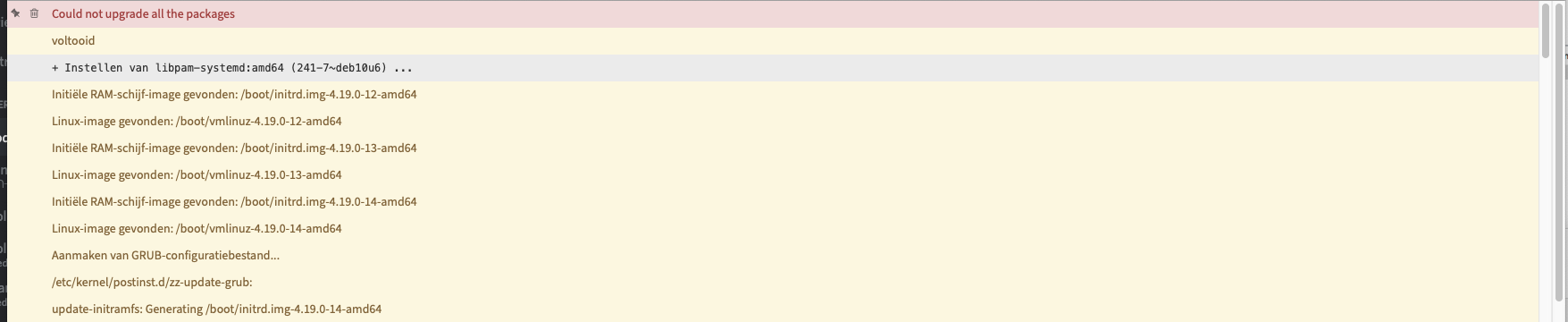
so I tried again, then this occurred;
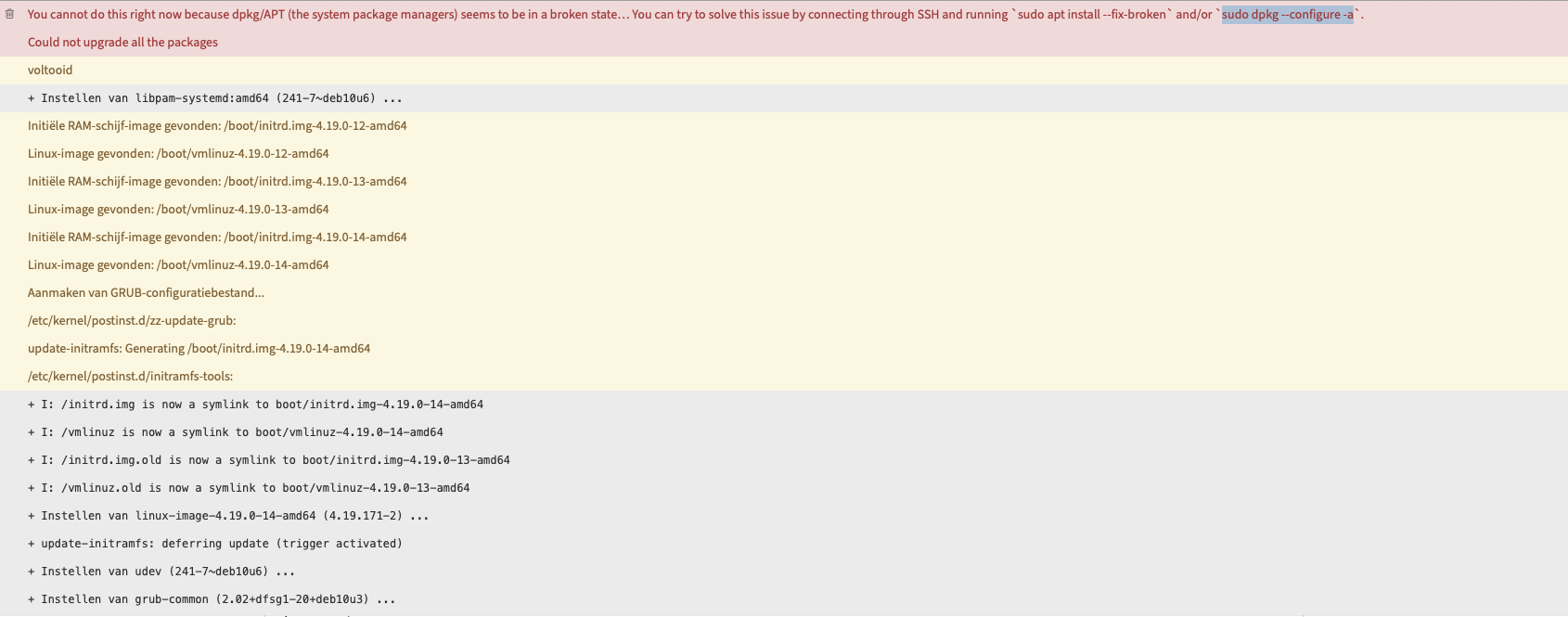
Oh hey nice fix commands let’s try them…
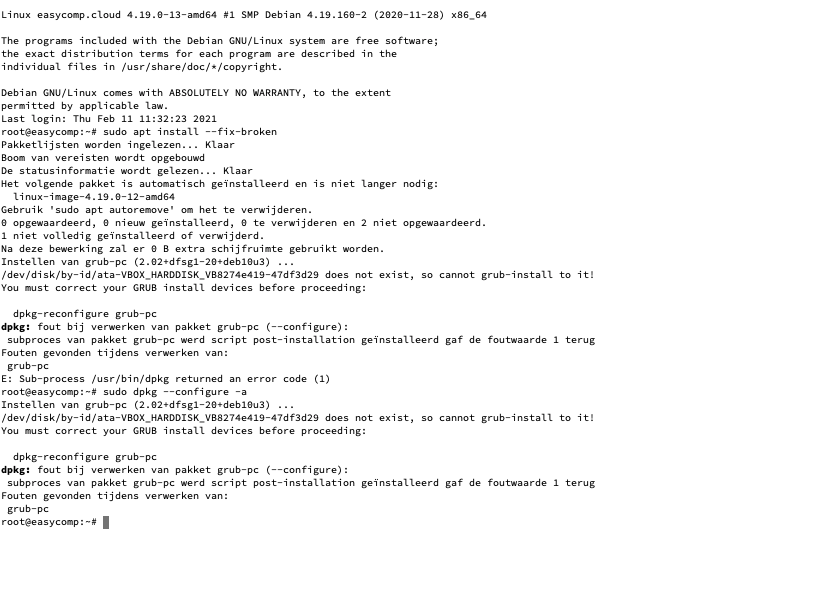
Rough translation by bing.
Linux [easycomp.cloud](https://ssl.microsofttranslator.com/bv.aspx?ref=TVert&from=&to=en&a=easycomp.cloud) 4.19.0-13-amd64 #1 SMP Debian 4.19.160-2 (2020-11-28) x86\_64
The programs included with the Debian GNU/Linux system are free software;
the exact distribution terms for each program are described in the
individual files in /usr/share/doc/\*/copyright.
Debian GNU/Linux comes with ABSOLUTELY NO WARRANTY, to the extent
afforded by applicable law.
Last login: Thu Feb 11 11:32:23 2021
root@easycomp:~# sudo apt install --fix-broken
Package lists are read in… Ready
Tree of requirements is built up
The status information is read… Ready
The following package is installed automatically and is no longer required:
linux-image-4.19.0-12-amd64
Use ‘sudo apt autoremove’ to remove it.
0 upgraded, 0 newly installed, 0 to remove and 2 not upgraded.
1 not fully installed or removed.
After this operation, 0 B extra disk space will be used.
Setting up grub PC (2.02+dfsg1-20+deb10h3) …
/dev/disk/by-id/ata-VBOX\_HARDDISK\_VB8274e419-47df3d29 does not exist, so cannot grub-install to it!
You must correct your GRUB install devices before proceeding:
dpkg reconfigure grub PC
dpkg: Grub PC (–configure) package processing error:
subprocess of package grub-PC script installed post-installation returned the error value 1
Errors found while processing:
grub PC
E: Sub-process /usr/bin/dpkg returned an error code (1)
root@easycomp:~# sudo dpkg --configure -a
Setting up grub PC (2.02+dfsg1-20+deb10h3) …
/dev/disk/by-id/ata-VBOX\_HARDDISK\_VB8274e419-47df3d29 does not exist, so cannot grub-install to it!
You must correct your GRUB install devices before proceeding:
dpkg reconfigure grub PC
dpkg: Grub PC (–configure) package processing error:
subprocess of package grub-PC script installed post-installation returned the error value 1
Errors found while processing:
grub PC
root@easycomp:~#
NO it won’t let me…
Any help please 😉
---
### Author:  [@Aleks](https://forum.yunohost.org/u/Aleks)
#### Post date: [February 11, 2021, 11:18am UTC](https://forum.yunohost.org/t/update-errors-also-on-fix-commands/14496/2 "2021-02-11T11:18:25Z")
Hmyeah it mentions some `ata-VBOX_HARDDISK` … does that ring any bell ?
Did something happen about your disks recently somehow ?
---
### Author:  [@someonesusername](https://forum.yunohost.org/u/someonesusername)
#### Post date: [February 11, 2021, 11:21am UTC](https://forum.yunohost.org/t/update-errors-also-on-fix-commands/14496/3 "2021-02-11T11:21:29Z")
hmm I did move things to an other disk to expand the storage space as I noted in;
> [@Tutorial: How to expand LVM disk partition for virtual box or VMware](https://forum.yunohost.org/t/tutorial-how-to-expand-lvm-disk-partition-for-virtual-box-or-vmware/13615/3):
>
> This is what we call self service man_facepalming:t3 tongue
But then again 11 days ago I did an update and it was fine
---
### Author:  [@Aleks](https://forum.yunohost.org/u/Aleks)
#### Post date: [February 11, 2021, 11:24am UTC](https://forum.yunohost.org/t/update-errors-also-on-fix-commands/14496/4 "2021-02-11T11:24:12Z")
Weeeell idk let’s try what it advices and :
```auto
dpkg-reconfigure grub-pc
```
---
### Author:  [@someonesusername](https://forum.yunohost.org/u/someonesusername)
#### Post date: [February 11, 2021, 11:27am UTC](https://forum.yunohost.org/t/update-errors-also-on-fix-commands/14496/5 "2021-02-11T11:27:43Z")
> [@Aleks](#):
>
> ```auto
> dpkg-reconfigure grub-pc
>
> ```
/usr/sbin/dpkg-reconfigure: grub PC is damaged or not fully installed
oh no it became corrupted. Now lets release the fire!
---
### Author:  [@someonesusername](https://forum.yunohost.org/u/someonesusername)
#### Post date: [February 11, 2021, 11:37am UTC](https://forum.yunohost.org/t/update-errors-also-on-fix-commands/14496/6 "2021-02-11T11:37:32Z")
What can I do to reinstall grub some where else so that it doesn’t get oopsie? if it reboots and fix the issue?
---
### Author:  [@Aleks](https://forum.yunohost.org/u/Aleks)
#### Post date: [February 11, 2021, 11:39am UTC](https://forum.yunohost.org/t/update-errors-also-on-fix-commands/14496/7 "2021-02-11T11:39:56Z")
iiiiiii would avoid rebooting as grub is precisely kinda important during the boot process, so if it’s misconfigured the oopsie can become quite bigger …
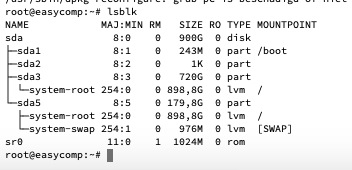
Maybe let’s first look at `lsblk` to have a better idea of what are your disk devices…
---
### Author:  [@someonesusername](https://forum.yunohost.org/u/someonesusername)
#### Post date: [February 11, 2021, 12:27pm UTC](https://forum.yunohost.org/t/update-errors-also-on-fix-commands/14496/8 "2021-02-11T12:27:50Z")
Yeah gramma was far from correct there I ment that don’t get an optie if it reboots? and fix the issue?
---
### Author:  [@someonesusername](https://forum.yunohost.org/u/someonesusername)
#### Post date: [February 11, 2021, 12:28pm UTC](https://forum.yunohost.org/t/update-errors-also-on-fix-commands/14496/9 "2021-02-11T12:28:20Z")
---
### Author:  [@Aleks](https://forum.yunohost.org/u/Aleks)
#### Post date: [February 11, 2021, 1:06pm UTC](https://forum.yunohost.org/t/update-errors-also-on-fix-commands/14496/10 "2021-02-11T13:06:04Z")
Sooooo idk I would try something like `grub-install /dev/sda` …
---
### Author:  [@someonesusername](https://forum.yunohost.org/u/someonesusername)
#### Post date: [February 11, 2021, 1:10pm UTC](https://forum.yunohost.org/t/update-errors-also-on-fix-commands/14496/11 "2021-02-11T13:10:41Z")
what comes after the … is it a placeholder or a long long long silence?
---
### Author:  [@someonesusername](https://forum.yunohost.org/u/someonesusername)
#### Post date: [February 11, 2021, 1:11pm UTC](https://forum.yunohost.org/t/update-errors-also-on-fix-commands/14496/12 "2021-02-11T13:11:22Z")
Installation finished no issues reported.
Now what?
---
### Author:  [@Aleks](https://forum.yunohost.org/u/Aleks)
#### Post date: [February 11, 2021, 1:48pm UTC](https://forum.yunohost.org/t/update-errors-also-on-fix-commands/14496/13 "2021-02-11T13:48:50Z")
Idk let’s randomly try again `sudo apt install --fix-broken` and `sudo dpkg --configure -a` ?
---
### Author:  [@someonesusername](https://forum.yunohost.org/u/someonesusername)
#### Post date: [February 11, 2021, 1:58pm UTC](https://forum.yunohost.org/t/update-errors-also-on-fix-commands/14496/14 "2021-02-11T13:58:10Z")
dpkg-reconfigure grub-pc
dpkg: fout bij verwerken van pakket grub-pc (–configure):
subproces van pakket grub-pc werd script post-installation geïnstalleerd gaf de foutwaarde 1 terug
Fouten gevonden tijdens verwerken van:
grub-pc
root@easycomp:~# sudo apt install --fix-broken
Pakketlijsten worden ingelezen… Klaar
Boom van vereisten wordt opgebouwd
De statusinformatie wordt gelezen… Klaar
Het volgende pakket is automatisch geïnstalleerd en is niet langer nodig:
linux-image-4.19.0-12-amd64
Gebruik ‘sudo apt autoremove’ om het te verwijderen.
0 opgewaardeerd, 0 nieuw geïnstalleerd, 0 te verwijderen en 2 niet opgewaardeerd.
1 niet volledig geïnstalleerd of verwijderd.
Na deze bewerking zal er 0 B extra schijfruimte gebruikt worden.
Instellen van grub-pc (2.02+dfsg1-20+deb10u3) …
/dev/disk/by-id/ata-VBOX\_HARDDISK\_VB8274e419-47df3d29 does not exist, so cannot grub-install to it!
You must correct your GRUB install devices before proceeding:
dpkg-reconfigure grub-pc
dpkg: fout bij verwerken van pakket grub-pc (–configure):
subproces van pakket grub-pc werd script post-installation geïnstalleerd gaf de foutwaarde 1 terug
Fouten gevonden tijdens verwerken van:
grub-pc
E: Sub-process /usr/bin/dpkg returned an error code (1)
root@easycomp:~#
---
### Author:  [@someonesusername](https://forum.yunohost.org/u/someonesusername)
#### Post date: [February 11, 2021, 2:10pm UTC](https://forum.yunohost.org/t/update-errors-also-on-fix-commands/14496/15 "2021-02-11T14:10:27Z")
dpkg reconfigure grub PC
dpkg: Grub PC (–configure) package processing error:
subprocess of package grub-PC script installed post-installation returned the error value 1
Errors found while processing:
grub PC
root@easycomp:~# sudo apt install --fix-broken
Package lists are read in… Ready
Tree of requirements is built up
The status information is read… Ready
The following package is installed automatically and is no longer required:
linux-image-4.19.0-12-amd64
Use ‘sudo apt autoremove’ to remove it.
0 upgraded, 0 newly installed, 0 to remove and 2 not upgraded.
1 not fully installed or removed.
After this operation, 0 B extra disk space will be used.
Setting up grub PC (2.02+dfsg1-20+deb10h3) …
/dev/disk/by-id/ata-VBOX\_HARDDISK\_VB8274e419-47df3d29 does not exist, so cannot grub-install to it!
You must correct your GRUB install devices before proceeding:
dpkg reconfigure grub PC
dpkg: Grub PC (–configure) package processing error:
subprocess of package grub-PC script installed post-installation returned the error value 1
Errors found while processing:
grub PC
E: Sub-process /usr/bin/dpkg returned an error code (1)
root@easycomp:~ #
---
### Author:  [@Aleks](https://forum.yunohost.org/u/Aleks)
#### Post date: [February 11, 2021, 2:19pm UTC](https://forum.yunohost.org/t/update-errors-also-on-fix-commands/14496/16 "2021-02-11T14:19:11Z")
Hmpf ok let’s `grep -nr 'HARDDISK' /etc/`
---
### Author:  [@someonesusername](https://forum.yunohost.org/u/someonesusername)
#### Post date: [February 11, 2021, 6:12pm UTC](https://forum.yunohost.org/t/update-errors-also-on-fix-commands/14496/17 "2021-02-11T18:12:39Z")
which one do I need to put between the ‘’ my brain is scrambled today
---
### Author:  [@Aleks](https://forum.yunohost.org/u/Aleks)
#### Post date: [February 11, 2021, 6:57pm UTC](https://forum.yunohost.org/t/update-errors-also-on-fix-commands/14496/18 "2021-02-11T18:57:35Z")
uuuuh idk just copypasta the command bruh…
`grep -nr 'HARDDISK' /etc/`
---
### Author:  [@someonesusername](https://forum.yunohost.org/u/someonesusername)
#### Post date: [February 12, 2021, 11:54am UTC](https://forum.yunohost.org/t/update-errors-also-on-fix-commands/14496/19 "2021-02-12T11:54:34Z")
> [@Aleks](#):
>
> grep -nr ‘HARDDISK’ /etc/
I told you my brain was scrambled sarwy
---
### Author:  [@someonesusername](https://forum.yunohost.org/u/someonesusername)
#### Post date: [February 12, 2021, 11:55am UTC](https://forum.yunohost.org/t/update-errors-also-on-fix-commands/14496/20 "2021-02-12T11:55:29Z")
Done that, now what back to the pervious fix commands?
[Next page](https://forum.yunohost.org/t/update-errors-also-on-fix-commands/14496.md?page=2)