# \[Solved\] SSH: no route to host
**URL:** https://forum.yunohost.org/t/solved-ssh-no-route-to-host/36723
**Category:** Support
**Tags:** ssh, french, english
**Created:** [May 1, 2025, 10:23am UTC](https://forum.yunohost.org/t/solved-ssh-no-route-to-host/36723 "2025-05-01T10:23:09Z")
**Posts on this page:** 20
**Page:** 1
### Author:  [@Pascal06](https://forum.yunohost.org/u/Pascal06)
#### Post date: [May 1, 2025, 10:23am UTC](https://forum.yunohost.org/t/solved-ssh-no-route-to-host/36723/1 "2025-05-01T10:23:09Z")
**What type of hardware are you using** : Old laptop or computer
**What YunoHost version are you running** : 12.0
**How are you able to access your server** : The webadmin
Direct access via physical keyboard/screen
**Are you in a special context or did you perform specific tweaking on your YunoHost instance ?** : No
### Describe your issue
Hello everybody,
Yesterday I installed Yunohost 12.0 / Nextcloud on a Dell Latitude E6540. All this stuff is behind a BBox Miami fiber box by an Ethernet wired connexion.
Then, early this morning before I went to bed everything worked perfectly and all my clients were synchronized and I can access to Nextcloud from the outside. Before sleeping, I left one of my laptop connected to the server throughout SSH.
A few hours later at my wake, I just wanted to remove some temp folder I created on the server but I remarked that my SSH session couldn’t be established again:
` $ ssh pascal@192.168.1.58
ssh: connect to host 192.168.1.58 port 22: No route to host
$ ssh 192.168.1.58
ssh: connect to host 192.168.1.58 port 22: No route to host
`
So, I tried to ping the server:
`$ ping 192.168.1.58
PING 192.168.1.58 (192.168.1.58) 56(84) bytes of data.
From 192.168.1.182 icmp_seq=1 Destination Host Unreachable
`
So, I restarted all my stuff: my client laptop, the server, the BBox. Same thing: SSH is unreachable.
Then, I tried to use another ethernet port: same thing
However, if I try in the reverse way (connect to my client laptop from the server) it’s working.
I can’t understand, I did nothing during my sleep 😃
I found nothing relevant neither in logs nor in Failtoban.
So what’s wrong ?
Could you help me please ?
Thanks a lot in advance,
Pascal
### Share relevant logs or error messages
args:
key: security
value: null
ended\_at: 2025-05-01 08:17:32.503552
error: null
interface: api
operation: settings\_set
parent: null
related\_to:
started\_at: 2025-05-01 08:17:32.061387
success: true
yunohost\_version: 12.0.14
============
2025-05-01 10:17:32,070: DEBUG - Nothing to update in LDAP
2025-05-01 10:17:32,070: INFO - Saving the new configuration…
2025-05-01 10:17:32,090: DEBUG - Formating result in ‘export’ mode
2025-05-01 10:17:32,094: DEBUG - Executing command ‘[‘sh’, ‘-c’, ‘/bin/bash -x “./03-ssh” pre '' '' /var/cache/yunohost/regenconf/pending/ssh 7\>&1’]’
2025-05-01 10:17:32,097: DEBUG - + set -e
2025-05-01 10:17:32,098: DEBUG - + . /usr/share/yunohost/helpers
2025-05-01 10:17:32,098: DEBUG - ++++ dirname – /usr/share/yunohost/helpers
2025-05-01 10:17:32,099: DEBUG - +++ cd – /usr/share/yunohost
2025-05-01 10:17:32,099: DEBUG - +++ pwd
2025-05-01 10:17:32,100: DEBUG - ++ SCRIPT\_DIR=/usr/share/yunohost
2025-05-01 10:17:32,100: DEBUG - ++ YNH\_HELPERS\_VERSION=1
2025-05-01 10:17:32,101: DEBUG - ++ readonly ‘XTRACE\_ENABLE=set -o xtrace’
2025-05-01 10:17:32,101: DEBUG - ++ XTRACE\_ENABLE=‘set -o xtrace’
2025-05-01 10:17:32,128: DEBUG - + do\_pre\_regen /var/cache/yunohost/regenconf/pending/ssh
2025-05-01 10:17:32,129: DEBUG - + pending\_dir=/var/cache/yunohost/regenconf/pending/ssh
2025-05-01 10:17:32,129: DEBUG - + cd /usr/share/yunohost/conf/ssh
2025-05-01 10:17:32,164: DEBUG - + export compatibility=intermediate
2025-05-01 10:17:32,164: DEBUG - + compatibility=intermediate
2025-05-01 10:17:32,197: DEBUG - + export port=22
2025-05-01 10:17:32,198: DEBUG - + port=22
2025-05-01 10:17:32,198: DEBUG - ++ int\_to\_bool
2025-05-01 10:17:32,198: DEBUG - ++ sed -e ‘s/^1$/True/g’ -e ‘s/^0$/False/g’ -e ‘s/^true$/True/g’ -e ‘s/^false$/False/g’
2025-05-01 10:17:32,231: DEBUG - + export password\_authentication=True
2025-05-01 10:17:32,231: DEBUG - + password\_authentication=True
2025-05-01 10:17:32,232: DEBUG - ++ ls /etc/ssh/ssh\_host\_ed25519\_key /etc/ssh/ssh\_host\_rsa\_key /etc/ssh/ssh\_host\_ecdsa\_key
2025-05-01 10:17:32,233: DEBUG - + export ‘ssh\_keys=/etc/ssh/ssh\_host\_ecdsa\_key
2025-05-01 10:17:32,233: DEBUG - /etc/ssh/ssh\_host\_ed25519\_key
2025-05-01 10:17:32,233: DEBUG - /etc/ssh/ssh\_host\_rsa\_key’
2025-05-01 10:17:32,234: DEBUG - + ssh\_keys=‘/etc/ssh/ssh\_host\_ecdsa\_key
2025-05-01 10:17:32,234: DEBUG - /etc/ssh/ssh\_host\_ed25519\_key
2025-05-01 10:17:32,234: DEBUG - /etc/ssh/ssh\_host\_rsa\_key’
2025-05-01 10:17:32,234: DEBUG - + [[-f /proc/net/if\_inet6]]
2025-05-01 10:17:32,234: DEBUG - + ipv6\_enabled=true
2025-05-01 10:17:32,234: DEBUG - + export ipv6\_enabled
2025-05-01 10:17:32,234: DEBUG - + ynh\_render\_template sshd\_config /var/cache/yunohost/regenconf/pending/ssh/etc/ssh/sshd\_config
2025-05-01 10:17:32,234: DEBUG - + local template\_path=sshd\_config
2025-05-01 10:17:32,234: DEBUG - + local output\_path=/var/cache/yunohost/regenconf/pending/ssh/etc/ssh/sshd\_config
2025-05-01 10:17:32,234: DEBUG - ++ dirname /var/cache/yunohost/regenconf/pending/ssh/etc/ssh/sshd\_config
2025-05-01 10:17:32,235: DEBUG - + mkdir -p /var/cache/yunohost/regenconf/pending/ssh/etc/ssh
2025-05-01 10:17:32,235: DEBUG - + python3 -c ‘import os, sys, jinja2; sys.stdout.write(
2025-05-01 10:17:32,236: DEBUG - jinja2.Template(sys.stdin.read()
2025-05-01 10:17:32,236: DEBUG - ).render(os.environ));’
2025-05-01 10:17:32,337: DEBUG - Vérification de la configuration en attente qui aurait été appliquée pour la catégorie ‘ssh’…
2025-05-01 10:17:32,345: DEBUG - processing pending conf ‘/var/cache/yunohost/regenconf/pending/ssh/etc/ssh/sshd\_config’ to system conf ‘/etc/ssh/sshd\_config’
2025-05-01 10:17:32,346: DEBUG - Le fichier de configuration ‘/etc/ssh/sshd\_config’ a été sauvegardé sous ‘/var/cache/yunohost/regenconf/backup/etc/ssh/sshd\_config-20250501.081732’
2025-05-01 10:17:32,352: DEBUG - Le fichier de configuration ‘/etc/ssh/sshd\_config’ a été mis à jour
2025-05-01 10:17:32,352: SUCCESS - La configuration a été mise à jour pour ‘ssh’
2025-05-01 10:17:32,354: DEBUG - updating conf hashes for ‘ssh’ with: {‘/etc/ssh/sshd\_config’: ‘25ba62828712765d39b7e22713c2fe84’}
2025-05-01 10:17:32,367: DEBUG - Executing command ‘[‘sh’, ‘-c’, ‘/bin/bash -x “./03-ssh” post '' '' /etc/ssh/sshd\_config 7\>&1’]’
2025-05-01 10:17:32,370: DEBUG - + set -e
2025-05-01 10:17:32,370: DEBUG - + . /usr/share/yunohost/helpers
2025-05-01 10:17:32,371: DEBUG - ++++ dirname – /usr/share/yunohost/helpers
2025-05-01 10:17:32,371: DEBUG - +++ cd – /usr/share/yunohost
2025-05-01 10:17:32,372: DEBUG - +++ pwd
2025-05-01 10:17:32,372: DEBUG - ++ SCRIPT\_DIR=/usr/share/yunohost
2025-05-01 10:17:32,372: DEBUG - ++ YNH\_HELPERS\_VERSION=1
2025-05-01 10:17:32,373: DEBUG - ++ readonly ‘XTRACE\_ENABLE=set -o xtrace’
2025-05-01 10:17:32,374: DEBUG - ++ XTRACE\_ENABLE=‘set -o xtrace’
2025-05-01 10:17:32,392: DEBUG - + do\_post\_regen /etc/ssh/sshd\_config
2025-05-01 10:17:32,393: DEBUG - + regen\_conf\_files=/etc/ssh/sshd\_config
2025-05-01 10:17:32,393: DEBUG - + [[-n /etc/ssh/sshd\_config]]
2025-05-01 10:17:32,393: DEBUG - + chown root:root /etc/ssh/sshd\_config
2025-05-01 10:17:32,394: DEBUG - + chmod 644 /etc/ssh/sshd\_config
2025-05-01 10:17:32,395: DEBUG - + systemctl restart ssh
2025-05-01 10:17:32,497: DEBUG - Journal complet de cette opération : ‘ Régénérer les configurations du système ‘ssh’ ’
2025-05-01 10:17:32,501: SUCCESS - Config updated as expected
---
### Author:  [@otm33](https://forum.yunohost.org/u/otm33)
#### Post date: [May 1, 2025, 10:36am UTC](https://forum.yunohost.org/t/solved-ssh-no-route-to-host/36723/2 "2025-05-01T10:36:24Z")
> [@Pascal06](#):
>
> No route to host
And YNH server IP address is still 192.168.1.58?
---
### Author:  [@Pascal06](https://forum.yunohost.org/u/Pascal06)
#### Post date: [May 1, 2025, 11:36am UTC](https://forum.yunohost.org/t/solved-ssh-no-route-to-host/36723/3 "2025-05-01T11:36:50Z")
Hello,
yes I can access to Yunohost on the same address by my web browser
---
### Author:  [@otm33](https://forum.yunohost.org/u/otm33)
#### Post date: [May 1, 2025, 12:49pm UTC](https://forum.yunohost.org/t/solved-ssh-no-route-to-host/36723/4 "2025-05-01T12:49:59Z")
> [@Pascal06](#):
>
> ssh: connect to host 192.168.1.58 port 22: No route to host
As-tu la possibilité de tester depuis une connexion wifi et/ou depuis un autre appareil ?
---
### Author:  [@Pascal06](https://forum.yunohost.org/u/Pascal06)
#### Post date: [May 1, 2025, 1:11pm UTC](https://forum.yunohost.org/t/solved-ssh-no-route-to-host/36723/6 "2025-05-01T13:11:14Z")
Salut,
oui effectivement je n’ai pas pensé à le préciser mais j’ai testé d’accéder en SSH depuis un autre PC mais j’ai le même problème.
Comme si le serveur n’avait plus son démon SSH.
J’ai vérifié et il tourne.
---
### Author:  [@Pascal06](https://forum.yunohost.org/u/Pascal06)
#### Post date: [May 1, 2025, 1:38pm UTC](https://forum.yunohost.org/t/solved-ssh-no-route-to-host/36723/7 "2025-05-01T13:38:05Z")
Par contre tous les clients que j’ai essayé sont connectés en wifi. Peut être devrais-je essayer un client connecté en ethernet ?
---
### Author:  [@Pascal06](https://forum.yunohost.org/u/Pascal06)
#### Post date: [May 1, 2025, 1:45pm UTC](https://forum.yunohost.org/t/solved-ssh-no-route-to-host/36723/8 "2025-05-01T13:45:22Z")
Je viens d’essayer un client Android (en wifi): pareil…
---
### Author:  [@otm33](https://forum.yunohost.org/u/otm33)
#### Post date: [May 1, 2025, 1:51pm UTC](https://forum.yunohost.org/t/solved-ssh-no-route-to-host/36723/9 "2025-05-01T13:51:43Z")
Mystérieux…
Et le port 22 est toujours bien à l’écoute sur le serveur ?
As-tu tenté `nc -zv 192.168.1.58 22` ?
Ou modifié le port ssh / des params de sécurité dans la webadmin ?
---
### Author:  [@Pascal06](https://forum.yunohost.org/u/Pascal06)
#### Post date: [May 1, 2025, 2:46pm UTC](https://forum.yunohost.org/t/solved-ssh-no-route-to-host/36723/10 "2025-05-01T14:46:16Z")
> [@otm33](#):
>
> nc -zv 192.168.1.58 22
Je viens d’essayer `$ nc -zv 192.168.1.58 22
nc: connect to 192.168.1.58 port 22 (tcp) failed: No route to host`
je n’ai absolument rien modifié entre hier et aujourd’hui.
J’ai redémarré la box ce matin pensant que ça pouvait venir de là…
Vraiment bizarre. Ce matin j’ai fait un `systemctl status ssh` sur le serveur mais je n’ai rien vu d’anormal…
J’irai revérifier à nouveau tout à l’heure, et en même temps je connecterai une machine cliente en ethernet
---
### Author:  [@jarod5001](https://forum.yunohost.org/u/jarod5001)
#### Post date: [May 1, 2025, 3:30pm UTC](https://forum.yunohost.org/t/solved-ssh-no-route-to-host/36723/11 "2025-05-01T15:30:05Z")
Dans la webadmin \>tools \>YunoHost settings : vérifie le numéro du port SSH.
Sinon dans la webadmin \>tools \>services, vérifie que le service SSH est en marche.
Le diagnostic peut aussi éclairer.
---
### Author:  [@Pascal06](https://forum.yunohost.org/u/Pascal06)
#### Post date: [May 1, 2025, 4:42pm UTC](https://forum.yunohost.org/t/solved-ssh-no-route-to-host/36723/12 "2025-05-01T16:42:22Z")
Bonjour,
je viens d’essayer avec une connexion ethernet: pareil.
Le port SSH n’a pas été modifié et est toujours 22.
Voici le log du service:
> **[hastebin](https://paste.yunohost.org/regiduhila)**
---
### Author:  [@otm33](https://forum.yunohost.org/u/otm33)
#### Post date: [May 1, 2025, 5:54pm UTC](https://forum.yunohost.org/t/solved-ssh-no-route-to-host/36723/13 "2025-05-01T17:54:20Z")
Je me demande pourquoi il n’y a que des ipv6 dans le log.
As-tu essayé `ss -tuln | grep :22 `?
---
### Author:  [@Pascal06](https://forum.yunohost.org/u/Pascal06)
#### Post date: [May 1, 2025, 6:03pm UTC](https://forum.yunohost.org/t/solved-ssh-no-route-to-host/36723/14 "2025-05-01T18:03:56Z")
Non, je n’ai pas essayé ss. Côté serveur ?
---
### Author:  [@wbk](https://forum.yunohost.org/u/wbk)
#### Post date: [May 1, 2025, 7:39pm UTC](https://forum.yunohost.org/t/solved-ssh-no-route-to-host/36723/15 "2025-05-01T19:39:30Z")
Hi Pascal06,
Welcome to the forums!
> [@Pascal06](#):
>
> A few hours later at my wake, I just wanted to remove some temp folder I created on the server but I remarked that my SSH session couldn’t be established again:
>
> `$ ssh pascal@192.168.1.58 ssh: connect to host 192.168.1.58 port 22: No route to host`
My first hunch was `fail2ban`, but you already checked that.
As you installed Yunohost on a laptop (looking at images after searching for the model number), how about trying to SSH from the laptop itself?
Could you try connecting to 127.0.0.1 as well as 192.168.1.58, and see if either works or not? If localhost works, but the external IP not, could you post the output of `ssh -vv [user@192.168.1.58](mailto:user@192.168.1.58)’ ? (all of this from the server itself)
Can you connect via SSH from outside of your house, via the host/domain name or public IP?
Another thought: does the bbox provide a “http-only”-mode, that prevents access on any ports other than 80 and 443?
---
### Author:  [@Pascal06](https://forum.yunohost.org/u/Pascal06)
#### Post date: [May 2, 2025, 7:22am UTC](https://forum.yunohost.org/t/solved-ssh-no-route-to-host/36723/17 "2025-05-02T07:22:32Z")
> [@wbk](#):
>
> My first hunch was `fail2ban`, but you already checked that.
>
> As you installed Yunohost on a laptop (looking at images after searching for the model number), how about trying to SSH from the laptop itself?
>
> Could you try connecting to 127.0.0.1 as well as 192.168.1.58, and see if either works or not? If localhost works, but the external IP not, could you post the output of `ssh -vv [user@192.168.1.58](mailto:user@192.168.1.58)’ ? (all of this from the server itself)
>
> Can you connect via SSH from outside of your house, via the host/domain name or public IP?
>
> Another thought: does the bbox provide a “http-only”-mode, that prevents access on any ports other than 80 and 443?
Hello,
thanks a lot for your reply.
I just tried to SSH from the server side:
ssh [user@127.0.0.1](mailto:user@127.0.0.1) works
ssh [user@192.168.1.58](mailto:user@192.168.1.58) don’t
Here the output of `ssh -vv user@192.168.1.58`
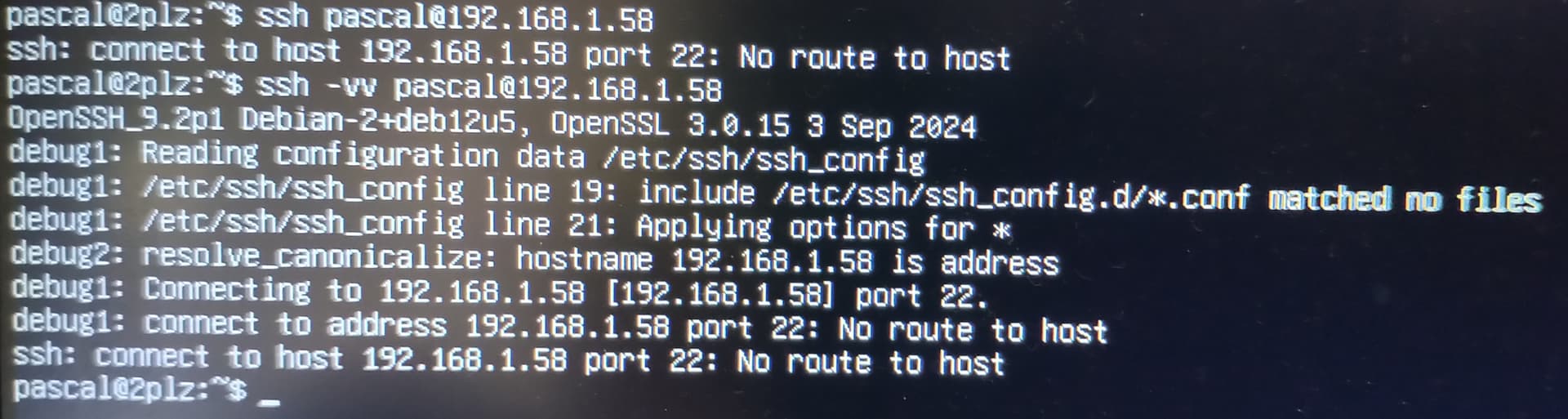
I tried to SSH the server from the outside by allowing port 22 on the BBox: it works. But I don’t want to be accessible on port 22 from the outside.
However I don’t know if the box provide a http only mode…
Finally, following @otm33 here the output of `ss -tuln | grep :22`:
```auto
pascal@2plz:~$ ss -tuln | grep :22
tcp LISTEN 0 128 0.0.0:22 0.0.0.0:*
tcp LISTEN 0 128 [::]:22 [::]:*
```
---
### Author:  [@jarod5001](https://forum.yunohost.org/u/jarod5001)
#### Post date: [May 2, 2025, 7:38am UTC](https://forum.yunohost.org/t/solved-ssh-no-route-to-host/36723/19 "2025-05-02T07:38:03Z")
Did you try to change the ssh port? On the webadmin \>tools \>YunoHost settings
---
### Author:  [@otm33](https://forum.yunohost.org/u/otm33)
#### Post date: [May 2, 2025, 9:10am UTC](https://forum.yunohost.org/t/solved-ssh-no-route-to-host/36723/21 "2025-05-02T09:10:52Z")
Bonjour @Pascal06
> [@Pascal06](#):
>
> Non, je n’ai pas essayé ss. Côté serveur ?
Oui, sur le serveur (mais vu ce que tu as dit précédemment, la réponse va être “à l’écoute”).
Si on résume :
- la connexion en ssh sur le serveur fonctionne (le service est actif et tu peux te connecter depuis l’extérieur)
- le serveur YNH communique bien avec les autres machines du même réseau (ping voire ssh vers autre machine)
- le fichier de conf /etc/ssh/sshd\_config n’a pas été modifié (et un `yunohost tools regen-conf ssh --debug` voire `yunohost tools regen-conf` global ont été tentés)
- la jail sshd est vide
- mais toutes les connexions en ssh depuis ton réseau local échouent (avec un message “no route to host”) comme si ce dernier était banni ou filtré.
Il serait peut-être intéressant de voir ce que renvoie, depuis une machine client, sur le réseau local, `nmap -p 22,80,443 192.168.1.58`
---
### Author:  [@Pascal06](https://forum.yunohost.org/u/Pascal06)
#### Post date: [May 2, 2025, 1:13pm UTC](https://forum.yunohost.org/t/solved-ssh-no-route-to-host/36723/22 "2025-05-02T13:13:04Z")
Just tried to change server ssh port to 26 and then:
```auto
$ ssh pascal@192.168.1.58 -p 26
ssh: connect to host 192.168.1.58 port 26: No route to host
```
I’m becoming crazy with that ;'(
---
### Author:  [@Pascal06](https://forum.yunohost.org/u/Pascal06)
#### Post date: [May 2, 2025, 1:17pm UTC](https://forum.yunohost.org/t/solved-ssh-no-route-to-host/36723/23 "2025-05-02T13:17:45Z")
> [@otm33](#):
>
> nmap -p 22,80,443 192.168.1.58
Salut,
voici les résultats:
```auto
pascal@pascal-Latitude-5580:~$ nmap -p 22,80,443 192.168.1.58
Starting Nmap 7.95 ( https://nmap.org ) at 2025-05-02 15:15 CEST
Note: Host seems down. If it is really up, but blocking our ping probes, try -Pn
Nmap done: 1 IP address (0 hosts up) scanned in 3.05 seconds
pascal@pascal-Latitude-5580:~$ nmap -Pn 22,80,443 192.168.1.58
Starting Nmap 7.95 ( https://nmap.org ) at 2025-05-02 15:15 CEST
Failed to resolve "22,80,443".
Nmap scan report for 192.168.1.58
Host is up (0.094s latency).
All 1000 scanned ports on 192.168.1.58 are in ignored states.
Not shown: 990 filtered tcp ports (no-response), 10 filtered tcp ports (host-unreach)
Nmap done: 1 IP address (1 host up) scanned in 6.59 seconds
pascal@pascal-Latitude-5580:~$
```
---
### Author:  [@otm33](https://forum.yunohost.org/u/otm33)
#### Post date: [May 2, 2025, 1:35pm UTC](https://forum.yunohost.org/t/solved-ssh-no-route-to-host/36723/24 "2025-05-02T13:35:34Z")
> [@Pascal06](#):
>
> ```auto
> pascal@pascal-Latitude-5580:~$ nmap -Pn 22,80,443 192.168.1.58
> Starting Nmap 7.95 ( https://nmap.org ) at 2025-05-02 15:15 CEST
> Failed to resolve "22,80,443".
>
> ```
Sans le ping, la commande est: `nmap -Pn -p 22,80,443 192.168.1.58`
=\> c’est pour voir quels ports seraient filtrés (adapte du coup le 22 en fonction du changement que tu as effectué)
> [@Pascal06](#):
>
> I’m becoming crazy with that ;'(
Il y a de quoi
[Next page](https://forum.yunohost.org/t/solved-ssh-no-route-to-host/36723.md?page=2)