# \[solved\]Domaine soudainement inacessible / Domain not accessible anymore
**URL:** https://forum.yunohost.org/t/solved-domaine-soudainement-inacessible-domain-not-accessible-anymore/20272
**Category:** Support
**Tags:** french
**Created:** [July 2, 2022, 4:13pm UTC](https://forum.yunohost.org/t/solved-domaine-soudainement-inacessible-domain-not-accessible-anymore/20272 "2022-07-02T16:13:13Z")
**Posts on this page:** 3
**Page:** 1
### Author:  [@Krakinou](https://forum.yunohost.org/u/Krakinou)
#### Post date: [July 2, 2022, 4:13pm UTC](https://forum.yunohost.org/t/solved-domaine-soudainement-inacessible-domain-not-accessible-anymore/20272/1 "2022-07-02T16:13:13Z")
🇫🇷 Français un peu plus bas!
### My YunoHost server
**Hardware:** Raspberry pi 4 at home
**YunoHost version:** 4.3.6.3
**I have access to my server :** Through SSH | through the webadmin
**Are you in a special context or did you perform some particular tweaking on your YunoHost instance ?** : no
### Description of my issue
Hello all,
I was adding a new domain to my yunohost instance to install [gossa](https://github.com/YunoHost-Apps/gossa_ynh).
I added the entry in the DNS of my registar ([ovh.com](http://ovh.com)) via a CNAME record as stated in the [install guide](https://yunohost.org/fr/dns_subdomains):
```auto
gossa CNAME mydomain.ovh
```
I added a new subdomain “gossa.mydomain.ovh” in the webadmin.
And from there, suddenly I cannot anymore access any webpage anymore?? 🤨
So I deleted the CNAME entry and the new subdomain (via ssh access) but to no avail.
When I connect to `mydomain.ovh` in firefox, I have error : “Secured connexion failed” (translation is from me) with no error code.
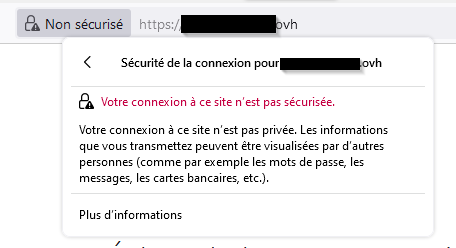
On chrome, I have error code ERR\_HTTP2\_PROTOCOL\_ERROR, but I did not find anything useful on that except that it’s an issue on the server side.
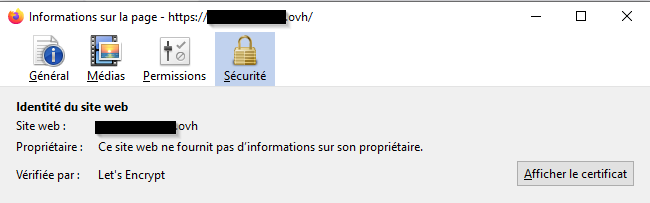
certificate seems to be ok :
When I try to connect with `www.mydomain.ovh`, I got error code SEC\_ERROR\_UNKNOWN\_ISSUER and strangely enough, that the selfsigned certificate which is used:
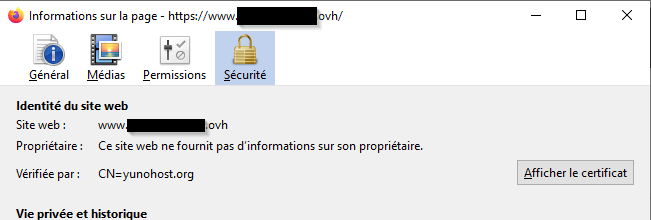
With this error I can overcome the security and access the web pages, but it’s not a real solution.
Here is what I did to try solve the issue :
- run the diagnostics : Nothing special is displayed
- Regen the let’s encrypt certificate : nothing happened
- review the A, AAAA, CAA and CNAME entry in my DNS zone, but I did not spot any thing obvious missing
- Check nginx log, I have this kind of message with error code 444 but nothing else:
```plaintext
2a01:e0a:852:d320:34ba:30b5:b76b:d87c - - [02/Jul/2022:17:43:39 +0200] "GET / HTTP/2.0" 444 0 "-" "Mozilla/5.0 (Windows NT 10.0; Win64; x64; rv:102.0) Gecko/20100101 Firefox/102.0"
```
- regen nginx conf with `yunohost tools regen-conf nginx`
I don’t have any other idea left : any help would be greatly appreciated!
Thanks!
* * *
### Mon serveur YunoHost
**Matériel:** Raspberry Pi 4
**Version de YunoHost:** 4.6.3.6
**J’ai accès à mon serveur :** En SSH | Par la webadmin
**Êtes-vous dans un contexte particulier ou avez-vous effectué des modificiations particulières sur votre instance ?** : non
### Description du problème
Bonjour à tous,
J’étais en train d’installer un nouveau domaine sur mon yunohost pour pouvoir installer [gossa](https://github.com/YunoHost-Apps/gossa_ynh).
J’ai donc ajouter l’entrée dans les DNS de mon fournisseur ([ovh.com](http://ovh.com)) avec une entrée CNAME comme indiqué dans le [guide d’installation](https://yunohost.org/fr/dns_subdomains):
```auto
gossa CNAME mydomain.ovh
```
Ensuite, j’ai ajouté un nouveau sous-domaine `gossa.mydomain.ovh` dans la webadmin.
Et là : patatra, je ne peux plus accéder à aucune page web?? 🤨
J’ai donc essayé de supprimer le CNAME et le nouveau sous-domaine (par ssh) mais sans succès.
Quand je me connecte à `mydomain.ovh` dans firefox, j’ai l’erreur : “Échec de la connexion sécurisée” sans code erreur particulier:

Dans chrome, j’ai un code erreur ERR\_HTTP2\_PROTOCOL\_ERROR, mais je n’ai pas trouvé de doc particulière sur ce code à part qu’il s’agit d’un pb coté serveur.
Les certificats semble pourtant ok:

Si je tente de me connecter à `www.mydomain.ovh`, là j’ai l’erreur SEC\_ERROR\_UNKNOWN\_ISSUER et (assez bizarement) on dirait que c’est le certificat autosigné qui est utilisé:

En passant par là, je peux alors contourner l’erreur pour accéder à la webadmin, mais ce n’ai pas vraiment une solution définitive.
Voici ce que j’ai fait pour essayer de régler le pb:
- faire tourner les diagnostics : Rien de spécial n’est trouvé
- Régénérer les certificats let’s encrypt : Rien
- revalider mes entrées A, AAAA, CAA and CNAME dans la zone DNS, mais je n’ai rien vu qui me semble étrange.
- Vérifier les logs de nginx, J’ai une erreur 444 à chaque tentative de connexion mais rien d’autre :
```plaintext
2a01:e0a:852:d320:34ba:30b5:b76b:d87c - - [02/Jul/2022:17:43:39 +0200] "GET / HTTP/2.0" 444 0 "-" "Mozilla/5.0 (Windows NT 10.0; Win64; x64; rv:102.0) Gecko/20100101 Firefox/102.0"
```
- Régénérer la config nginx avec `yunohost tools regen-conf nginx` : aucun résultat…
Je n’ai plus aucune autre idée… La moindre aide serait vraiment apprécié! Merci!
Krakinou
---
### Author:  [@Krakinou](https://forum.yunohost.org/u/Krakinou)
#### Post date: [July 2, 2022, 9:09pm UTC](https://forum.yunohost.org/t/solved-domaine-soudainement-inacessible-domain-not-accessible-anymore/20272/2 "2022-07-02T21:09:35Z")
OK, after a bit of tweeking, it appears that this is the [GeoIP blocking](https://forum.yunohost.org/t/tuto-bloquer-les-requetes-selon-le-pays/9947) that was responsible for that.
I noticed after a while that in fact, if I was accessing the webpage by forcing IPv4, it was working while accessing with IPv6 was not. So it seems that the filtering on IPv6 is a little bit to efficient.
What happenned was that creating the domain regenered the conf, and in some bizarre way created the issue: if I remove the hook and regen the conf, everything is working fine again.
---
### Author:  [@system](https://forum.yunohost.org/u/system)
#### Post date: [August 1, 2022, 9:09pm UTC](https://forum.yunohost.org/t/solved-domaine-soudainement-inacessible-domain-not-accessible-anymore/20272/3 "2022-08-01T21:09:49Z")
This topic was automatically closed 30 days after the last reply. New replies are no longer allowed.