# Set a Cronjob for shell script
**URL:** https://forum.yunohost.org/t/set-a-cronjob-for-shell-script/23173
**Category:** Advanced use case
**Tags:** english
**Created:** [January 18, 2023, 10:26pm UTC](https://forum.yunohost.org/t/set-a-cronjob-for-shell-script/23173 "2023-01-18T22:26:04Z")
**Posts on this page:** 5
**Page:** 1
### Author:  [@izakis](https://forum.yunohost.org/u/izakis)
#### Post date: [January 18, 2023, 10:26pm UTC](https://forum.yunohost.org/t/set-a-cronjob-for-shell-script/23173/1 "2023-01-18T22:26:04Z")
### My YunoHost server
**Hardware:** computer
**YunoHost version:** 11.0.11
**I have access to my server :** Through direct access via keyboard / screen
**Are you in a special context or did you perform some particular tweaking on your YunoHost instance ?** : no
Hello,
There is anything on Yunohost that avoid a use of custom cronjobs?
i am trying to set a cronjob for a shell script i wrote to update my public ip,
the script chmod’s to be executed and chown for root, the cronjob is as root,
am i doing something wrong?
no matter what i am trying it will not run,
thank you
---
### Author:  [@tierce](https://forum.yunohost.org/u/tierce)
#### Post date: [January 19, 2023, 7:52am UTC](https://forum.yunohost.org/t/set-a-cronjob-for-shell-script/23173/2 "2023-01-19T07:52:35Z")
As far as I know, there is nothing to avoid the use of a cronjob.
Did you use `crontab -e` as `root` or create a cronfile in `/etc/cron.d/` or something else ?
I prefer to create a file…
```auto
nano /etc/cron.d/democron
```
Put somethings like
```auto
* * * * * username command >> /var/log/democron.log 2>&1
```
And save it.
I found a nice [cron for humans](https://cron.help/) to help me define the schedules.
---
### Author:  [@izakis](https://forum.yunohost.org/u/izakis)
#### Post date: [January 19, 2023, 3:32pm UTC](https://forum.yunohost.org/t/set-a-cronjob-for-shell-script/23173/3 "2023-01-19T15:32:11Z")
@tierce
Thank you very much your reply,
I did use several methods to create a cronjob due to the first one didn’t worked for me, which I don’t remember all of them now,
but finally till I will get any answer on the forum, i decided to delete all crons with a command and clear it all,
yes I just did try this again:
crontab -e (as root), and it doesn’t works,
I did make sure the shell file have a full chmod + ownership for root, and it can be executed by:
sed -i -e ‘s/\r$//’ scriptname.sh
and when i execute it manually its all good, does update the ip + writes the log,
now I tried your suggestion:
nano /etc/cron.d/democron
and its still doesn’t works
please take a look how it is look like:

I have tired also:
\*/1 \* \* \* \* root /etc/eetsceeck/scripts/updateip.sh
and
1 \* \* \* \* /etc/eetsceeck/scripts/updateip.sh
and
1 \* \* \* \* root /etc/eetsceeck/scripts/updateip.sh
also I tried:
sudo /etc/init.d/updateip start
also I tired:
sudo service cron start
this is my script:
```auto
# EXECUTE COMMAND BY CURL:
curl "https://ipv4.dynv6.com/api/update?ipv4=auto&ipv6=6to4&host=epnetwork.cf&token=xxxxxxxxxxxxxxxxxxxx&zone=epnetwork.cf"
# PRINT MESSAGE:
echo 'Done Updating IP'
# DEFINE VARIABLES:
# SYNTAX HOUR-MINUTES-SECOND MONTH - DAY - YEAR.
current_date_time="`date "+%H:%M:%S - %m.%d.%y"`";
my_current_public_ip="`curl "ipconfig.io"`";
# PRINT MESSAGES:
echo 'Writes The log, Please Wait...'
printf "\n IP $my_current_public_ip Being Updated on: $current_date_time For Dynv6 (epnetwork.cf); " >> /etc/eetsceeck/scripts/updateip.log
echo 'Done Updating IP.'
# END OF FILE.
################################################################
################################################################
################################################################
################################################################
```
once its executed its supposed to write a log onto /etc/eetsceeck/scripts/updateip.log
which looks like this:
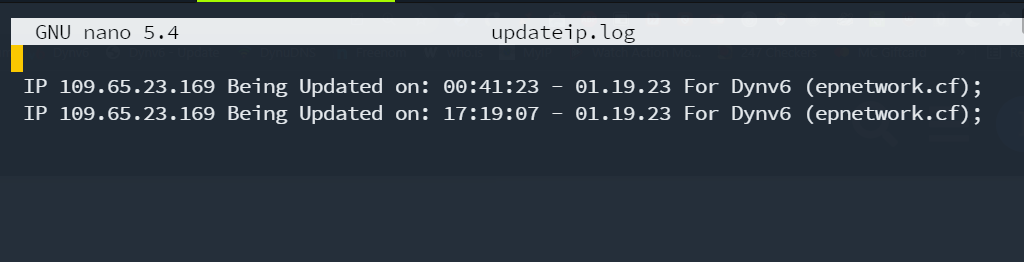
as you see those lines been written while I executed the script manually,
I did try also:
/var/spool/cron/crontabs
I don’t know what to do or to try anymore,
---
### Author:  [@izakis](https://forum.yunohost.org/u/izakis)
#### Post date: [January 19, 2023, 9:04pm UTC](https://forum.yunohost.org/t/set-a-cronjob-for-shell-script/23173/4 "2023-01-19T21:04:57Z")
i found the problem,
all these tutorials on the internet worth nothing.
the cron should run as usual with the dot at the beginning.
and without the \*/
the internet is full with crap.
that’s the right syntax:
1 \* \* \* \* ./etc/eetsceeck/scripts/updateip.sh
---
### Author:  [@system](https://forum.yunohost.org/u/system)
#### Post date: [February 18, 2023, 9:05pm UTC](https://forum.yunohost.org/t/set-a-cronjob-for-shell-script/23173/5 "2023-02-18T21:05:35Z")
This topic was automatically closed 30 days after the last reply. New replies are no longer allowed.