# \[Résolu\] ERREUR - Impossible de mettre à niveau piped - ERROR - Could not upgrade piped
**URL:** https://forum.yunohost.org/t/resolu-erreur-impossible-de-mettre-a-niveau-piped-error-could-not-upgrade-piped/29892
**Category:** Support apps
**Tags:** invidious, bug, french, english
**Created:** [June 4, 2024, 12:02pm UTC](https://forum.yunohost.org/t/resolu-erreur-impossible-de-mettre-a-niveau-piped-error-could-not-upgrade-piped/29892 "2024-06-04T12:02:36Z")
**Posts on this page:** 3
**Page:** 1
### Author:  [@JfmbLinux](https://forum.yunohost.org/u/JfmbLinux)
#### Post date: [June 4, 2024, 12:02pm UTC](https://forum.yunohost.org/t/resolu-erreur-impossible-de-mettre-a-niveau-piped-error-could-not-upgrade-piped/29892/1 "2024-06-04T12:02:37Z")
🇫🇷
Bonjour à tous,
Impossible de mettre à jour Piped, une erreur s’est produite dans le script de mise à niveau de l’application.
```auto
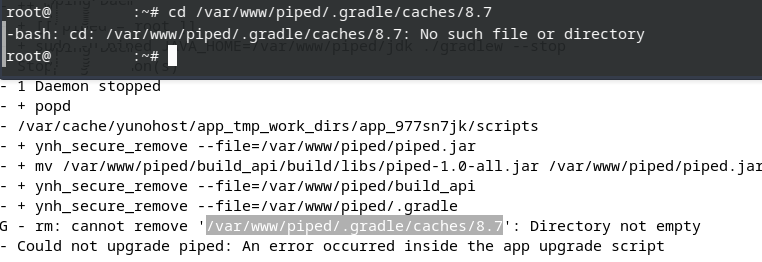
2024-06-03 17:30:53,291: WARNING - rm: cannot remove '/var/www/piped/.gradle/caches/8.7': Directory not empty
2024-06-03 17:30:54,293: ERROR - Could not upgrade piped: An error occurred inside the app upgrade script
```
Impossible de supprimer `'/var/www/piped/.gradle/caches/8.7'` : répertoire non vide.
Sauf que le répertoire en question, quand je veux y accéder avec la commande :
`-bash: cd: /var/www/piped/.gradle/caches/8.7: No such file or directory`, voici la réponse : aucun fichier ou répertoire de ce type 🤔
Merci pour votre aide 🙏
🇬🇧
Hello everyone,
Unable to update Piped, an error occurred in the application upgrade script.
```auto
2024-06-03 17:30:53,291: WARNING - rm: cannot remove '/var/www/piped/.gradle/caches/8.7': Directory not empty
2024-06-03 17:30:54,293: ERROR - Could not upgrade piped: An error occurred inside the app upgrade script
```
Unable to delete `'/var/www/piped/.gradle/caches/8.7'`: directory not empty.
Except that the directory in question, when I want to access it with the command:
`-bash: cd: /var/www/piped/.gradle/caches/8.7: No such file or directory`, here is the answer: No such file or directory 🤔

Thanks for your help 🙏
---
### Author:  [@JfmbLinux](https://forum.yunohost.org/u/JfmbLinux)
#### Post date: [June 10, 2024, 3:45pm UTC](https://forum.yunohost.org/t/resolu-erreur-impossible-de-mettre-a-niveau-piped-error-could-not-upgrade-piped/29892/2 "2024-06-10T15:45:05Z")
🇫🇷
Salut,
Suite et fin.
J’ai trouvé une solution, je ne sais pas si c’est grâce à cela, mais ç’a fonctionné.
J’ai effectué un peu de ménage dans mon disque avec cette commande :
`sudo yunohost tools basic-space-cleanup`, cela m’a permis de récupérer plus de 2,7 Go et après un reboot du système.
J’ai relancé la mise à jour de Piped et la mise à jour s’est bien déroulée.
Problème résolu.
🇬🇧
Hello
Continuation and end.
I found a solution, I don’t know if it’s thanks to that, but it worked.
I did a bit of cleaning up my disk with this command:
‘sudo yunohost tools basic-space-cleanup’, this allowed me to recover more than 2.7 GB and after a system reboot.
I ran the Piped update again and the update went smoothly.
Problem solved.
---
### Author:  [@system](https://forum.yunohost.org/u/system)
#### Post date: [June 25, 2024, 3:45pm UTC](https://forum.yunohost.org/t/resolu-erreur-impossible-de-mettre-a-niveau-piped-error-could-not-upgrade-piped/29892/3 "2024-06-25T15:45:10Z")
This topic was automatically closed 15 days after the last reply. New replies are no longer allowed.