# \[Redirect\_ynh\] Share your case examples and config
**URL:** https://forum.yunohost.org/t/redirect-ynh-share-your-case-examples-and-config/2182
**Category:** Apps
**Tags:** french, english
**Created:** [November 24, 2016, 6:24am UTC](https://forum.yunohost.org/t/redirect-ynh-share-your-case-examples-and-config/2182 "2016-11-24T06:24:48Z")
**Posts on this page:** 20
**Page:** 1
### Author:  [@scith](https://forum.yunohost.org/u/scith)
#### Post date: [November 24, 2016, 6:24am UTC](https://forum.yunohost.org/t/redirect-ynh-share-your-case-examples-and-config/2182/1 "2016-11-24T06:24:48Z")
Hello,
With @opi we have just updated the [Redirect app](https://github.com/YunoHost-Apps/redirect_ynh).
This app adds a link on your user panel redirecting to another page or app. Some redirects can even be protected behind the SSO.
I have detailed some case examples and config types in the readme.
Feel free to share in this topic your use of this app (for Docker containers? External links? …) and the Nginx customization you had to do.
The idea behind this sharing is to (1) see how the app is used, (2) see if the nginx default config could be improved, (3) provide other users with customized Nginx files for certain apps.
Thanks and feel free to contribute 🙂
---
### Author:  [@scith](https://forum.yunohost.org/u/scith)
#### Post date: [November 24, 2016, 7:24am UTC](https://forum.yunohost.org/t/redirect-ynh-share-your-case-examples-and-config/2182/2 "2016-11-24T07:24:31Z")
Personally, I have initially packaged this app to use it with Docker containers.
Currently, I use it to redirect (proxy+SSO) to multiple apps from a “Stealthbox” Docker container (couchpotato, deluge, sickrage…).
I also use it to create tiles redirecting (visible) to Owncloud apps (contacts, calendar…).
Recently, another user posted [a customized Nginx for the “glowing-bears” app](https://forum.yunohost.org/t/proxy-nginx-websocket/2169/3)
---
### Author:  [@arthurlutz](https://forum.yunohost.org/u/arthurlutz)
#### Post date: [February 27, 2017, 1:15pm UTC](https://forum.yunohost.org/t/redirect-ynh-share-your-case-examples-and-config/2182/3 "2017-02-27T13:15:57Z")
I have a server with a bunch of websites served by apache. I didn’t want to install yunohost directly on that host so I installed in a VM that sits behind a NAT on an internal (virtual) subnetwork. For now I am accessing the yunohost web server through some ssh tunnels.
Redirect app is helping me serve these existing websites (awaiting proper migration if/when possible).
This is how to automate the configuration :
- login via ssh
- write the list of domain names in in a text file
- run the following bash loops (assuming 192.168.122.1 is the internal IP of your virtual machine host) :
```bash
for i in `cat domains.list `; do yunohost --admin-password YOURADMINPASSWORD domain add $i; done
for i in `cat domains.list `; do yunohost app install https://github.com/YunoHost-Apps/redirect_ynh --args "domain=$i&path=/&redirect_path=http://192.168.122.1&is_public=1&redirect_type=proxy" --label $i; done
```
then DNAT the 80/443 to your VM (192.168.122.Y) and your existing websites should be served via apache _and_ nginx.
---
### Author:  [@kanhu](https://forum.yunohost.org/u/kanhu)
#### Post date: [May 10, 2017, 3:03pm UTC](https://forum.yunohost.org/t/redirect-ynh-share-your-case-examples-and-config/2182/4 "2017-05-10T15:03:53Z")
Will it be possible to redirect localhost:5290/http-bind to something like im.domian.tld/http-bind like Yunohost have ?
[https://im.yunohost.org/http-bind](https://im.yunohost.org/http-bind)
---
### Author:  [@scith](https://forum.yunohost.org/u/scith)
#### Post date: [May 10, 2017, 3:19pm UTC](https://forum.yunohost.org/t/redirect-ynh-share-your-case-examples-and-config/2182/5 "2017-05-10T15:19:11Z")
Hi suppose, you just have to install redirect\_ynh and then customize the nginx accordingly
---
### Author:  [@kanhu](https://forum.yunohost.org/u/kanhu)
#### Post date: [May 10, 2017, 3:43pm UTC](https://forum.yunohost.org/t/redirect-ynh-share-your-case-examples-and-config/2182/6 "2017-05-10T15:43:46Z")
@scith
Thanks for the quick reply. It works \o/
---
### Author:  [@Issa](https://forum.yunohost.org/u/Issa)
#### Post date: [January 28, 2018, 12:37pm UTC](https://forum.yunohost.org/t/redirect-ynh-share-your-case-examples-and-config/2182/7 "2018-01-28T12:37:34Z")
hello i need a reverse proxy https — HTTP
how do that please
---
### Author:  [@Benjamin](https://forum.yunohost.org/u/Benjamin)
#### Post date: [February 5, 2018, 1:02am UTC](https://forum.yunohost.org/t/redirect-ynh-share-your-case-examples-and-config/2182/8 "2018-02-05T01:02:24Z")
Hello,
I’m trying to redirect https//mon.domaine.org/libretime to an LXC container that runs on 10.0.3.200 an apache server with a website on /
With this configuration :
```
location /libretime/ {
proxy_pass http://10.0.3.200/;
proxy_redirect off;
proxy_set_header Host $host;
proxy_set_header X-Real-IP $remote_addr;
proxy_set_header X-Forwarded-Proto $scheme;
proxy_set_header X-Forwarded-For $proxy_add_x_forwarded_for;
proxy_set_header X-Forwarded-Host $server_name;
proxy_set_header X-Forwarded-Port $server_port;
proxy_http_version 1.1;
proxy_set_header Upgrade $http_upgrade;
proxy_set_header Connection "upgrade";
# Include SSOWAT user panel.
include conf.d/yunohost_panel.conf.inc;
more_clear_input_headers 'Accept-Encoding';
}
```
I can get the homepage but not the css file, the server is looking at [https://mon.domaine.org/css/radio-page/radio-page.css](https://mon.domaine.org/css/radio-page/radio-page.css) whereas it is at [https://mon.domaine.org/libretime/css/radio-page/radio-page.css](https://mon.domaine.org/libretime/css/radio-page/radio-page.css).
Did I missed a parameter in the config ?
Thanks for any advice + this nice app
++
b
---
### Author:  [@Aleks](https://forum.yunohost.org/u/Aleks)
#### Post date: [February 5, 2018, 1:24am UTC](https://forum.yunohost.org/t/redirect-ynh-share-your-case-examples-and-config/2182/9 "2018-02-05T01:24:30Z")
> [@Benjamin](#):
>
> I can get the homepage but not the css file, the server is looking at [https://mon.domaine.org/css/radio-page/radio-page.css](https://mon.domaine.org/css/radio-page/radio-page.css) whereas it is at [https://mon.domaine.org/libretime/css/radio-page/radio-page.css](https://mon.domaine.org/libretime/css/radio-page/radio-page.css).
It could be your app not understanding properly that its root URL is not your.domain.tld but your.domain.tld/libretime ? Like, some apps have this kind of parameter in their config files… Depends of how the app is built. (NB : by ‘app’ here, i mean your website)
---
### Author:  [@Benjamin](https://forum.yunohost.org/u/Benjamin)
#### Post date: [February 5, 2018, 3:55pm UTC](https://forum.yunohost.org/t/redirect-ynh-share-your-case-examples-and-config/2182/10 "2018-02-05T15:55:28Z")
Hi,
Yes, thanks, it seems to be the good direction, now I manage to get the css if I modify the config file of the webapp, but the login button drive me to yunohost login page …
++
b
---
### Author:  [@mokas01](https://forum.yunohost.org/u/mokas01)
#### Post date: [June 22, 2018, 12:43pm UTC](https://forum.yunohost.org/t/redirect-ynh-share-your-case-examples-and-config/2182/11 "2018-06-22T12:43:50Z")
Just tried and get Sonarr ([sonarr.tv](http://sonarr.tv)) to work thanks to ynh\_redirect (sonarr is manually installed through the repo as described [here](https://github.com/Sonarr/Sonarr/wiki/Installation#linux)
> url : dedicated\_subdomain.domain.tld
> path : /
> redirect\_from (i forgot the real variable name) : [http://127.0.0.1:8989](http://127.0.0.1:8989)
> type: proxy
and it works \o/
As each and everytime, thanks to the amazing work. I couldn’t have easily configured a reverse proxy (the name and concept of which i discovered reading the readme and the forum) so easily and quickly
Ynh rocks 🚀
---
### Author:  [@mrbenns](https://forum.yunohost.org/u/mrbenns)
#### Post date: [June 9, 2019, 9:39am UTC](https://forum.yunohost.org/t/redirect-ynh-share-your-case-examples-and-config/2182/12 "2019-06-09T09:39:34Z")
Having a problem with Redirect, can’t get it to see SOnarr which is running on my Windows machine in the LAN. Redirect itself is running on Yunohost on a VM on the same pc. It just gives me a 502 error. I have tried all the different options and I have it working to redirect to a version of Ombi running on the same PC
---
### Author:  [@fidoboulettes](https://forum.yunohost.org/u/fidoboulettes)
#### Post date: [July 9, 2019, 5:04am UTC](https://forum.yunohost.org/t/redirect-ynh-share-your-case-examples-and-config/2182/13 "2019-07-09T05:04:31Z")
Bonjour,
je ne suis pas sur d’avoir bien compris l’usage de cette app.
Est ce qu’elle permet de faire une redirection vers une autre app hebergé sur un autre serveur du réseau local?
Si oui, je n’ai pas compris comment l’utiliser… En fait, je voudrai, à partir de mon panel yunohost, faire une redirection sur mon appli domotique (jeedom) qui se situe sur un(e) rasperry qui n’a accès qu’à mon réseau local.
Merci de votre aide
---
### Author:  [@anonyme18](https://forum.yunohost.org/u/anonyme18)
#### Post date: [July 9, 2019, 8:04am UTC](https://forum.yunohost.org/t/redirect-ynh-share-your-case-examples-and-config/2182/14 "2019-07-09T08:04:28Z")
Bonjour,
Ton utilisation me paraît tout à fait correcte.
Personnellement, pour la tester, j’avais laissé les options par défaut et déclaré l’URL de mon site distant.
---
### Author:  [@fidoboulettes](https://forum.yunohost.org/u/fidoboulettes)
#### Post date: [August 22, 2019, 6:28am UTC](https://forum.yunohost.org/t/redirect-ynh-share-your-case-examples-and-config/2182/15 "2019-08-22T06:28:04Z")
Bonjour,
hé ben ça y est, j’ai enfin résolu mon problème… en fait, c’était la variable path qui n’allait pas.
Donc, si ça peut aider… pour rappel, mon jeedom local est dispo à une addresse locale:
type 192.XXX.XXX.XXX:
Dans yunhost:
Libellé: S’que vous voulez (moi: Jeedom)
Domaine: [domo.NDD.fr](http://domo.NDD.fr) (en gros j’ai fait une redirection sous-domaine vers mon domaine principal en CNAME)
Chemin: / (j’ai laissé vide avec juste le slash)
Chemin: IP locale en 192.XXX.XXX.XXX
Type: dans mon cas proxy invisible accessible à tous
Voilà, j’espère que c’est assez clair et que ça va aider un peu
---
### Author:  [@donotos](https://forum.yunohost.org/u/donotos)
#### Post date: [September 1, 2019, 11:17am UTC](https://forum.yunohost.org/t/redirect-ynh-share-your-case-examples-and-config/2182/16 "2019-09-01T11:17:48Z")
Apres pas mal de galeres je partage avec vous mon fichier custom pour ceux qui voudrai rediriger la WEBUI de qbittorent:
```
location /qbt {
rewrite ^(.*[^/])$ $1/ redirect;
}
location ~ ^/qbt/(?.*) {
proxy_pass http://192.168.1.205:8081/$url;
proxy_hide_header Referer;
proxy_hide_header Origin;
proxy_set_header Referer '';
proxy_set_header Origin '';
# Include SSOWAT user panel.
include conf.d/yunohost_panel.conf.inc;
more_clear_input_headers 'Accept-Encoding';
}
```
---
### Author:  [@djib](https://forum.yunohost.org/u/djib)
#### Post date: [February 15, 2020, 3:18pm UTC](https://forum.yunohost.org/t/redirect-ynh-share-your-case-examples-and-config/2182/17 "2020-02-15T15:18:42Z")
Great plugin, thanks.
I used it to migrate a Wordpress to a new domain and keep the old links working.
I added `$request_uri;` to the end of the `return 301` statement and “voilà!”.
Thanks.
---
### Author:  [@Issa](https://forum.yunohost.org/u/Issa)
#### Post date: [February 20, 2020, 5:19pm UTC](https://forum.yunohost.org/t/redirect-ynh-share-your-case-examples-and-config/2182/18 "2020-02-20T17:19:43Z")
Bonjour à tous,
savez vous comment faire un reverse proxy transparent mais sur du https ?
j’ai un serveur proxmox et je n’arrive pas à rediriger le flux http et hhtps par mon ynohohst ?
qu’en pensez vous svp
---
### Author:  [@scith](https://forum.yunohost.org/u/scith)
#### Post date: [February 27, 2020, 2:55pm UTC](https://forum.yunohost.org/t/redirect-ynh-share-your-case-examples-and-config/2182/19 "2020-02-27T14:55:58Z")
Bonjour, normalement c’est automatiquement en HTTPS. Il suffit de mettre l’adresse http dans le proxy (pas la https). Le proxy restera en HTTPS
---
### Author:  [@Issa](https://forum.yunohost.org/u/Issa)
#### Post date: [April 1, 2020, 3:11am UTC](https://forum.yunohost.org/t/redirect-ynh-share-your-case-examples-and-config/2182/20 "2020-04-01T03:11:40Z")
Bonjour,
ça ne fonctionne pas :
j’ai un nas qnap qui fonctionne en local via l’adresse suivante :
[https://192.168.50.100/cgi-bin/](https://192.168.50.100/cgi-bin/)
et j’aimerais donc le faire passer par un nom de domaine issue de yunohost du style
[qnap.domaine.fr](http://qnap.domaine.fr)
voici ma conf yunohost de redirect :
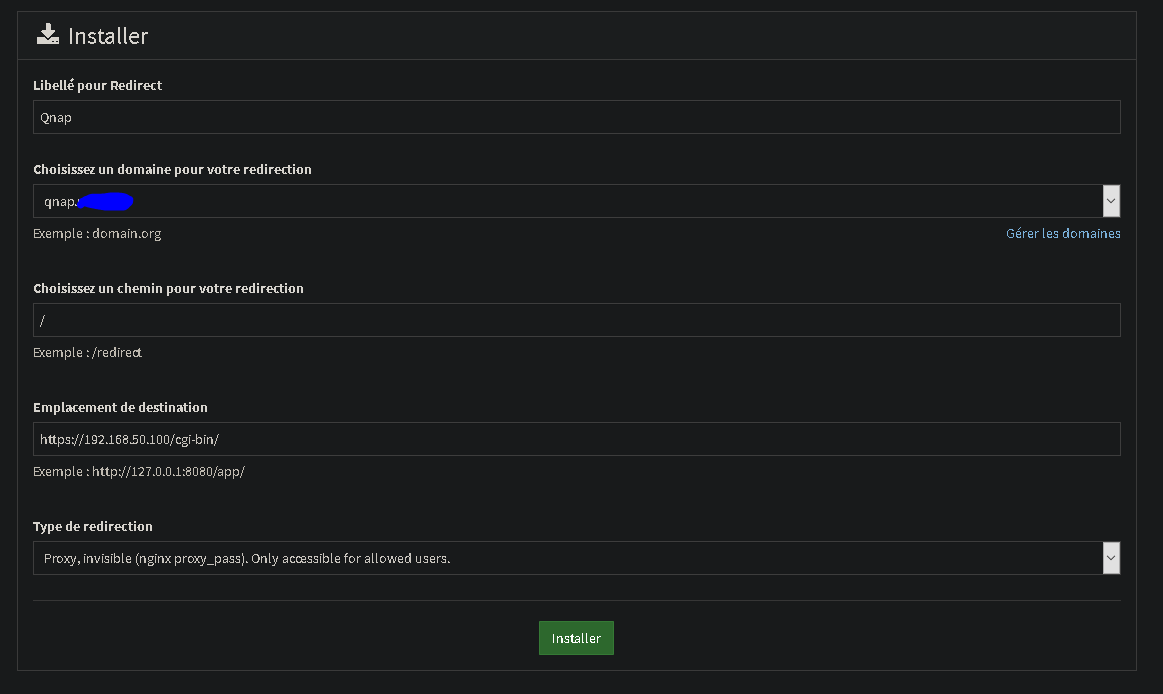
Voici ma conf sur mon qnap :
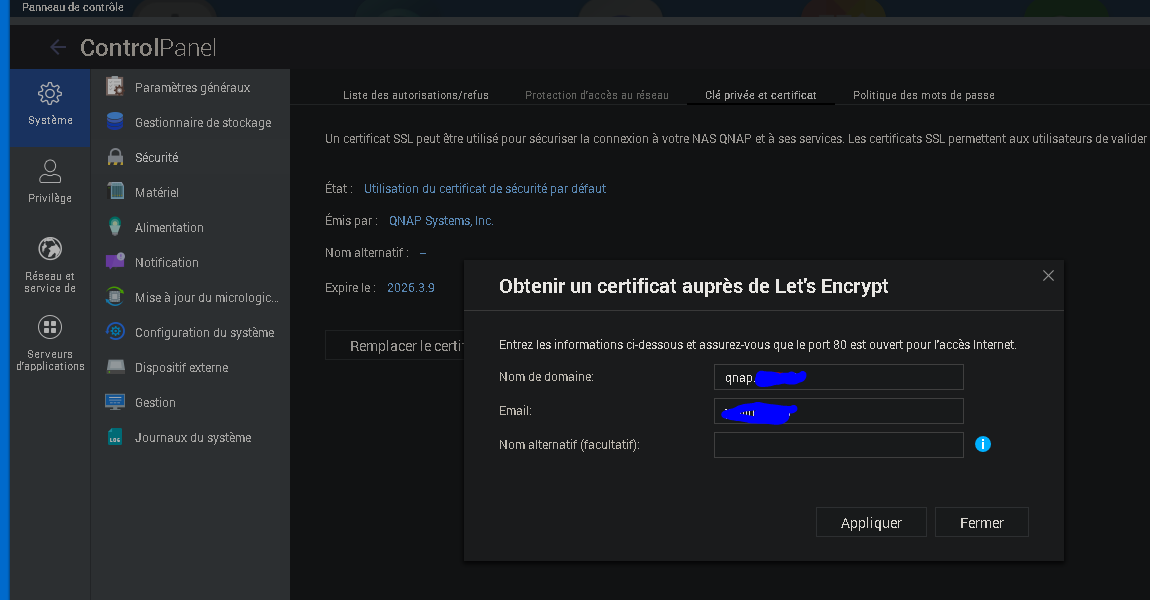
et lorsque j’éssai de valider mon certificat let’s encrypt sur mon Qnap :
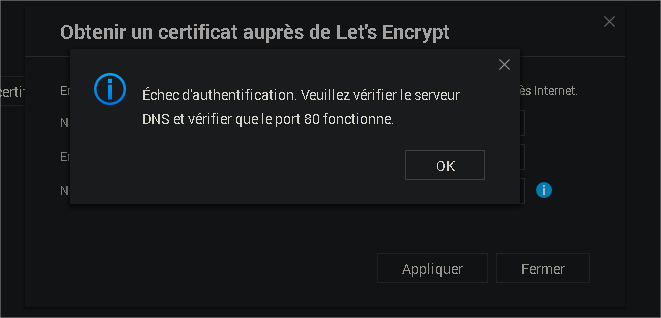
l’erreur que j’ai dans mon navigateur :
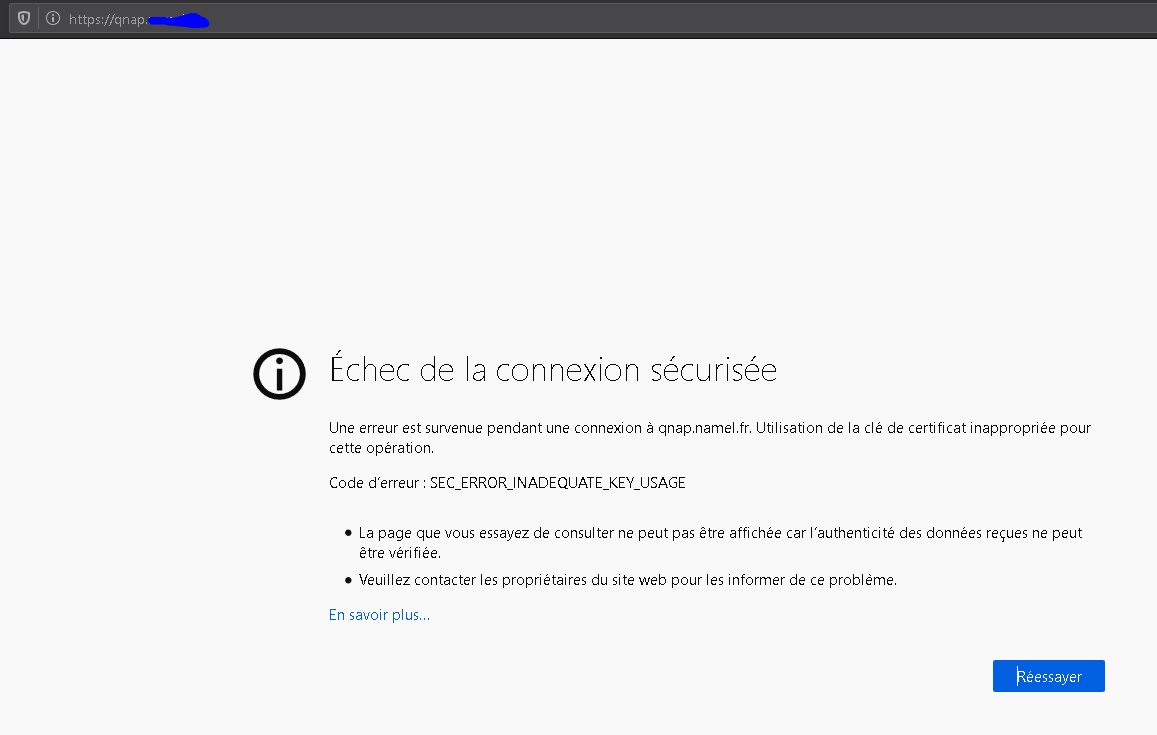
savez vous comment résoudre ce probléme
merci par avance
[Next page](https://forum.yunohost.org/t/redirect-ynh-share-your-case-examples-and-config/2182.md?page=2)