### Author:  [@Fresne](https://forum.yunohost.org/u/Fresne)
#### Post date: [April 7, 2024, 1:40pm UTC](https://forum.yunohost.org/t/problems-with-docker-and-redirect/29212/1 "2024-04-07T13:40:35Z")
### My YunoHost server
**Hardware:** Raspberry Pi 4 at home
**YunoHost version:** 11.2.9.1 (stable)
**I have access to my server :** Through SSH | through the webadmin | direct access via keyboard / screen | …
**Are you in a special context or did you perform some particular tweaking on your YunoHost instance ?** : no
**My IT skill** : Proto newbie confortable with command line
## Description of my issue:
Cant logging to slskd (soulseeek) installed in a container (docker-compose)
## Things I tried before coming here 🙂
-Modify the redirect.conf file of my app :
```auto
location / {
proxy_pass http://localhost:5030;
proxy_redirect off;
proxy_set_header Host $host;
proxy_set_header X-Real-IP $remote_addr;
proxy_set_header X-Forwarded-Proto $scheme;
proxy_set_header X-Forwarded-For $proxy_add_x_forwarded_for;
proxy_set_header X-Forwarded-Host $server_name;
proxy_set_header X-Forwarded-Port $server_port;
proxy_http_version 1.1;
proxy_set_header Upgrade $http_upgrade;
proxy_set_header Connection "upgrade";
# Unset Authorization and Cookie headers **<-- thats the modification I did**
proxy_set_header Authorization "";
proxy_set_header Cookie "";
# Include SSOWAT user panel.
include conf.d/yunohost_panel.conf.inc;
more_clear_input_headers 'Accept-Encoding';
}
```
\*- I have found this post on github :
>
>
> Hi,
>
> I have the slskd container running on a Yunohost instance. It is on a sub…domain configured with the redirect. Basically it should work like a normal reverse proxy installation with nginx. I have disabled HTTPS in slskd since the subdomain enforces SSL with a redirect anyway.
>
> I can load the login page without problems. When I try to login with correct username and password i cannot open the session. I dont get visual 401 error that is shown with a wrong password. Here is the log of the requests.
> \`\`\`
> \[slskd.Application\] \[21:30:13 INF\] Logged in to the Soulseek server as \*\*\*\*\*\*
> \[slskd.Application\] \[21:30:13 INF\] Version 0.19.5.0 is up to date.
> \[Serilog.AspNetCore.RequestLoggingMiddleware\] \[21:30:22 INF\] HTTP GET /index.html responded 200 in 99.2081 ms
> \[Serilog.AspNetCore.RequestLoggingMiddleware\] \[21:30:22 INF\] HTTP GET /api/v0/session/enabled responded 200 in 50.5017 ms
> \[Serilog.AspNetCore.RequestLoggingMiddleware\] \[21:30:22 INF\] HTTP GET /api/v0/session responded 401 in 26.7708 ms
> \[Serilog.AspNetCore.RequestLoggingMiddleware\] \[21:30:33 INF\] HTTP POST /api/v0/session responded 200 in 77.5231 ms
> \[Serilog.AspNetCore.RequestLoggingMiddleware\] \[21:30:33 INF\] HTTP GET /api/v0/session/enabled responded 200 in 10.3989 ms
> \[Serilog.AspNetCore.RequestLoggingMiddleware\] \[21:30:33 INF\] HTTP POST /hub/search/negotiate responded 401 in 11.2866 ms
> \[Serilog.AspNetCore.RequestLoggingMiddleware\] \[21:30:33 INF\] HTTP GET /api/v0/session responded 401 in 10.3335 ms
> \`\`\`\`
>
> The following screenshots show the state after trying to log in with correct username and password.
>
> !\[image\](https://github.com/slskd/slskd/assets/10211013/ae5cc8a8-05de-4f08-81b5-39176411bd15)
>
>
>
> Can you help me figure out whats wrong?
> Thanks, Caspar
\*Which drove me to this one 🙂
> [@Unable to connect in some containerized app if logged in Yunohost](https://forum.yunohost.org/t/unable-to-connect-in-some-containerized-app-if-logged-in-yunohost/26906):
>
> My YunoHost server Hardware: VPS bought online… YunoHost version: 11.2.5 I have access to my server : Through SSH Are you in a special context or did you perform some particular tweaking on your YunoHost instance ? : no Description of my issue With some applications in containers the authentication fails until i log out from Yunohost. That the case with containers like Mealie or Portainer I use the Redirect app for a public proxy (as a private proxy i’m fully stuck as i can’t log out) and …
It seems to me that I have the exact same issue , only I cannot find the way to resolve it !
Coud someone help please? @tituspijean , you were the one giving the solution maybe you could show me the way ?
Thanks again to all yunohost team for all the great work
---
### Author:  [@tituspijean](https://forum.yunohost.org/u/tituspijean)
#### Post date: [April 7, 2024, 2:29pm UTC](https://forum.yunohost.org/t/problems-with-docker-and-redirect/29212/2 "2024-04-07T14:29:57Z")
After your modification, have you reloaded NGINX with `systemctl reload nginx`?
I do not know enough about the headers, but there’s a risk that the authorization and cookie are reset upon every request with your hack. That would reset even a successful login.
Have you run the same command as I suggested in the other thread? If so, what’s its output?
Can you confirm you have the exact same issue as the one described on Github, notably the successful POST request to `/session` but other requests failing?
---
### Author:  [@Fresne](https://forum.yunohost.org/u/Fresne)
#### Post date: [April 7, 2024, 8:48pm UTC](https://forum.yunohost.org/t/problems-with-docker-and-redirect/29212/3 "2024-04-07T20:48:34Z")
Wooa I didn’t expect such a rapid answer !
I did reload nginx after modifications but nothing changed .
Here is a print screen of what I get in my browser .
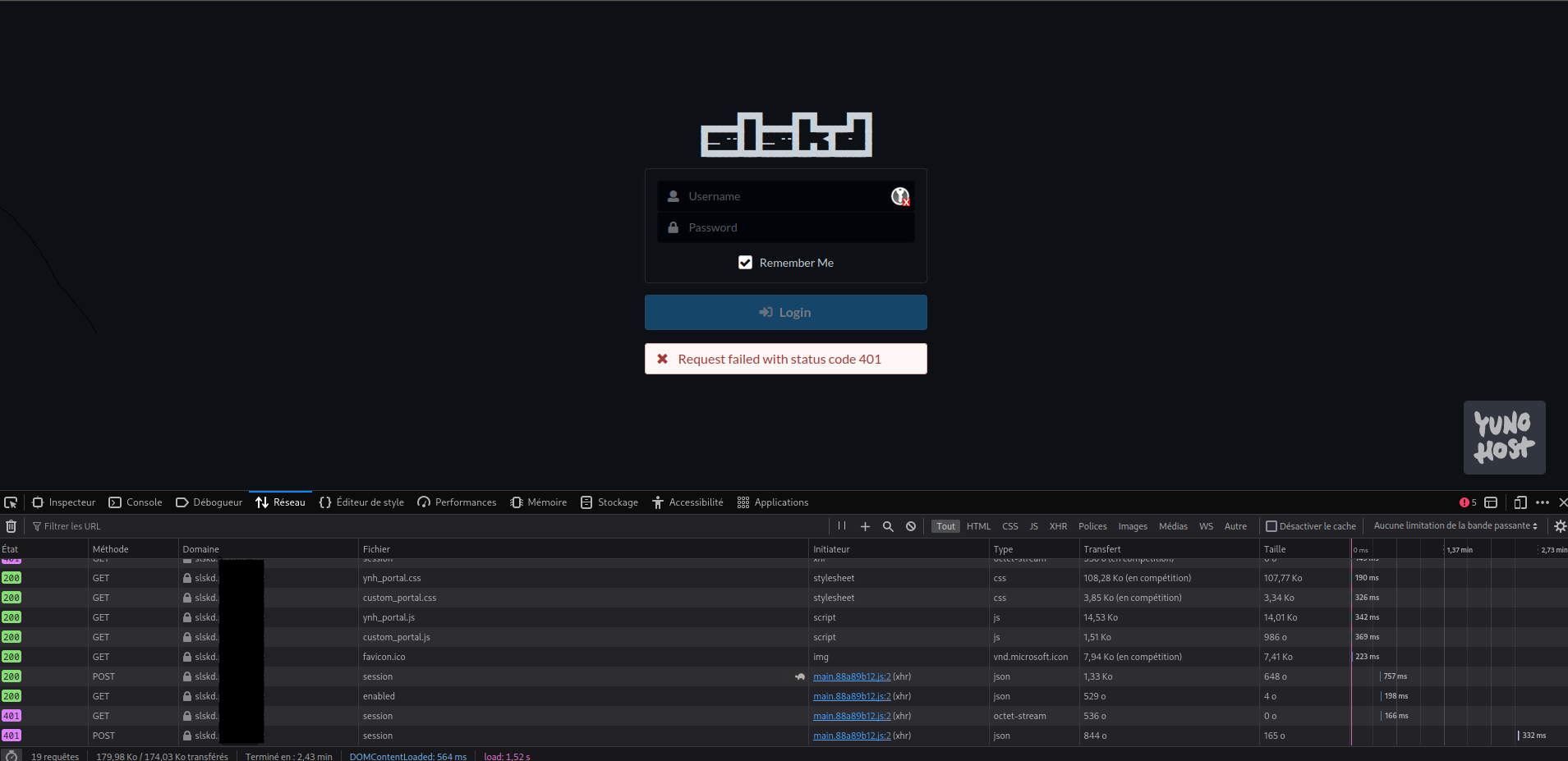
For you solutions : I didn’t really understand what I should input and didn’t want to run the command without understanding a bit … That’s why I did this thread because my IT skills are not enough for me to understand your proposed solution … Maybe you coud explain a bit? Or should I just copy paste and try ? ??
---
### Author:  [@tituspijean](https://forum.yunohost.org/u/tituspijean)
#### Post date: [April 7, 2024, 9:31pm UTC](https://forum.yunohost.org/t/problems-with-docker-and-redirect/29212/4 "2024-04-07T21:31:10Z")
Open a terminal to your server in SSH, then run:
```auto
app=redirect
sudo yunohost tools shell -c "from yunohost.permission import permission_url; permission_url('$app.main' ,auth_header=False)"
```
If you do not know how to do this, ~~god bless you~~ , you can check out the documentation: [SSH and command line | Yunohost Documentation](https://yunohost.org/en/administer/admin_guide/command_line) 😉
---
### Author:  [@Fresne](https://forum.yunohost.org/u/Fresne)
#### Post date: [April 8, 2024, 7:50pm UTC](https://forum.yunohost.org/t/problems-with-docker-and-redirect/29212/5 "2024-04-08T19:50:21Z")
Lol , running command trought SSH is fine by me .
Run the command and still got the same error message.
Here is the docker-compose log (altought it doesnt say anything interresting)
I uncommented the slskd.yaml (Daaaaaa) and that changed the log output , now saying I am connected to soulseek . Still cant access the app tought
```auto
slskd_1 | ▄▄▄▄ ▄▄▄▄ ▄▄▄▄
slskd_1 | ▄▄▄▄▄▄█ █▄▄▄▄▄█ █▄▄▄▄▄█ █
slskd_1 | █ __--█ █__ --█ ◄█ - █
slskd_1 | █▄▄▄▄▄█▄▄█▄▄▄▄▄█▄▄█▄▄█▄▄▄▄▄█
slskd_1 | ╒════════════════════════════════════════════════════════╕
slskd_1 | │ GNU AFFERO GENERAL PUBLIC LICENSE │
slskd_1 | │ https://slskd.org │
slskd_1 | │ │
slskd_1 | │ 0.20.0.0 (0.20.0.0+264019f1) │
slskd_1 | └────────────────────────────────────────────────────────┘
slskd_1 | [20:31:32 INF] Version: 0.20.0.0 (0.20.0.0+264019f1)
slskd_1 | [20:31:32 INF] System: .NET 8.0.2, Unix 6.1.74.8, 64 bit, 4 processors
slskd_1 | [20:31:32 INF] Process ID: 7 (64 bit)
slskd_1 | [20:31:32 INF] Invocation ID: c364e3b4-a25d-413e-868a-61f7c075f7c1
slskd_1 | [20:31:32 INF] Instance Name: default
slskd_1 | [20:31:32 INF] Configuring application...
slskd_1 | [20:31:32 INF] Using application directory /app
slskd_1 | [20:31:32 INF] Using configuration file /app/slskd.yml
slskd_1 | [20:31:32 INF] Storing application data in /app/data
slskd_1 | [20:31:32 INF] Saving application logs to /app/logs
slskd_1 | [20:31:36 INF] Listening for HTTP requests at http://0.0.0.0:5030/
slskd_1 | [20:31:36 INF] Listening for HTTPS requests at https://0.0.0.0:5031/
slskd_1 | [20:31:36 INF] Using randomly generated self-signed certificate
slskd_1 | [20:31:39 INF] Using base url /
slskd_1 | [20:31:39 INF] Serving static content from /slskd/wwwroot
slskd_1 | [20:31:39 INF] Configuration complete. Starting application...
slskd_1 | [20:31:40 INF] Application started
slskd_1 | [20:31:41 INF] Listening for incoming connections on 0.0.0.0:50300
slskd_1 | [20:31:41 INF] Checking GitHub Releases for latest version
slskd_1 | [20:31:41 INF] Initializing shares
slskd_1 | [20:31:41 INF] Share cache StorageMode is 'Memory'. Attempting to load from backup...
slskd_1 | [20:31:42 INF] Share cache backup validated. Attempting to restore...
slskd_1 | [20:31:42 INF] Share cache successfully restored from backup
slskd_1 | [20:31:42 INF] Share cache loaded from disk successfully. Sharing 0 directories and 0 files
slskd_1 | [20:31:42 INF] Warming browse response cache...
slskd_1 | [20:31:42 INF] Starting system clock...
slskd_1 | [20:31:42 INF] Browse response cached successfully in 112ms
slskd_1 | [20:31:42 INF] System clock started
slskd_1 | [20:31:43 INF] Connected to the Soulseek server
slskd_1 | [20:31:43 INF] A new version is available! 0.20.0.0 -> 0.20.1
slskd_1 | [20:31:43 INF] Logged in to the Soulseek server as nbu
```
On firefox using web console I get :
(\*\*\* to hide Id data)
```auto
HTTP/2 401
server: nginx
date: Mon, 08 Apr 2024 21:16:11 GMT
content-type: application/octet-stream
content-length: 0
x-sso-wat: You've just been SSOed
www-authenticate: Bearer
content-security-policy: upgrade-insecure-requests
x-content-type-options: nosniff
x-xss-protection: 1; mode=block
x-download-options: noopen
x-permitted-cross-domain-policies: none
x-frame-options: SAMEORIGIN
permissions-policy: interest-cohort=()
strict-transport-security: max-age=63072000; includeSubDomains; preload
X-Firefox-Spdy: h2
GET /api/v0/session HTTP/2
Host: slskd. *****.***
User-Agent: Mozilla/5.0 (X11; Linux x86_64; rv:124.0) Gecko/20100101 Firefox/124.0
Accept: application/json, text/plain, */*
Accept-Language: fr,fr-FR;q=0.8,en-US;q=0.5,en;q=0.3
Accept-Encoding: gzip, deflate, br
DNT: 1
Sec-GPC: 1
Connection: keep-alive
Referer: https://slskd. *****.*** /searches
Cookie: SSOwAuthUser=admin; SSOwAuthHash=475d6dd58608 *********************************************f8f00b34cb05e38fb7************ a08dea86c5e55bf; SSOwAuthExpire=1713209706.31
Sec-Fetch-Dest: empty
Sec-Fetch-Mode: cors
Sec-Fetch-Site: same-origin
TE: trailers
```
Is there any Yunohost logs that would be relevant to share ?
Thanks for the help .
---
### Author:  [@Fresne](https://forum.yunohost.org/u/Fresne)
#### Post date: [April 17, 2024, 7:53pm UTC](https://forum.yunohost.org/t/problems-with-docker-and-redirect/29212/6 "2024-04-17T19:53:47Z")
Still no solutions ☹ . Maybe I ll just wait for slskd to be in Yunohost official apps… @tituspijean no idea what my next steps could be?
cheers
---
### Author:  [@jarod5001](https://forum.yunohost.org/u/jarod5001)
#### Post date: [April 17, 2024, 9:08pm UTC](https://forum.yunohost.org/t/problems-with-docker-and-redirect/29212/7 "2024-04-17T21:08:14Z")
> slskd begins listening for incoming connections on port 50300 and maps the application directory to the provided path
Did you open port 50300 on yunohost firewall?
---
### Author:  [@tituspijean](https://forum.yunohost.org/u/tituspijean)
#### Post date: [April 17, 2024, 9:34pm UTC](https://forum.yunohost.org/t/problems-with-docker-and-redirect/29212/8 "2024-04-17T21:34:54Z")
> [@Fresne](#):
>
> ```auto
> # Unset Authorization and Cookie headers **<-- thats the modification I did**
> proxy_set_header Authorization "";
> proxy_set_header Cookie "";
>
> ```
Have you removed this from the nginx configuration?
---
### Author:  [@system](https://forum.yunohost.org/u/system)
#### Post date: [May 2, 2024, 9:35pm UTC](https://forum.yunohost.org/t/problems-with-docker-and-redirect/29212/9 "2024-05-02T21:35:32Z")
This topic was automatically closed 15 days after the last reply. New replies are no longer allowed.