# OnlyOffice install work, but impossible to load the interface/document when trying to use it
**URL:** https://forum.yunohost.org/t/onlyoffice-install-work-but-impossible-to-load-the-interface-document-when-trying-to-use-it/42346
**Category:** Support apps
**Tags:** nextcloud, onlyoffice, french, english
**Created:** [May 26, 2026, 2:08pm UTC](https://forum.yunohost.org/t/onlyoffice-install-work-but-impossible-to-load-the-interface-document-when-trying-to-use-it/42346 "2026-05-26T14:08:47Z")
**Posts on this page:** 14
**Page:** 1
### Author:  [@marinB](https://forum.yunohost.org/u/marinB)
#### Post date: [May 26, 2026, 2:08pm UTC](https://forum.yunohost.org/t/onlyoffice-install-work-but-impossible-to-load-the-interface-document-when-trying-to-use-it/42346/1 "2026-05-26T14:08:47Z")
**What app is this about, and its version** : OnlyOffice 9.4.0~YNH1
**What YunoHost version are you running** : 12.1.40.1
**What type of hardware are you using** : VPS bought online
### Describe your issue
I just updated OnlyOffice to the last version (9.4.0~YNH1). Everything went well, when I check the OnlyOffice homepage, it says that “Document Server is running”. The onlyoffice service is also running without any issue. The connector in Nextcloud is reaching the onlyoffice server without any problem.
But when I try to open a document, the OnlyOffice editor doesn’t load. Only the basic elements of the interface are loading (the blank document in the middle of the page, the main zoning squares,…), but the document itself and the buttons never load.
I tried to use another browser (Firefox, and Chromium), and checked my browser debugger, but I don’t really have the skills to understand it. I still share the warnings I get below.
Since I didn’t have any problem before the update, I assume it is maybe a problem with the update rather than a problem on my side ? If you have ideas on how to investigate the problem further and how I can share relevant information to identify it, feel free to ask me.
Thanks in advance for yout help !
### Share relevant logs or error messages
[WARN] @nextcloud/vue: You need to fill either the text or the ariaLabel props in the button component.
Object { uid: “marin\_bisson”, app: “@nextcloud/vue”, level: 2, text: undefined, ariaLabel: null, instance: {…} }
app: “@nextcloud/vue”
ariaLabel: null
instance: Object { \_uid: 17, \_isVue: true, \_\_v\_skip: true, … }
level: 2
text: undefined
uid: “[uid]”
: Object { … }
Feature Policy : nom de fonctionnalité non prise en charge ignoré « autoplay ». api.js:1300:16
Feature Policy : nom de fonctionnalité non prise en charge ignoré « clipboard-write ». api.js:1300:16
Feature Policy : nom de fonctionnalité non prise en charge ignoré « autoplay ». api.js:626:52
Feature Policy : nom de fonctionnalité non prise en charge ignoré « clipboard-write ». api.js:626:52
Content-Security-Policy : « x-frame-options » ignoré en raison de la directive « frame-ancestors ».
La mise en page a été forcée avant le chargement complet de la page. Si les feuilles de style ne sont pas encore chargées, cela peut provoquer un flash de contenu non stylisé. index.html
Échec du chargement pour l’élément dont la source est « [URL]/web-apps/apps/common/Analytics.js ». index.html:1:1
unreachable code after return statement sdk-all-min.js:21477:2
unreachable code after return statement sdk-all-min.js:55629:54
unreachable code after return statement sdk-all-min.js:55630:42
unreachable code after return statement sdk-all-min.js:56429:4
unreachable code after return statement sdk-all-min.js:56715:4
unreachable code after return statement sdk-all-min.js:56722:4
Erreur dans les liens source : request failed with status 404
URL de la ressource : [URL]/web-apps/vendor/socketio/socket.io.min.js
URL du lien source : socket.io.min.js.map
Erreur dans les liens source : request failed with status 404
URL de la ressource : [URL]/web-apps/vendor/underscore/underscore.js
URL du lien source : underscore-umd.js.map
Erreur dans les liens source : No sources are declared in this source map.
URL de la ressource : [URL]/apps/notifications/js/vite-preload-helper-DxYC2qmj.chunk.mjs
URL du lien source : vite-preload-helper-DxYC2qmj.chunk.mjs.map
---
### Author:  [@otm33](https://forum.yunohost.org/u/otm33)
#### Post date: [May 26, 2026, 7:54pm UTC](https://forum.yunohost.org/t/onlyoffice-install-work-but-impossible-to-load-the-interface-document-when-trying-to-use-it/42346/2 "2026-05-26T19:54:02Z")
Hello @marinB
Do you have an ad blocker ? If so, could you try disabling it ?
---
### Author:  [@marinB](https://forum.yunohost.org/u/marinB)
#### Post date: [May 27, 2026, 2:14pm UTC](https://forum.yunohost.org/t/onlyoffice-install-work-but-impossible-to-load-the-interface-document-when-trying-to-use-it/42346/3 "2026-05-27T14:14:11Z")
Hi, thanks for answering ! Yes, I have uBlockOrigin, but I already tried to disable it and it still didn’t work. I also tried to desactivate the tracking protections in each browser I tried (Zen, Firefox and Chromium)…
---
### Author:  [@otm33](https://forum.yunohost.org/u/otm33)
#### Post date: [May 27, 2026, 2:30pm UTC](https://forum.yunohost.org/t/onlyoffice-install-work-but-impossible-to-load-the-interface-document-when-trying-to-use-it/42346/4 "2026-05-27T14:30:33Z")
Any error or trace related to this issue in onlyoffice logs and nextcloud logs ?
---
### Author:  [@jeannotlapin](https://forum.yunohost.org/u/jeannotlapin)
#### Post date: [May 28, 2026, 11:11am UTC](https://forum.yunohost.org/t/onlyoffice-install-work-but-impossible-to-load-the-interface-document-when-trying-to-use-it/42346/5 "2026-05-28T11:11:57Z")
Hi,
I bumped into a very similar error after the exact same update done yesterday (I also have yunohost version 12.1.40.1 and updated to onlyoffice 9.4.0)
However, it works on chrome and on firefox when I’m in private navigation.
When I’m on regular navigation(I use firefox 151.0.2 on manjaro), I have the same behaviour you describe:
nextcloud open a new tab, load the basic interface and not the document.
If I unregister all the service workers related to the domain yunohost is running on:
- the preview service worker for nextcloud
- the document editor service worker for only office
I can load once a document, but then I have to unregister them again to be able to load a second one.
Otherwise I get an error:
Failed to load ‘/9.4.0-05a51311b392713c36758d3cc071949a/web-apps/apps/common/Analytics.js’. A ServiceWorker passed a promise to FetchEvent.respondWith() that rejected with ‘TypeError: NetworkError when attempting to fetch resource.’.
in firefox.
---
### Author:  [@otm33](https://forum.yunohost.org/u/otm33)
#### Post date: [May 28, 2026, 11:54am UTC](https://forum.yunohost.org/t/onlyoffice-install-work-but-impossible-to-load-the-interface-document-when-trying-to-use-it/42346/6 "2026-05-28T11:54:50Z")
Same thing after clearing cache, cookies and restarting firefox ?
---
### Author:  [@jeannotlapin](https://forum.yunohost.org/u/jeannotlapin)
#### Post date: [May 28, 2026, 12:22pm UTC](https://forum.yunohost.org/t/onlyoffice-install-work-but-impossible-to-load-the-interface-document-when-trying-to-use-it/42346/7 "2026-05-28T12:22:24Z")
yes, really the only thing that works is unregistering the service workers, but it works once… then I have to do it again
---
### Author:  [@jeannotlapin](https://forum.yunohost.org/u/jeannotlapin)
#### Post date: [May 28, 2026, 12:24pm UTC](https://forum.yunohost.org/t/onlyoffice-install-work-but-impossible-to-load-the-interface-document-when-trying-to-use-it/42346/8 "2026-05-28T12:24:10Z")
Note:
when I try to load directly the
/9.4.0-05a51311b392713c36758d3cc071949a/web-apps/apps/common/Analytics.js
(I removed the first part with my domain) directly from firefox, it displays the js code
---
### Author:  [@BluishHumility](https://forum.yunohost.org/u/BluishHumility)
#### Post date: [May 28, 2026, 2:37pm UTC](https://forum.yunohost.org/t/onlyoffice-install-work-but-impossible-to-load-the-interface-document-when-trying-to-use-it/42346/9 "2026-05-28T14:37:11Z")
I have this issue too. It gets stuck like this indefinitely if I try to open a document:

I normally use Librewolf so I tested opening a document in Chromium and got a different result–I get this “refused to connect” error instead:
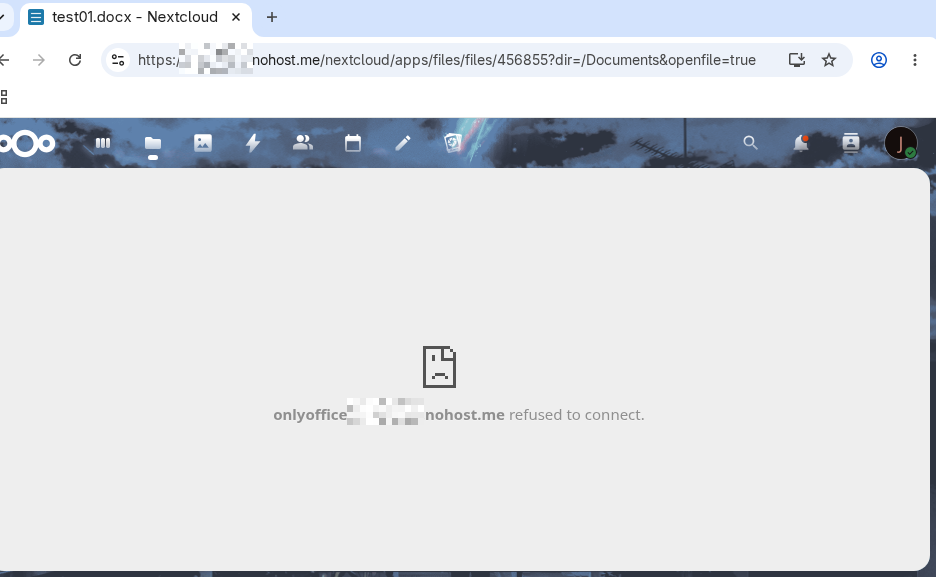
I also have the AppImage of OnlyOffice installed (the desktop application). It can open and edit files just fine, unless I connect to my NextCloud server. It can browse files on the server normally but when I try to open one it just spins and spins, and the file never opens.
---
### Author:  [@otm33](https://forum.yunohost.org/u/otm33)
#### Post date: [May 28, 2026, 6:48pm UTC](https://forum.yunohost.org/t/onlyoffice-install-work-but-impossible-to-load-the-interface-document-when-trying-to-use-it/42346/10 "2026-05-28T18:48:07Z")
Trying to summarize… Feel free to add whatever could be relevant
> **[Digicalc by La Digitale](https://digicalc.app/6a18800cb083c)**
---
### Author:  [@otm33](https://forum.yunohost.org/u/otm33)
#### Post date: [May 28, 2026, 8:06pm UTC](https://forum.yunohost.org/t/onlyoffice-install-work-but-impossible-to-load-the-interface-document-when-trying-to-use-it/42346/11 "2026-05-28T20:06:17Z")
>
>
> Version: 9.4.0
>
> \*\*Description\*\*
>
> In version 9.4, the file Analytics.js is loaded… by require.js during editor initialization. This filename is recognized by common ad/tracker blockers (uBlock Origin, Firefox Enhanced Tracking Protection) as a tracking script, causing the request to be blocked. When this request is blocked, the editor fails to load entirely and shows a blank screen or an error message.
>
> This issue did not occur in version 9.1 or 9.3, suggesting it is related to the architectural changes introduced in 9.4 (removal of code minification, single-process architecture).
>
> \*\*Steps to reproduce\*\*
>
> Install OnlyOffice Docs 9.4 (Docker Community Edition)
> Integrate with Seafile or OpenCloud via API or WOPI
> Open a document with uBlock Origin enabled in Firefox or Chrome
> Observe that the editor fails to load
>
> \*\*Expected behavior\*\*
>
> The editor should load correctly even when ad blockers are active, since Analytics.js does not appear to contain actual tracking code (isAnalyticsEnable = false is set in the SDK).
>
> \*\*Actual behavior\*\*
>
> uBlock Origin blocks the request to /Analytics.js based on the filename. Firefox Enhanced Tracking Protection also blocks it, returning NS\_ERROR\_INTERCEPTION. This causes the editor to not load.
>
> \*\*Suggested fix\*\*
>
> Rename Analytics.js to a name that does not trigger ad blocker filter lists, such as editor-metrics.js or similar. Alternatively, remove the file entirely if analytics are already disabled by default.
>
> \*\*Environment\*\*
>
> OnlyOffice Docs 9.4.0 (Docker Community Edition)
> Firefox with uBlock Origin / Enhanced Tracking Protection
> Chrome with uBlock Origin
> Integrated with Seafile Pro 11.0 and OpenCloud 6.2 via WOPI
---
### Author:  [@BluishHumility](https://forum.yunohost.org/u/BluishHumility)
#### Post date: [May 28, 2026, 8:44pm UTC](https://forum.yunohost.org/t/onlyoffice-install-work-but-impossible-to-load-the-interface-document-when-trying-to-use-it/42346/12 "2026-05-28T20:44:16Z")
> [@otm33](#):
>
> Do you have an ad blocker ? If so, could you try disabling it ?
Sorry I missed this suggestion the first time around. I do use uBlock Origin, and sure enough if I add my web server URL to the whitelist (open the extension \> open the dashboard \> “trusted sites” tab) it appears to resolve the issue. Thanks for the tip!
---
### Author:  [@jeannotlapin](https://forum.yunohost.org/u/jeannotlapin)
#### Post date: [May 29, 2026, 9:34pm UTC](https://forum.yunohost.org/t/onlyoffice-install-work-but-impossible-to-load-the-interface-document-when-trying-to-use-it/42346/13 "2026-05-29T21:34:13Z")
Thanks for the tip, it works, I missed it originally because ublock (and privacy badger) were whitelisting the domain nextcloud runs on but not the domain only office runs on. With both whitelisted, it’s fine.
Thanks for your help!
---
### Author:  [@system](https://forum.yunohost.org/u/system)
#### Post date: [June 13, 2026, 9:35pm UTC](https://forum.yunohost.org/t/onlyoffice-install-work-but-impossible-to-load-the-interface-document-when-trying-to-use-it/42346/14 "2026-06-13T21:35:04Z")
This topic was automatically closed 15 days after the last reply. New replies are no longer allowed.