# No apps offered to install on the webadmin page
**URL:** https://forum.yunohost.org/t/no-apps-offered-to-install-on-the-webadmin-page/18643
**Category:** Support
**Tags:** english
**Created:** [January 29, 2022, 2:31pm UTC](https://forum.yunohost.org/t/no-apps-offered-to-install-on-the-webadmin-page/18643 "2022-01-29T14:31:56Z")
**Posts on this page:** 20
**Page:** 1
### Author:  [@Avenor](https://forum.yunohost.org/u/Avenor)
#### Post date: [January 29, 2022, 2:31pm UTC](https://forum.yunohost.org/t/no-apps-offered-to-install-on-the-webadmin-page/18643/1 "2022-01-29T14:31:57Z")
Hello all,
I have just installed YunoHost and have added a few apps to test. After successfully resolving an accessibility issue (["foo.noho.st" NOT accessible in local Wi-Fi -- but IS accessible externally](https://forum.yunohost.org/t/foo-noho-st-not-accessible-in-local-wi-fi-but-is-accessible-externally/18641)) now **all installed apps have disappeared** on the webadmin page.
### My YunoHost server
**Hardware:** Raspberry Pi 4 8GB
**YunoHost version:** 4.3.6.2
**I have access to my server :** Through SSH and through the webadmin
**Are you in a special context or did you perform some particular tweaking on your YunoHost instance ?** : no
### Description of my issue
- On the **webadmin** page, it says **“There are no installed apps”,** although I had installed several apps
- On the **user’s portal,** however, **these apps are still available** and are also functioning normally
When I try to install a new app on the webadmin page, I get this error:

What did I do wrong?
---
### Author:  [@wbk](https://forum.yunohost.org/u/wbk)
#### Post date: [January 29, 2022, 2:53pm UTC](https://forum.yunohost.org/t/no-apps-offered-to-install-on-the-webadmin-page/18643/2 "2022-01-29T14:53:03Z")
Hi Avenor,
Welcome to the forums!
Pity your introduction to Yunohost is troubled by these problems.
I would try to remove the file mentioned in your screenshot, and see if that resolves (pant of) the matter:
```auto
$ sudo rm /var/cache/yunohost/repo/default.json
```
The file should not become corrupted of course. Seeing you run off a Raspberry Pi, is Yunohost installed on the embedded storage or on a uSD-card?
---
### Author:  [@Avenor](https://forum.yunohost.org/u/Avenor)
#### Post date: [January 29, 2022, 3:31pm UTC](https://forum.yunohost.org/t/no-apps-offered-to-install-on-the-webadmin-page/18643/3 "2022-01-29T15:31:48Z")
Hello wbk,
thank you for the welcome, and the newb-friendly command 🙂
I executed the command you gave me and the apps are back on the webadmin page.
But my enthusiasm was premature: When I click the **+Install** button, the page with the apps offered for installing didn’t load (I did reboot the server, but that didn’t help).
I’m running YunoHost off an SD card.
I love the YunoHost concept, and it’s actually really interesting to learn all this hands-on stuff … so no worries about some difficulties along the way.
---
### Author:  [@Aleks](https://forum.yunohost.org/u/Aleks)
#### Post date: [January 29, 2022, 3:56pm UTC](https://forum.yunohost.org/t/no-apps-offered-to-install-on-the-webadmin-page/18643/4 "2022-01-29T15:56:55Z")
I think you can just open the “Upgrade the system” section just so that it refreshes the app catalog, then go back to the App install section
---
### Author:  [@Avenor](https://forum.yunohost.org/u/Avenor)
#### Post date: [January 29, 2022, 4:30pm UTC](https://forum.yunohost.org/t/no-apps-offered-to-install-on-the-webadmin-page/18643/5 "2022-01-29T16:30:24Z")
Thanks. Unfortunately that didn’t work. I opened “System update” and Yunohost did some things, but finished with an error (see screenshot) and also with “Nothing to do, all is up-to-date”.
After clicking +Install, there are still no apps offered for installation.
BTW, in case this is important, the issues started when suddenly Rainloop had lost its incoming emails after I deleted just a few of them. So I thought I’d simply reinstall it - and then noticed all the above described problems.
Here’s the screenshot of what happened after I opened “System update”

---
### Author:  [@Avenor](https://forum.yunohost.org/u/Avenor)
#### Post date: [January 29, 2022, 7:30pm UTC](https://forum.yunohost.org/t/no-apps-offered-to-install-on-the-webadmin-page/18643/6 "2022-01-29T19:30:36Z")
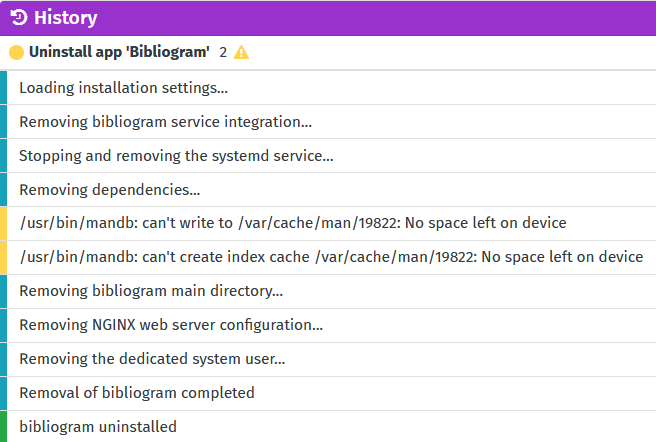
Just tried to uninstall apps, that still works. But I’m getting a strange error in the log about “No space left on device” 🤔
Something seems broken. Should I perhaps reinstall the whole thing?
---
### Author:  [@wbk](https://forum.yunohost.org/u/wbk)
#### Post date: [January 29, 2022, 11:48pm UTC](https://forum.yunohost.org/t/no-apps-offered-to-install-on-the-webadmin-page/18643/7 "2022-01-29T23:48:50Z")
> [@Avenor](#):
>
> I love the YunoHost concept, and it’s actually really interesting to learn all this hands-on stuff … so no worries about some difficulties along the way.
Great attitude 🙂
There are three things that attract my attention:
- No space left on device, as you already noticed;
- Running off the SD-card;
- Failed signatures during update of repository
If the SD card is too big to be full already, combined with other errors, it _could_ be the SD card is (on the way to be) broken. You might shut down the Yunohost and have it fsck’d on another computer (preferably Linux, I don’t know how well Windows and Mac handle ext4 these days).
The signatures could have to do with the Debian having a new stable version a couple of months back. I don’t remember it giving a signature error, but you could have a look at [Updates may fail because "Repository [...] changed its 'Suite' value from 'stable' to 'oldstable'"](https://forum.yunohost.org/t/updates-may-fail-because-repository-changed-its-suite-value-from-stable-to-oldstable/16931)
---
### Author:  [@Avenor](https://forum.yunohost.org/u/Avenor)
#### Post date: [January 30, 2022, 8:02am UTC](https://forum.yunohost.org/t/no-apps-offered-to-install-on-the-webadmin-page/18643/8 "2022-01-30T08:02:22Z")
My suspicion is that an incomplete shutdown happened somewhere along the way. At some point I noticed that “reboot” or “shutdown -r” didn’t seem to work any more, so I just had to _assume_ the shutdown had happened before unplugging and replugging the Raspberry Pi. I guess that something important got broken that way.
Since I’m at the beginning of setting this up, and nothing significant was installed yet, I just decided to start over with a new installation, which works fine for now.
I do have a Linux machine at hand: Can you tell me how I check the SD card there, just in case? (I’m a bit of a beginner …)?
Thanks!
---
### Author:  [@wbk](https://forum.yunohost.org/u/wbk)
#### Post date: [January 30, 2022, 11:44am UTC](https://forum.yunohost.org/t/no-apps-offered-to-install-on-the-webadmin-page/18643/9 "2022-01-30T11:44:36Z")
> [@Avenor](#):
>
> Since I’m at the beginning of setting this up, and nothing significant was installed yet, I just decided to start over with a new installation, which works fine for now.
Good that it works fine now.
> [@](#):
>
> I do have a Linux machine at hand: Can you tell me how I check the SD card there, just in case? (I’m a bit of a beginner …)?
That would be `sudo fsck.ext4 /dev/sd....` for the device that has your SD card. In my computer it shows up as /dev/sdg1, and on my laptop as /dev/sdb1. It depends a bit on how many harddisks are in your system.
Four commands help to find the right device,
- `lsblk` lists all block devices (harddisk-like devices)
- `df -h` lists filesystems, their size and free space. If your harddisk is \> 100 GB, and your SD card 16 or 32 GB, it is easy to recognize which is which
- `fdisk -l` also lists devices and their sizes, and gives the name/model as well
- start `tail -f /var/log/messages` before inserting the SD card; it will give some (‘live’) messages about what the computer recognizes while you insert the card, among which the location of the device
If you come to a dead end with that, start a new thread to ask about it!
For now, have a nice time with your Yunohost 🙂
---
### Author:  [@Avenor](https://forum.yunohost.org/u/Avenor)
#### Post date: [January 30, 2022, 12:19pm UTC](https://forum.yunohost.org/t/no-apps-offered-to-install-on-the-webadmin-page/18643/10 "2022-01-30T12:19:17Z")
Thanks a lot, wbk, and others who helped!
---
### Author:  [@Avenor](https://forum.yunohost.org/u/Avenor)
#### Post date: [February 8, 2022, 10:06pm UTC](https://forum.yunohost.org/t/no-apps-offered-to-install-on-the-webadmin-page/18643/11 "2022-02-08T22:06:16Z")
Hi @wbk, I have another question: The same error occurred again a few days after reinstalling. Now I want to check my SD card.
I identified it to be:

But running `sudo fsck.ext4 /dev/mmcblk0` (or …1, or …2) gave me an “… is in use” error.
I read somewhere that I need to unmount first. But unmounting didn’t work either:
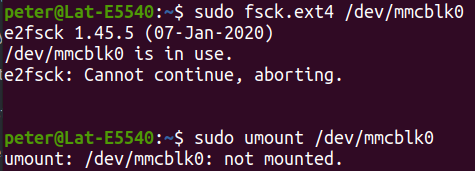
Do you have another tip how I can make `fsck` work on this SD card? (I think the problem has to do with this beeing a bootable SD card)
Thanks!
---
### Author:  [@wbk](https://forum.yunohost.org/u/wbk)
#### Post date: [February 9, 2022, 3:35pm UTC](https://forum.yunohost.org/t/no-apps-offered-to-install-on-the-webadmin-page/18643/12 "2022-02-09T15:35:36Z")
> [@Avenor](#):
>
> (I think the problem has to do with this beeing a bootable SD card)
Yes, it has to do with that; more specific, the system is running on the card. It can not be unmounted while the system is running.
There are two options, for each of them you have to power down your Yunohost:
1. Let the RPi/Yunohost do the filesystem check by itself: `sudo touch /forcefsck` will create an empty file ‘forefsck’ in the root directory, Linux will recognize it while booting and do the check;
2. Let you laptop/desktop do the filesystem check; power down your Yunohost, put the SD-card in your (Linux) computer, and have it checked.
The SD-card will have some markings that give a general impression of the performance. Preferably one of the markings is “A1” or “A2” ([“Application performance class”](https://en.wikipedia.org/wiki/SD_card#Class), link does not hit the right sub-chapter), those cards are sold especially for running programs (as opposed to storing photos/music/videos).
---
### Author:  [@Avenor](https://forum.yunohost.org/u/Avenor)
#### Post date: [February 9, 2022, 3:58pm UTC](https://forum.yunohost.org/t/no-apps-offered-to-install-on-the-webadmin-page/18643/13 "2022-02-09T15:58:30Z")
I think this is a misunderstanding here, wbk. I should have specified that I have **not** tried to run fsck while the SD card is in the running YunoHost.
Rather, I had removed the SD card and put it into a laptop that runs Ubuntu. So the Linux system from which I wanted to test the SD card is definitely _not_ running _from_ the SD card. That’s why I was so surprised that it would not let me run fsck on the SD card.
Essentially I have tried exactly your suggestion #2 above, and I got the errors I screenshotted in the previous post.
Was I doing something wrong on my laptop?
P.S.: The SD card is a SanDisk ultra 32 GB and it says “A1” on it.
---
### Author:  [@wbk](https://forum.yunohost.org/u/wbk)
#### Post date: [February 9, 2022, 4:39pm UTC](https://forum.yunohost.org/t/no-apps-offered-to-install-on-the-webadmin-page/18643/14 "2022-02-09T16:39:43Z")
Ah, now I pay attention to the screenshots, I think I know what the issue is.
The filesystem resides on the partition (`/dev/mmcblk0p1`), not on the disk (`/dev/mmcblk0`). Maybe Ubuntu automounts removable media, in that case unmounting is needed as you tried (but for the partition instead of the disk):
```auto
$ sudo umount /dev/mmcblk0p1/
$ sudo fsck.ext4 /dev/mmcblk0p1/
```
And then the same for mmcblk0p2.
---
### Author:  [@Avenor](https://forum.yunohost.org/u/Avenor)
#### Post date: [February 9, 2022, 4:47pm UTC](https://forum.yunohost.org/t/no-apps-offered-to-install-on-the-webadmin-page/18643/15 "2022-02-09T16:47:58Z")
Hm, actually I _did_ try also those `umount` commands with partitions mmcblk1 and mmcblk2:
> [@Avenor](#):
>
> But running `sudo fsck.ext4 /dev/mmcblk0` (or …1, or …2) gave me an “… is in use” error.
I just cut off those two commands from the screenshot because they showed the same result.
Hence my confusion: My Ubuntu Linux claims that the card as such, as well as its partitions, can’t be unmounted because they are “in use” - but how can they be “in use” if I just put the card in the slot after Ubuntu was already up and running?
Sorry this is so vexing …
Should I simply reformat the SD and then check it? I’ll probably have to reinstall YunoHost anyway because of a litany of errors already showing up in the webadmin Diagnosis.
---
### Author:  [@wbk](https://forum.yunohost.org/u/wbk)
#### Post date: [February 9, 2022, 5:03pm UTC](https://forum.yunohost.org/t/no-apps-offered-to-install-on-the-webadmin-page/18643/16 "2022-02-09T17:03:45Z")
> [@Avenor](#):
>
> partitions mmcblk1 and mmcblk2
For the record, note the exact spelling: mmcblk0p1
When the card is automounted, it could be that some process keeps the partition busy. Before issuing `umount`, which lines does `mount|grep mmc` return?
After unmounting, opened files can be viewed with `lsof`. If the card got mounted at /media/ :
```auto
$ lsof | grep media
```
to get a list of all files that are opened that have something of ‘media’ in the name or in the path.
---
### Author:  [@Avenor](https://forum.yunohost.org/u/Avenor)
#### Post date: [February 10, 2022, 2:00pm UTC](https://forum.yunohost.org/t/no-apps-offered-to-install-on-the-webadmin-page/18643/17 "2022-02-10T14:00:19Z")
I really appreciate your patience, wbk! I did everything over from scratch and now got this to work as follows:
When I put in the SD card to the Ubuntu laptop and say `mount | grep mmc` then I get this:

Then I `umount` and `fsck` the first partition and get:

Not sure how to interpret the output, but it looks like an error to me. Does that mean the SD card is corrupted?
The second partition looks better, it says “clean”

If I run `lsof | grep media`I get a huge list of output, but I guess that command is no longer necessary, because the `fsck` now did run?
The only “unusual” thing I ever did is that I once triggered a YunoHost reboot from the terminal with `reboot` instead of using the webadmin to reboot. Could that have wrecked the SD card? Or do you think it’s a physical damage in the SD card?
Thanks!
---
### Author:  [@wbk](https://forum.yunohost.org/u/wbk)
#### Post date: [February 10, 2022, 2:53pm UTC](https://forum.yunohost.org/t/no-apps-offered-to-install-on-the-webadmin-page/18643/18 "2022-02-10T14:53:26Z")
Hi, nice that you got progress!
> [@Avenor](#):
>
> Not sure how to interpret the output, but it looks like an error to me. Does that mean the SD card is corrupted?
Not in this case. When you have a look at your first screenshot, with `mount|grep mmc`, you see that the first line has `type vfat`. To check the partition, use `fsck.vfat` instead of `fsck.ext4` :
`sudo fsck.vfat /dev/mmcblk0p1`
Seeing the names of the partitions, I suspect that p1 only got /boot for your RPi. No Yunohost-specific data is stored there; even _if_ the partition were corrupted, it would not interfere with the app catalog.
The second partition should be fine, as far as file structure is concerned.
> [@](#):
>
> If I run `lsof | grep media`I get a huge list of output, but I guess that command is no longer necessary, because the `fsck` now did run?
Correct. It will list all files that are in use and got _something_ with media in the name. If you have a problem unmounting a partition, you can `grep` for something more specific, in this case for example `lsof | grep '/media/peter/rootfs'`.
> [@](#):
>
> The only “unusual” thing I ever did is that I once triggered a YunoHost reboot from the terminal with `reboot` instead of using the webadmin to reboot.
It is not unusual and perfectly valid. The webadmin will call, via via, the same command.
> [@](#):
>
> Or do you think it’s a physical damage in the SD card?
It could be, but I would expect the integrity of the filesystem to suffer as well in that case.
> [@Avenor](#):
>
> P.S.: The SD card is a SanDisk ultra 32 GB and it says “A1” on it.
I used the same cards in Orange Pi Zero’s, mostly with no problems but sometimes it would get corrupted. I don’t know which (usage) factors contribute to failure; the usage patterns were similar for cards that would keep running and those that failed. The failed cards could afterwards be used in camera’s with no problem (apart from being on the slow side, no matter the A1 etc. class).
Just a thought: when reading and writing to the card, it hits two locations, so to speak, the index and the actual data area. The index will see heaviest usage, the data area less so. Either could go bad.
Now imagine index location ‘a’ for got bad, and it points to data location ‘b’. If you removed the files in the areas related to ‘a’ and ‘b’, and recreated them, it could be (depending algoritms) that they are in the same area.
Maybe if you were to rename them instead of deleting, it would occupy the bad area. New files would be created in another (perhaps good) area.
It’s a bit of speculation. If the error is again about /var/cache, you could try renaming /var/cache to /var/cache\_bad, and make a new /var/cache directory.
Another thing could be that the RPi is writing too fast for the SD card to keep up, triggering ‘card full’ in one way or another.
---
### Author:  [@Avenor](https://forum.yunohost.org/u/Avenor)
#### Post date: [February 10, 2022, 8:58pm UTC](https://forum.yunohost.org/t/no-apps-offered-to-install-on-the-webadmin-page/18643/19 "2022-02-10T20:58:52Z")
Here is what I got for checking `fsck.vfat` for the first partition:

So the “dirty bit” is cleaned up 🙂
I wonder how that “dirty bit” happened, though 🤔
I’ll now put the card back into the Raspberry and see if things work, maybe using your suggestion about `/var/cache` – and if not, I think I’ll have to reinstall everything. That’s not (yet) a big problem, as I’m just playing around. But if I eventually want to use and rely on YunoHost, yet get a crash every other week, then it wouldn’t be a viable solution.
So before I get serious with it, I’ll have to experiment with another SD card, to exclude the possibility that this one is corrupted. I am really not aware that I knowingly destroyed anything, I was very cautious.
Thank you so much, wbk, for your extraordinary patience walking me through so many details. I really learnd a lot, you’re a great teacher to the YunoHost (and Linux) newbies!
---
### Author:  [@Avenor](https://forum.yunohost.org/u/Avenor)
#### Post date: [February 10, 2022, 9:14pm UTC](https://forum.yunohost.org/t/no-apps-offered-to-install-on-the-webadmin-page/18643/20 "2022-02-10T21:14:59Z")
Update: The “cleaned up” card boots normally in the Raspberry. But still no installed apps show up, and I cannot go to the “+Install” page either. I get the exact same error as in the very first post in this thread.
I followed your advice and renamed `/var/cache` to `/var/cache_bad`.
Aaaand … it worked! Now the installed apps are all showing, and I can also access the “+Install” page where apps are offered to install.
If I undestood you correctly, I should just leave the `cache_bad` directory as is, so that in case there are errors in that area, the space counts as occupied and the error shouldn’t have any practical relevance – unless more errors appear elsewhere.
Bravo, thanks, wbk, for helping againg!
[Next page](https://forum.yunohost.org/t/no-apps-offered-to-install-on-the-webadmin-page/18643.md?page=2)