OK. Will run them later. My only tweak in Immich is to edit the env file so it points to my 1tb usb drive for storage.
And the logs of immich services.
I ran all three of the commands. all seemed to work OK. all apps were already up to date.
https://paste.yunohost.org/raw/nufujaxemi
above is the failed NC update
below is restore that breaks immich
https://paste.yunohost.org/raw/ufuyujivux
Immich logs
I’m not sure if it’s related but I spotted something odd….
In my Nextcloud setup I use Collabora-Online Built-in CODE server for document editing. This I installed via the command line a long time ago. I noticed that the server it pointed to in the settings was the old URL for my YNH server. Howver, it doesnt allow me to edit the field that contains the server address. See below. So I removed the app and then re-installed from the CLI. Unfortunatley that did not update the server address! How can I change that field? All suggestions welcomed.
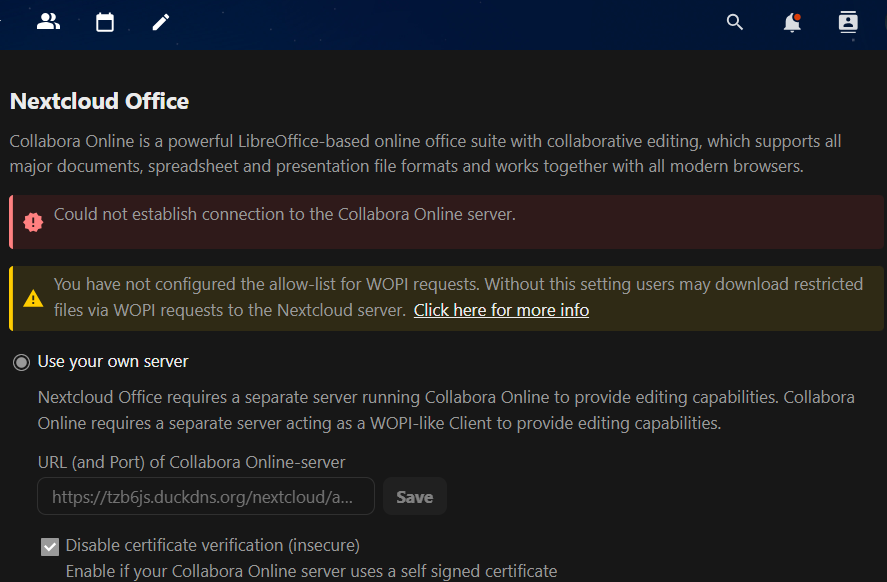
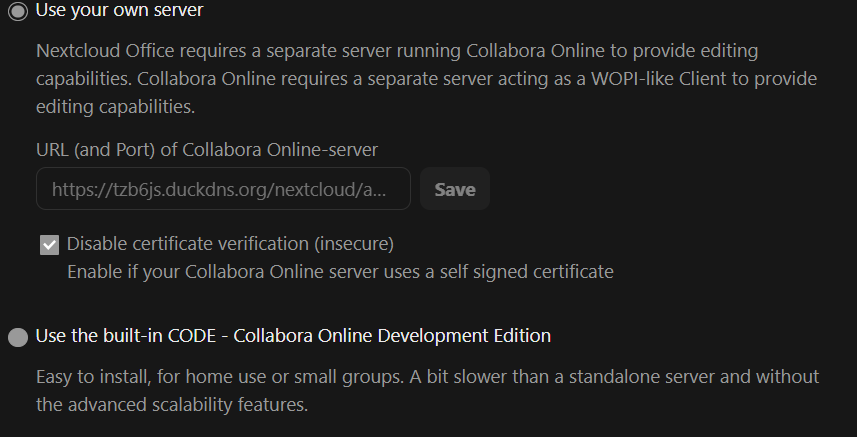
I seem to have some interesting related errors in the log as below. Probably because it cant access the internal server.
| Error | index | ExceptionCall to a member function xpath() on false in file ‘/var/www/nextcloud/apps/richdocuments/lib/WOPI/Parser.php’ line 41 |
|---|---|---|
I think I have hit a brick wall. The Collabra issue may be unrelated but it seems to be locked. The only option I can think of is to look at editing the conf file but that is a big and complex file, I may do mmore damage than good…
I was starting to think that I seem to have so many issues that I should take the nuclear option and delete Nextcloud and then install a fresh clean V32. The thought of the effort to setup all the shares and family users, public share and apps is dauning but I was going to dig deep and have a clean start. On reflection that feels like the ‘simple’ option. There must be a better way. There must bo some way of analysing the faults in the setup and fixing them. Interestingly I have a ‘sandbox’ that consists of the same hardware and the same Apps installed but with no users or data configured. Interestngly taht has no problems with a Nextcloud update and it doesnt mess up Immich either. I wonder if there are some more .occ commands I can use to try to ‘heal’ my live instance of Nextcloud. Anyone got any suggestions (or tell me to nuke it and start again) ?
Hi,
well i don’t know what would be the best; Some days ago i asked that you shared yor upgrade script. In fact, it is not the most recent one.
If i were you i would try the following steps:
- go to nextcloud_ynh/scripts/upgrade at master · YunoHost-Apps/nextcloud_ynh · GitHub and download the file into your yunohost server, in
/etc/yunohost/apps/nextcloud/scripts/ - delete
/var/log/nextcloud/nextcloud.log - restart an upgrade
- share your log
- share
/var/log/nextcloud/nextcloud.log
Marc, apols for that , I thought I had provided all the latest files from my system, I think you are saying that the update script I have is not the latest one. I will do as you indicate and try the upgrade again (after I backup my Immich app). Thanks.
Try to run the upgrade from cli
Marc,
I did as you suggested, I grabbed the latest script and deleted the log (there was also a log.1 in there). I then did the upgrade. …
I got the error flag up “An error occured in the upgrade script” as before. I will attach the log.
Error: "500"
Action: "PUT" /yunohost/api/apps/nextcloud/upgrade
Jarod, I will now also try that… I cant seem to remember the CLI command. Can you please advise same? Got it. Yunohost app upgrade nextcloud .
Jarod, that also failed. I will attach the screen scrape. I see it has also damaged my Immich app. Once again it is now showing 502 Bad Gateway. I will try to restore that from a backup. The issue with Immich being affected is repeatable.
Here is the output
root@giliker:~# Yunohost app upgrade nextcloud
-bash: Yunohost: command not found
root@giliker:~# yunohost app upgrade nextcloud
Info: Now upgrading nextcloud…
Info: Creating a safety backup prior to the upgrade
Info: Collecting files to be backed up for nextcloud…
Info: Declaring files to be backed up…
Info: /home/yunohost.app/nextcloud will not be saved, because ‘BACKUP_CORE_ONLY’ is set.
Info: /var/log/nextcloud will not be saved, because ‘BACKUP_CORE_ONLY’ is set.
Info: Backing up the MySQL database…
Info: Backup script completed for nextcloud. (YunoHost will then actually copy those files to the archive).
Info: Creating a backup archive from the collected files…
Info: The archive will contain about 1.4GB of data.
Success! Backup created: nextcloud-pre-upgrade2
Info: Backup nextcloud-pre-upgrade1 was deleted because it is replaced by a newer backup nextcloud-pre-upgrade2
Info: Updating sources…
Info: Updating system_user…
Info: Updating install_dir…
Info: Updating data_dir…
Info: Updating permissions…
Info: Provisioning ports…
Info: Updating apt…
Info: Updating database…
Info: [+++…] > Ensuring downward compatibility…
Error: Failed to upgrade nextcloud: An error occurred inside the app upgrade script
Info: The operation ‘Upgrade the ‘nextcloud’ app’ could not be completed. Please share the full log of this operation using the command ‘yunohost log share 20260310-232714-app_upgrade-nextcloud’ to get help
Warning: Here’s an extract of the logs before the crash. It might help debugging the error:
Info: DEBUG - ++ curl -s https://apps.nextcloud.com/api/v1/platform/32.0.0/apps.json
Info: DEBUG - ++ jq -r ‘. | .id’
Info: DEBUG - ++ sort
Info: DEBUG - ++ comm -23 /dev/fd/63 /tmp/tmp.Ucj2WKFBlp
Info: DEBUG - +++ comm -23 /tmp/tmp.w2hI3qwkSZ /tmp/tmp.Rtlax5hfTh
Info: DEBUG - + installed_apps_not_compatible_with_future_version=
Info: DEBUG - ++ exec_occ config:app:get user_ldap s02ldap_email_attr
Info: DEBUG - ++ ‘[’ 31 -ge 30 ‘]’
Info: DEBUG - ++ NEXTCLOUD_PHP_VERSION=8.3
Info: DEBUG - +++ ynh_app_setting_get --key=php_version
Info: DEBUG - +++ app=nextcloud
Info: DEBUG - ++ php_version=8.3
Info: DEBUG - ++ [[ 8.3 != \8.\3 ]]
Info: DEBUG - ++ cd /var/www/nextcloud
Info: DEBUG - +++ filter_boring_occ_warnings
Info: DEBUG - ++ ynh_exec_as_app php8.3 --define apc.enable_cli=1 occ --no-interaction --no-ansi config:app:get user_ldap s02ldap_email_attr
Info: DEBUG - +++ sed -E ‘s@\s*([0-9]+/[0-9]+\s+[(-|>|=)+]\s+[0-9]+%|\s*Starting …|Nextcloud or one of the apps require upgrade - only a limited number of commands are available|You may use your browser or the occ upgrade command to do the upgrade)@@g’
Info: DEBUG - ++ sudo -u nextcloud env PATH=/usr/local/sbin:/usr/local/bin:/usr/sbin:/usr/bin:/sbin:/bin COREPACK_ENABLE_DOWNLOAD_PROMPT=0 NPM_CONFIG_UPDATE_NOTIFIER=false php8.3 --define apc.enable_cli=1 occ --no-interaction --no-ansi config:app:get user_ldap s02ldap_email_attr
Info: DEBUG - + ldapEmail=
Info: DEBUG - + ynh_exit_properly
Warning: Upgrade failed … attempting to restore the safety backup (Yunohost first need to remove the app for this) …
Info: Removing nextcloud…
Info: [++++++++++…] > Removing system configurations related to nextcloud…
Info: [####################] > Removal of nextcloud completed
Info: Deprovisioning database…
Info: Deprovisioning apt…
Warning: Warning: Stopping phpsessionclean.service, but it can still be activated by:
Warning: phpsessionclean.timer
Info: Deprovisioning ports…
Info: Deprovisioning permissions…
Info: Deprovisioning data_dir…
Info: Deprovisioning install_dir…
Info: Deprovisioning system_user…
Info: Deprovisioning sources…
Success! nextcloud uninstalled
Info: Preparing archive for restoration…
Info: Restoring nextcloud…
Info: Provisioning sources…
Info: Provisioning system_user…
Info: Provisioning install_dir…
Info: Provisioning data_dir…
Info: Provisioning permissions…
Info: Provisioning apt…
Info: Provisioning database…
Info: [++…] > Restoring the app main directory…
Info: [##+++…] > Restoring data directory…
Info: Skipping /home/yunohost.app/nextcloud which doesn’t exists in the archive, probably because restoring from a safety-backup-before-upgrade
Info: [#####++…] > Restoring the MySQL database…
Info: [#######+++…] > Restoring system configurations related to nextcloud…
Info: Skipping /var/log/nextcloud which doesn’t exists in the archive, probably because restoring from a safety-backup-before-upgrade
Info: [##########++…] > Adding multimedia directories…
Info: [############+++…] > Restoring the Fail2Ban configuration…
Info: [###############++…] > Reloading NGINX web server…
Info: [####################] > Restoration completed for nextcloud
Success! Restoration completed
Error: The operation ‘Upgrade the ‘nextcloud’ app’ could not be completed. Please share the full log of this operation using the command ‘yunohost log share 20260310-232714-app_upgrade-nextcloud’ to get help
root@giliker:~#
Can also share the logs of immich services?
That’s not normal that operations on nextcloud break immich
Here they are (x2) server followed by machine learning.
The only link I am aware of between the two is that NC has a link set up to access the directory that contains the Immich photo upload directory (sat on a 1Tb USB drive connected to YNH). Surely that shouldn’t affect it?
It may not be related but I have just fixed the Collabra link issue where the screen was greyed out and it wouldn’t let me select the option to use the built-in CODE. The issue appeared to be that it was selected to “use your own server” but the server it was pointed ot was an old duckdns url that had been replaced. I managed to edit this using the CLI .occ command and point it to a valid URL (even though it does not have a Collabra server running on it). The fact that it could attempt to talk to this URL seems to mean it knows it doesnt work and it unlocked the page. Thus I could then chose the built in server. One good bit of news. Hooray.
I note this here as I have seen numerous people with similar problems (on other NC forums) without a solution. This may help other YNH users.
Based on me fixing the Collabra issue I decided I would try to upgrade again. First I also disconnected the NC external storage link to the Immich folder. I checked all NC apps were up to date. I checked the logs to see there was nothing nasty in there. All looked good. So I tried the update agqin (via YNH UI). Drum roll ….. and I got exactly the same failure! It failed to update AND it managed to b*gger the Immich app again, the same 502 Bad Gateway.
I am really at a loss with this. I am also concerned that Immich keeps getting damaged too, i have to delete the app and then do a restore from a backup to fix it. Unfortunately the latter does cause problems for images people have taken since the last backup - I am not popular with the family because of this.
I can only assume that the install script for NC, when it removes the current install, actually strips out some common settings or code that is used by mutliple apps such as Immich. The consequential restore of NC fails to put that common code back such that it is accessible to other apps. Some common library (its a lifetie since I did any coding in Coral-66 !).
I really am stuck now. The only way forward I can see is a complete removal of NC including all settings files and then a new install. Am I missing something?
please
sudo yunohost log share /etc/yunohost/apps/nextcloud/scripts/upgrade

sudo yunohost log share /var/log/nextcloud/nextcloud.log
Find the nextcloud config file and switch to debug mode ( Debugging — Nextcloud latest Developer Manual latest documentation )
and then again the last command
sudo -u nextcloud env PATH=/usr/local/sbin:/usr/local/bin:/usr/sbin:/usr/bin:/sbin:/bin COREPACK_ENABLE_DOWNLOAD_PROMPT=0 NPM_CONFIG_UPDATE_NOTIFIER=false php8.3 --define apc.enable_cli=1 occ --no-interaction --no-ansi config:app:get user_ldap s02ldap_email_attr
then
sudo yunohost log share /var/log/nextcloud/nextcloud.log
Marc, thanks for this. The output from the first two commands is below. I will set the debugging and try the upgrade tomorrow when I can agree a slot with my family.