Ok: there was a misunderstanding, so : when I was talking about external storage, I meant directories moved on an external disk. That’s not your case. Your installation is therefore standard.
Now finally I was able to restore
Do you use external storage for your nextcloud directories ?
I don’t
Anythging weird in your nextcloud nginx conf (you can compare it with the default one) ?Could you try to force upgrade via webadmin ?
/etc/nginx/nginx.conf
/etc/yunohost/apps/nextcloud/conf/nginx.conf
Which ngix.conf file is that?
your nextcloud domain nginx configuration file. Something like /etc/nginx/conf.d/nextcloud-domain.tld.d/nextcloud.conf
root@Vxnebehrzjepa:/etc/nginx/conf.d/nextcloud-domain.tld.d# ls -lha
total 8.0K
drwxr-xr-x 2 root root 4.0K Nov 20 03:04 .
drwxr-xr-x 4 root root 4.0K Aug 15  2024 ..
-r-------- 1 root root    0 Nov 11 16:44 nextcloud.conf
-r-------- 1 root root    0 Nov 11 16:44 nextcloud.d
It’s empty
this file is empty ?
Completely empty.
Does it need to be the exact same as the default?
You should try to force upgrade to rebuild this file.
How does one force the upgrade?
I tried upgrading and run into an error.
https://paste.yunohost.org/raw/efawagodiw
Perhaps I should close this thread and continue a new one,
because the culprit (empty nextcloud configuration)
has been found and I’m dealing with a different issue.
Check in Webadmin under Backup > Local archives. You should normally see a recent file named nextcloud-pre-upgrade1 (created a few days ago when you started the fisrt upgrade). Make a copy of it, download it : in short, back it up. It may be useful if things get worse…
Note: you may also want to create a backup of the current state of your Nextcloud (
Webadmin > Backup > Local archives > New backup, and select only “nextcloud”). It is most likely unnecessary because it should be the same state as pre-upgrade-1, but you never know…
2025-12-10 06:06:28,944: DEBUG - Exception: Database error when running migration 13000Date20170718121200 for app core
2025-12-10 06:06:28,945: DEBUG - The column "scope" on table "oc_authtoken" already exists.
A previous upgrade seems to have been interrupted, and a migration can no longer be applied to the database (?)
You can check what returns (needsDbUpgrade):
sudo -u nextcloud php /var/www/nextcloud/occ status
I would also try
sudo -u nextcloud php /var/www/nextcloud/occ maintenance:repair
You can run a force-upgrade via webadmin (app page)

Unfortunately, the nextcloud-pre-upgrade1 no longer exists and I was only able to download the nextcloud-pre-upgrade2 of the last failed upgrade.
nextcloud@Vxnebehrzjepa:~$ php occ status
  - installed: true
  - version: 31.0.9.1
  - versionstring: 31.0.9
  - edition:
  - maintenance: false
  - needsDbUpgrade: false
  - productname: Nextcloud
  - extendedSupport: false
nextcloud@Vxnebehrzjepa:~$ php occ maintenance:repair
 - Repair MySQL collation
     - All tables already have the correct collation -> nothing to do
 - Clean tags and favorites
     - ERROR: An exception occurred while executing a query: SQLSTATE[42S02]: Base table or view not found: 1146 Table 'nextcloud.oc_vcategory' doesn't exist
 - Repair invalid shares
     - ERROR: An exception occurred while executing a query: SQLSTATE[42S02]: Base table or view not found: 1146 Table 'nextcloud.oc_share' doesn't exist
...
 - Add log rotate job
     - ERROR: An exception occurred while executing a query: SQLSTATE[42S02]: Base table or view not found: 1146 Table 'nextcloud.oc_jobs' doesn't exist
...
 - Cache the user display names
     - ERROR: An exception occurred while executing a query: SQLSTATE[42S02]: Base table or view not found: 1146 Table 'nextcloud.oc_talk_attendees' doesn't exist
...
 - Remove deprecated refresh time markers for LDAP user records
     - ERROR: An exception occurred while executing a query: SQLSTATE[42S02]: Base table or view not found: 1146 Table 'nextcloud.oc_preferences' doesn't exist
 - Populating added database structures for workflows
     - ERROR: An exception occurred while executing a query: SQLSTATE[42S02]: Base table or view not found: 1146 Table 'nextcloud.oc_flow_operations' doesn't exist
[edit]
I deinstalled and renstalled nextcloud and will do a force upgrade from there.
After having done a force upgrade nextcloud.conf is no longer empty and back being the default.
Yet I’m still getting the “Welcome to nginx” page.
Can you run yunohost tools regen-conf nginx --dry-run --with-diff ans share the output ?
folaht@Vxnebehrzjepa:~ $ sudo yunohost tools regen-conf nginx --dry-run --with-diff
folaht@Vxnebehrzjepa:~ $
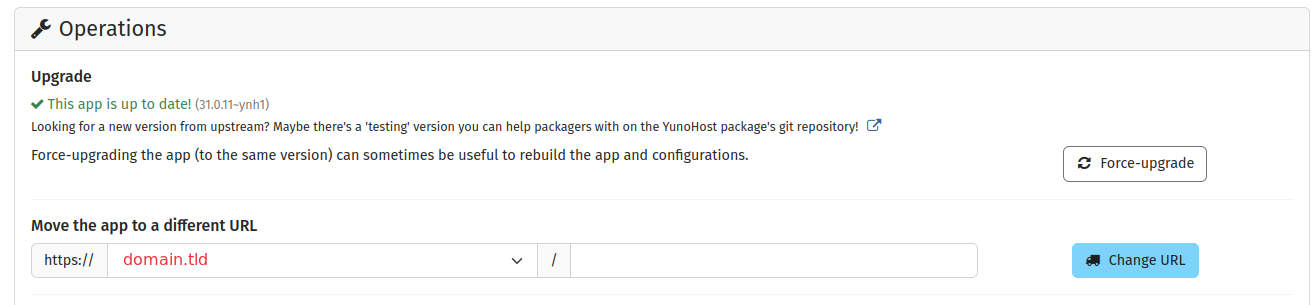
Looks like it doesn’t work with an empty subURL, but does with any other subURL.
But I like keeping it empty. Nextcloud is all I need.
In this file (/etc/nginx/conf.d/nextcloud-domain.tld.d/nextcloud.conf), what is the “# Path to source” value and does it match nextcloud folder ?
/etc/nginx/conf.d/nextcloud-domain.tld.d/nextcloud.conf
...
#sub_path_only rewrite ^/$ / permanent;
location ^~ / {

  # Path to source
  alias /var/www/nextcloud/;
...