Can't send emails (SMTP) - User unknown in virtual mailbox table

I have searched the forum for similar issues

on

This category is for general issues(=something is broken) regarding YunoHost, NOT apps.

on

This form is written in English but feel free to write in French if you’re more comfortable!

on

What type of hardware are you using

Other(?)

What YunoHost version are you running

Powered by YunoHost 12.1.41.2 (stable)

How are you able to access your server

The webadmin
SSH

Describe your issue

I used to use an SMTP relay from brevo, and now not anymore. I want to use the SMTP server that comes with YNH, but I can’t make it send emails.

When trying to send emails:

Mailspring gives me the message:
Recipient address rejected: User unknown in virtual mailbox table.

Thunderbird gives me the message:
sending is not enabled for this account

I am using a VPN in order to have my home yunohost server be available on the internet (I am on a CGNAT ISP, which doesn´t allow port forwarding, so I have a wireguard configuration to route all traffic through the VPN, as I documented here: Cómo tener un Servidor en Casa sin limitaciones | La Wiki de Ética Digital)

Share relevant logs or error messages

postfix log

dovecot log

Could you check that your domain is in the yunohost domain list and that the email is listed as mail or mail alias in yunohost user list ?

Could your check if your setup differs from official configurations ?

yunohost tools regen-conf postfix --force --dry-run --with-diff
yunohost tools regen-conf dovecot --force --dry-run --with-diff

If it contains some change, run the command bellow :

yunohost tools regen-conf postfix --force --with-diff
yunohost tools regen-conf dovecot --force --with-diff

Have you checked the diagnosis page (email and dns sections ?)?


I hope this answer was helpful. Please keep in mind that most of YunoHost’s development is done by volunteers, including this answer. Some of them earn less than the minimum wage in their country. If you can afford it, please consider donating to the 2026 fundraising campaign to help us keep this project going without putting anyone at risk.

yunohost tools regen-conf postfix --force --dry-run --with-diff
**SUCCESS** The configuration would have been updated for category 'postfix' 
**postfix**:  
  **applied**:  
    **/etc/postfix/sasl_passwd**:  
      **diff**: @@ -1 +0,0 @@ 
-\[smtp-relay.brevo.com\]:587 brevo@*****.casa:************ 
      **status**: force-removed 
  **pending**:

yunohost tools regen-conf dovecot --force --dry-run --with-diff

no output

yunohost tools regen-conf postfix --force --with-diff
**postfix**:  
  **applied**:  
    **/etc/postfix/sasl_passwd**:  
      **diff**: @@ -1 +0,0 @@ 
-\[smtp-relay.brevo.com\]:587 brevo@********.casa:**********
      **status**: force-removed 
  **pending**:

the diagnosis page is useless to me, as it doesn’t incorporate the info that I am using a wireguard VPN so it checks for the local IP. so it gives a whole bunch of errors but they really don’t apply to my situation.
I noted that here:

Now sometimes the email is being sent but I get a bounce:

this is the mail system at host eticadigital.eu. 
I'm sorry to have to inform you that your message could not be delivered to one or more recipients.
It's attached below. 
For further assistance, please send mail to postmaster. 
If you do so, please include this problem report. 
You can delete your own text from the attached returned message. 
The mail system : host reception.mail-tester.com\[134.98.158.159\] said: 550 5.7.23 : Recipient address rejected: Message rejected due to: SPF fail - not authorized. 
Please see http://www.openspf.net/Why?s=helo;id=eticadigital.eu;ip=179.60.84.*;r= (in reply to RCPT TO command)

the weird thing here is that the IP 179.60.84.* is not the IP of my VPS (which should route all traffic through itself), but of my local house server ISP… Why is it going directly through my ISP and not through the VPS if I am redirecting all traffic through the VPN/VPS as stated here
Cómo tener un Servidor en Casa sin limitaciones | La Wiki de Ética Digital ?

Probably the A record of the domain does not point to the exit node of the VPN server?

It is pointing to the public IP of the VPS, that is correct, right?

Yes, probably but you need IPv6 as well

it’s also there

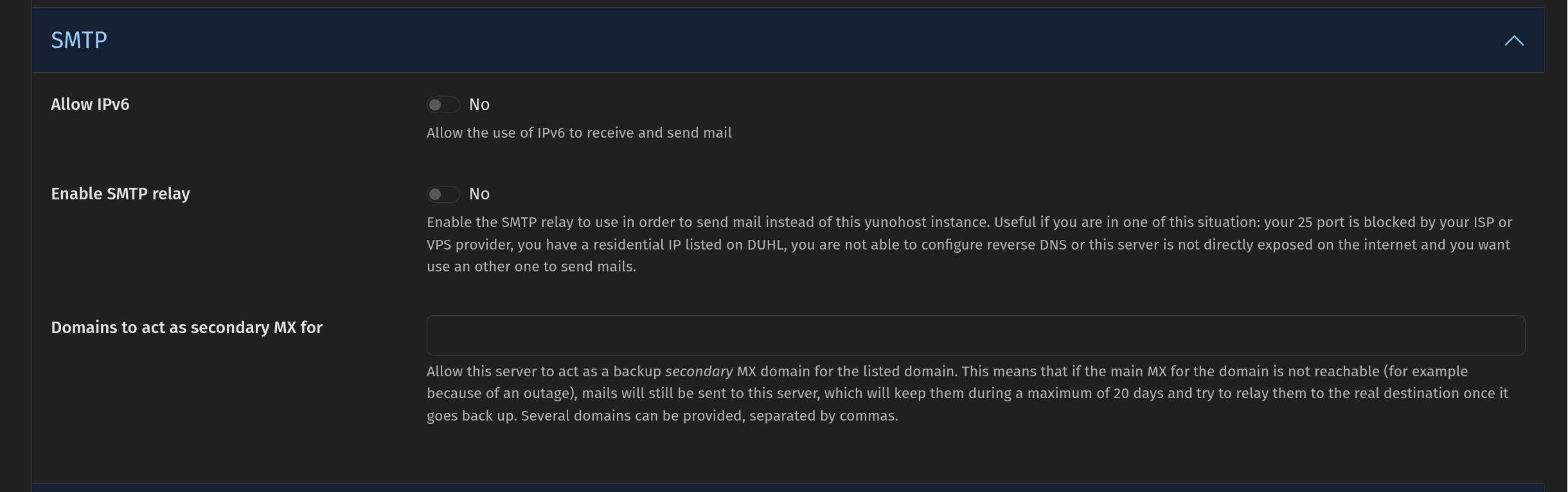
BUT I have turned off IPv6 use on YH webbUI

because I think I don’t need IPv6 AND I also don’t have it set up on my wireguard VPN Cómo tener un Servidor en Casa sin limitaciones | La Wiki de Ética Digital (don’t know exactly how to do it)

Can you check the routes ?

ip route show
ip route get 134.98.158.159

You can check with
dig -t txt domain.xx

Should have something with
v=spf1 mx ip4:xxx.xxx.xxx.xxx ip6:xxxx::1 -all

Where ip4 and ip6 is your exit node of the VPN server.

And i would turn on IPv6 on the YunoHost server.

default via 192.168.1.1 dev enp1s0  
10.0.1.1 dev vps scope link  
169.254.0.0/16 dev enp1s0 scope link metric 1000  
192.168.1.0/24 dev enp1s0 proto kernel scope link src 192.168.1.6
134.98.158.159 via 192.168.1.1 dev enp1s0 src 192.168.1.6 uid 0 
    cache 
; <<>> DiG 9.18.49-1\~deb12u3-Debian <<>> -t txt domain.xx 
;; global options: +cmd 
;; Got answer: 
;; ->>HEADER<<- opcode: QUERY, status: NXDOMAIN, id: 52025 
;; flags: qr rd ra; QUERY: 1, ANSWER: 0, AUTHORITY: 1, ADDITIONAL: 1 
 
;; OPT PSEUDOSECTION: 
; EDNS: version: 0, flags:; udp: 1232 
; COOKIE: c315d3a7346cd326010000006aedd************ (good) 
;; QUESTION SECTION: 
;domain.xx.                     IN      TXT 
 
;; AUTHORITY SECTION: 
.                       14439   IN      SOA     a.root-servers.net. nstld.verisign-grs.com. 2026110600 1800 900 604800 86400 
 
;; Query time: 216 msec 
;; SERVER: 127.0.0.1#53(127.0.0.1) (UDP) 
;; WHEN: Fri Nov 06 10:35:40 -03 2026 
;; MSG SIZE  rcvd: 141

My fear here is that
, considering that my wireguard tunnel is not yet configured for IPv6,
if I turn on IPv6, traffic could try to leak from my local home server directly to the internet via the home ISP
and not through the VPS/VPN which is what I want

So If postfix tries to send an email through the home ISP provided IP, it will get bounced because this IPs are all in spam blacklists. I want to use my VPS fixed IP.

You need to fix your DNS settings because your dig query has no “ANSWER SECTION”.
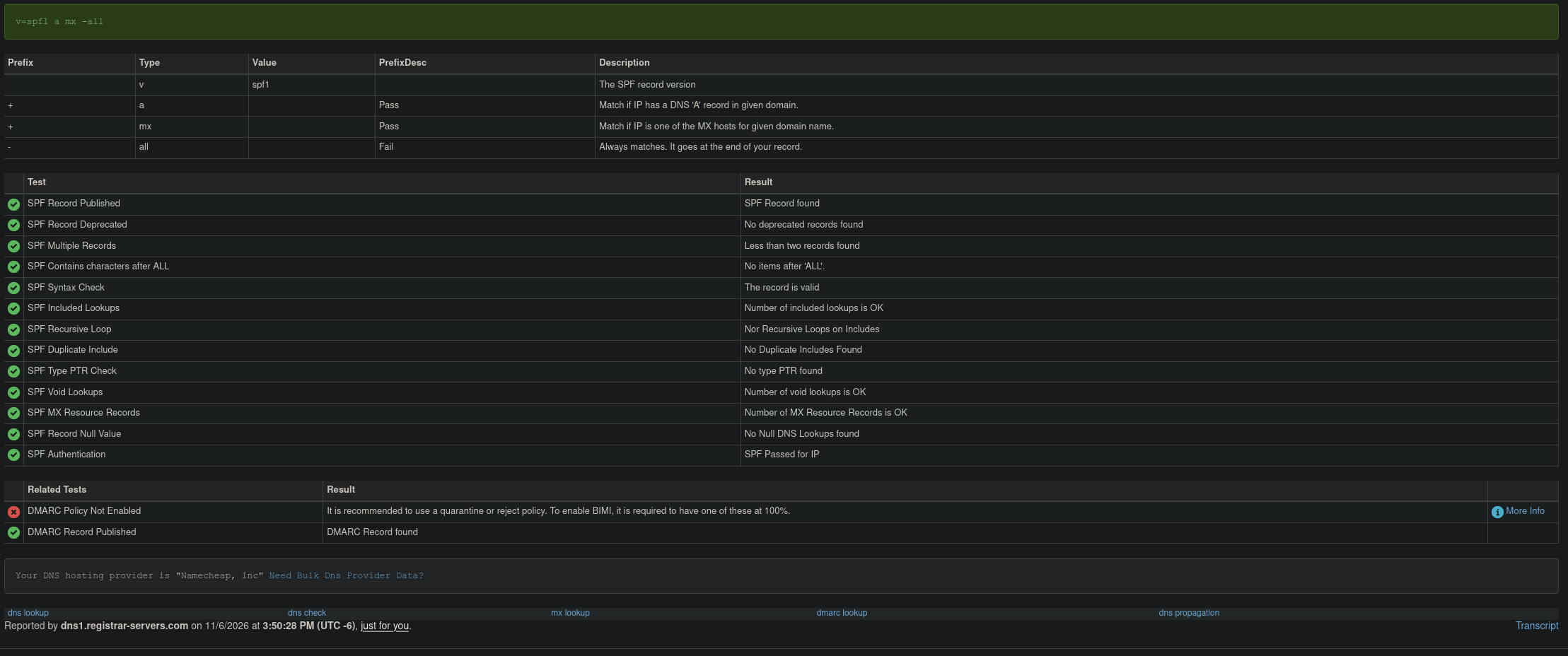
Test here:

You also can use a smarthost until your configuration is fixed. Propably your ISP have one?

It’s just one line in /etc/postfix/main.cf:
"relayhost = "

and then “service postfix restart”

I have to type my domain name and the VPS public IP?
Did so and got this:

I don’t think so but I really don’t know. My ISP is kinda the cheapest

So what should I do here?

@geoma I’m afraid you may have used dig -t txt domain.xx instead of dig -t txt eticadigital.eu (the real domain) verdad ?

Not all the traffic is routed through the wg tunnel (called vps, I guess ?). The default route is still your ISP one (you can check that with curl -4 ifconfig.me).

On the client side, you should test changing AllowedIPs = 10.0.1.2/32 to AllowedIPs = 0.0.0.0/0 and, on the server side, allowing outgoing traffic from the tunnel.

oops!
you are right!
I am with 4 different domain names (eticadigital.eu is the main one but the other three are the ones that hold the email accounts)


root@eticadigital:~# dig -t txt eticadigital.eu

; <<>> DiG 9.18.49-1~deb12u3-Debian <<>> -t txt eticadigital.eu
;; global options: +cmd
;; Got answer:
;; ->>HEADER<<- opcode: QUERY, status: NOERROR, id: 18277
;; flags: qr aa rd ra; QUERY: 1, ANSWER: 1, AUTHORITY: 0, ADDITIONAL: 1

;; OPT PSEUDOSECTION:
; EDNS: version: 0, flags:; udp: 1232
;; QUESTION SECTION:
;eticadigital.eu.               IN      TXT

;; ANSWER SECTION:
eticadigital.eu.        0       IN      TXT     "v=spf1 mx a -all"

;; Query time: 0 msec
;; SERVER: 127.0.0.1#53(127.0.0.1) (UDP)
;; WHEN: Fri Nov 06 21:13:42 -03 2026
;; MSG SIZE  rcvd: 73

root@eticadigital:~# dig -t txt escuelamusica.eu

; <<>> DiG 9.18.49-1~deb12u3-Debian <<>> -t txt escuelamusica.eu
;; global options: +cmd
;; Got answer:
;; ->>HEADER<<- opcode: QUERY, status: NOERROR, id: 6289
;; flags: qr aa rd ra; QUERY: 1, ANSWER: 1, AUTHORITY: 0, ADDITIONAL: 1

;; OPT PSEUDOSECTION:
; EDNS: version: 0, flags:; udp: 1232
;; QUESTION SECTION:
;escuelamusica.eu.              IN      TXT

;; ANSWER SECTION:
escuelamusica.eu.       0       IN      TXT     "v=spf1 mx a -all"

;; Query time: 0 msec
;; SERVER: 127.0.0.1#53(127.0.0.1) (UDP)
;; WHEN: Fri Nov 06 21:13:51 -03 2026
;; MSG SIZE  rcvd: 74

root@eticadigital:~# dig -t txt aeiou.city

; <<>> DiG 9.18.49-1~deb12u3-Debian <<>> -t txt aeiou.city
;; global options: +cmd
;; Got answer:
;; ->>HEADER<<- opcode: QUERY, status: NOERROR, id: 31521
;; flags: qr aa rd ra; QUERY: 1, ANSWER: 1, AUTHORITY: 0, ADDITIONAL: 1

;; OPT PSEUDOSECTION:
; EDNS: version: 0, flags:; udp: 1232
;; QUESTION SECTION:
;aeiou.city.                    IN      TXT

;; ANSWER SECTION:
aeiou.city.             0       IN      TXT     "v=spf1 mx a -all"

;; Query time: 0 msec
;; SERVER: 127.0.0.1#53(127.0.0.1) (UDP)
;; WHEN: Fri Nov 06 21:14:06 -03 2026
;; MSG SIZE  rcvd: 68

root@eticadigital:~# dig -t txt eticadigital.cl

; <<>> DiG 9.18.49-1~deb12u3-Debian <<>> -t txt eticadigital.cl
;; global options: +cmd
;; Got answer:
;; ->>HEADER<<- opcode: QUERY, status: NOERROR, id: 50871
;; flags: qr aa rd ra; QUERY: 1, ANSWER: 1, AUTHORITY: 0, ADDITIONAL: 1

;; OPT PSEUDOSECTION:
; EDNS: version: 0, flags:; udp: 1232
;; QUESTION SECTION:
;eticadigital.cl.               IN      TXT

;; ANSWER SECTION:
eticadigital.cl.        0       IN      TXT     "v=spf1 mx a -all"

;; Query time: 0 msec
;; SERVER: 127.0.0.1#53(127.0.0.1) (UDP)
;; WHEN: Fri Nov 06 21:14:13 -03 2026
;; MSG SIZE  rcvd: 73

root@eticadigital:~# 

yes, vps.conf is the service for the wg tunnel.

yes! this is still giving me the ISP IP and not the VPS one!
what should I do?

what do you mean on the client side and on the server side?
client side being my VPS and server side being the local machine?

mmh… afaiu, your YNH server is the client (el servidor local).

Server side (VPS)

[Interface]
Address = 10.0.1.1/32
ListenPort = 51820
PrivateKey = <VALOR vps.key del VPS>
PostUp = sysctl -w net.ipv4.ip_forward=1
PostUp = sysctl -w net.ipv6.conf.all.forwarding=1
PostUp = iptables -t nat -A PREROUTING -i <Dispositivo de RED del VPS> -p udp --dport 51820 -j ACCEPT
PostUp = iptables -t nat -A PREROUTING -i <Dispositivo de RED del VPS> -p tcp --dport 22 -j ACCEPT
PostUp = iptables -t nat -A PREROUTING -i <Dispositivo de RED del VPS> -j DNAT --to-destination 10.0.1.2
# this rule is quite weird : PostUp = iptables -t nat -A POSTROUTING -o %i -j MASQUERADE = should not be the wg interface
# should be = PostUp = iptables -t nat -A POSTROUTING -o [the VPS interface: e.g  ens18 ] -j MASQUERADE

PostDown = iptables -t nat -D PREROUTING -i <Dispositivo de RED del VPS> -p udp --dport 51820 -j ACCEPT
PostDown = iptables -t nat -D PREROUTING -i <Dispositivo de RED del VPS> -p tcp --dport 22 -j ACCEPT
PostDown = iptables -t nat -D PREROUTING -i <Dispositivo de RED del VPS> -j DNAT --to-destination 10.0.1.2
# same here = PostDown = iptables -t nat -D POSTROUTING -o %i -j MASQUERADE
# should be PostDown = iptables -t nat -D POSTROUTING -o ens18 or something else -j MASQUERADE
PostDown = sysctl -w net.ipv4.ip_forward=0
PostDown = sysctl -w net.ipv6.conf.all.forwarding=0

[Peer]
PublicKey = <VALOR postcloud.pub del SERVIDOR LOCAL>
PresharedKey = <VALOR postcloud-vps.psk del SERVIDOR LOCAL>
AllowedIPs = 10.0.1.2/32