# Back up data from Cryptpad
**URL:** https://forum.yunohost.org/t/back-up-data-from-cryptpad/42999
**Category:** Support apps
**Tags:** cryptpad, english
**Created:** [September 15, 2026, 5:32am UTC](https://forum.yunohost.org/t/back-up-data-from-cryptpad/42999 "2026-09-15T05:32:27Z")
**Posts on this page:** 19
**Page:** 1
### Author:  [@jacobb](https://forum.yunohost.org/u/jacobb)
#### Post date: [September 15, 2026, 5:32am UTC](https://forum.yunohost.org/t/back-up-data-from-cryptpad/42999/1 "2026-09-15T05:32:27Z")
### I have searched the forum for similar issues
on
### This category is for issues regarding specific apps, _NOT_ general issues with YunoHost.
on
### This form is written in English but feel free to write in French if you’re more comfortable!
on
### What app is this about, and its version
Cryptpad, latest
### What YunoHost version are you running
Latest
### What type of hardware are you using
VPS bought online
### Describe your issue
My cryptpad server does not work well. When opened it just stays at “Loading…”
I think the solution might be to make a fresh install, but in that case, I need to make a back up of the user files and reinsert them afterwards.
Is there an easy and safe way to do that?
### Share relevant logs or error messages
---
### Author:  [@jarod5001](https://forum.yunohost.org/u/jarod5001)
#### Post date: [September 15, 2026, 12:17pm UTC](https://forum.yunohost.org/t/back-up-data-from-cryptpad/42999/2 "2026-09-15T12:17:34Z")
Did you try the yunohost backup command?
---
### Author:  [@jacobb](https://forum.yunohost.org/u/jacobb)
#### Post date: [September 15, 2026, 12:57pm UTC](https://forum.yunohost.org/t/back-up-data-from-cryptpad/42999/3 "2026-09-15T12:57:57Z")
No, and it is very embarrassing that I didn’t even notice that there is such a function!
There is indeed a backup file for the cryptpad instance, but I fear it was created after I messed thing up. But I will try (it cannot get worse, I hope)
---
### Author:  [@jacobb](https://forum.yunohost.org/u/jacobb)
#### Post date: [September 15, 2026, 1:00pm UTC](https://forum.yunohost.org/t/back-up-data-from-cryptpad/42999/4 "2026-09-15T13:00:45Z")
OK, I tried, but to no avail.
Downloading the backup file fails and restoring it gives: “`The following apps can't be restored because they are already installed: cryptpad`”
---
### Author:  [@jarod5001](https://forum.yunohost.org/u/jarod5001)
#### Post date: [September 15, 2026, 1:28pm UTC](https://forum.yunohost.org/t/back-up-data-from-cryptpad/42999/5 "2026-09-15T13:28:54Z")
Try running `chown -R cryptpad:www-data /var/www/cryptpad`
Then restart the service `systemctl restart cryptpad`
And see if it helps.
---
### Author:  [@jacobb](https://forum.yunohost.org/u/jacobb)
#### Post date: [September 15, 2026, 1:37pm UTC](https://forum.yunohost.org/t/back-up-data-from-cryptpad/42999/6 "2026-09-15T13:37:38Z")
Unfortunately not
---
### Author:  [@jarod5001](https://forum.yunohost.org/u/jarod5001)
#### Post date: [September 15, 2026, 2:01pm UTC](https://forum.yunohost.org/t/back-up-data-from-cryptpad/42999/7 "2026-09-15T14:01:49Z")
Can you share the generated link
`yunohost service log cryptpad | yunopaste `
---
### Author:  [@jacobb](https://forum.yunohost.org/u/jacobb)
#### Post date: [September 15, 2026, 5:04pm UTC](https://forum.yunohost.org/t/back-up-data-from-cryptpad/42999/8 "2026-09-15T17:04:21Z")
> [@jarod5001](#):
>
> yunohost service log cryptpad | yunopaste
> **[hastebin](https://paste.yunohost.org/raw/)**
---
### Author:  [@otm33](https://forum.yunohost.org/u/otm33)
#### Post date: [September 15, 2026, 6:25pm UTC](https://forum.yunohost.org/t/back-up-data-from-cryptpad/42999/9 "2026-09-15T18:25:02Z")
What does return `ls -la /var/www/cryptpad/customize ?`
---
### Author:  [@jacobb](https://forum.yunohost.org/u/jacobb)
#### Post date: [September 15, 2026, 7:31pm UTC](https://forum.yunohost.org/t/back-up-data-from-cryptpad/42999/10 "2026-09-15T19:31:58Z")
# ls -la /var/www/cryptpad/customize
total 12
drwxr-x— 3 cryptpad www-data 4096 May 21 05:06 .
drwxr-x— 19 cryptpad www-data 4096 Sep 15 04:05 ..
drwxr-x— 25 cryptpad www-data 4096 Sep 15 04:06 www
Does that help?
---
### Author:  [@otm33](https://forum.yunohost.org/u/otm33)
#### Post date: [September 15, 2026, 8:49pm UTC](https://forum.yunohost.org/t/back-up-data-from-cryptpad/42999/11 "2026-09-15T20:49:16Z")
Does your cryptpad domain match the domain set in `/var/www/cryptpad/config/config.js` ?
---
### Author:  [@rodinux](https://forum.yunohost.org/u/rodinux)
#### Post date: [September 15, 2026, 9:32pm UTC](https://forum.yunohost.org/t/back-up-data-from-cryptpad/42999/12 "2026-09-15T21:32:15Z")
Does it comes after an upgrade ?
Did you have a sandbox-cryptpad.domain.tld or sandbox.cryptpad.domain.tld created ? and also have declared this one as a CNAME on DNS zone ?
Did you try force regenerate the ssl certificate for the cryptpad domain ?
---
### Author:  [@jarod5001](https://forum.yunohost.org/u/jarod5001)
#### Post date: [September 15, 2026, 9:53pm UTC](https://forum.yunohost.org/t/back-up-data-from-cryptpad/42999/13 "2026-09-15T21:53:07Z")
This happened after this [Error: "500" Handling: "GET /yunohost/api/domains](https://forum.yunohost.org/t/error-500-handling-get-yunohost-api-domains/42991)
---
### Author:  [@jacobb](https://forum.yunohost.org/u/jacobb)
#### Post date: [September 16, 2026, 3:44am UTC](https://forum.yunohost.org/t/back-up-data-from-cryptpad/42999/14 "2026-09-16T03:44:52Z")
Yes
---
### Author:  [@jacobb](https://forum.yunohost.org/u/jacobb)
#### Post date: [September 16, 2026, 4:12am UTC](https://forum.yunohost.org/t/back-up-data-from-cryptpad/42999/15 "2026-09-16T04:12:44Z")
I found out that cryptpad provides this:
> ### Diagnostics
>
> CryptPad provides a diagnostics page that runs instance configuration tests. Visit `https://cryptpad.yourdomain.com/checkup/` after completing all of the steps above to ensure everything is correctly configured.
But when trying at [https://pad.jacobbahn.dk/checkup/](https://pad.jacobbahn.dk/checkup/) I just get:
> # Oops!
>
> It’s possible that required resource couldn’t be loaded. See your browser’s console for more details.
>
> Failed to load `https://pad.jacobbahn.dk/customize/lucide.js?ver=2026.5.1-1789479497946`.
Could this be helpful in any way?
---
### Author:  [@jacobb](https://forum.yunohost.org/u/jacobb)
#### Post date: [September 16, 2026, 4:32am UTC](https://forum.yunohost.org/t/back-up-data-from-cryptpad/42999/16 "2026-09-16T04:32:08Z")
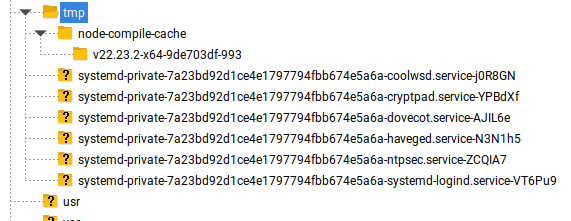
I have made tar files of the folders I wish to copy before a fresh install and put them in /tmp on the Yunohost server:
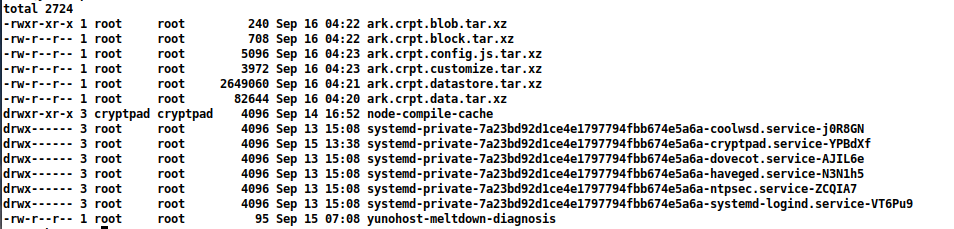
But I cannot see them in FileZilla (note that I have changed the permission for the first tar)
---
### Author:  [@jacobb](https://forum.yunohost.org/u/jacobb)
#### Post date: [September 16, 2026, 4:51am UTC](https://forum.yunohost.org/t/back-up-data-from-cryptpad/42999/17 "2026-09-16T04:51:04Z")
I ran a diagnosis on the Yunohost server. It is generally fine but gives me these two issues:


Could that be related?
---
### Author:  [@jacobb](https://forum.yunohost.org/u/jacobb)
#### Post date: [September 16, 2026, 10:10am UTC](https://forum.yunohost.org/t/back-up-data-from-cryptpad/42999/18 "2026-09-16T10:10:24Z")
Once again I find that the answer for me is to start all over. I shut down this whole Yunohost server and will make a fresh install
I am really thankful for your efforts, though.
---
### Author:  [@system](https://forum.yunohost.org/u/system)
#### Post date: [October 1, 2026, 10:11am UTC](https://forum.yunohost.org/t/back-up-data-from-cryptpad/42999/19 "2026-10-01T10:11:03Z")
This topic was automatically closed 15 days after the last reply. New replies are no longer allowed.